
July 31, 2013 09:06 by
 Ben
BenWebMatrix was built to streamline Web development and make it easy, whether you're getting started or you just want to get things done. It lets you focus on what’s important — your Web site.
SEO (Search Engine Optimization) is the effort to the make your website on the first position on the search engines like google, yahoo, bing, etc.

WebMatrix SEO Report feature that has Allows you to check the web script so that you can order search engine optimization friendly. In the example I was trying to make a simple script report.
Open Web Matrix, select Reports on the left menu.

After that there will be a form of SEO report settings. I let it default.

After setting Report saved, you can directly check validation of your web site. If anyone should be in WebMatrix optimization will give you a warning.

And know you can see it work! :)
July 22, 2013 06:17 by
MikeReporting Service (SSRS) 2008 R2 allows us to execute reports in 3 modes:
- On Demand
- From Cache
- From Snapshots
On Demand
- This is normal approach that we follow, by hitting a report server URL. Each time a report is run, data is returned from the database server and rendered to the report.
- This approach ensures that our report is update and fresh.
- The downside of this approach is that, if n users open up this report on their browsers, queries on the report are executed n times.
- Thus this approach at times might slow down the server.
Cache
- One of the performance enhancements techniques is to cache a report when it is initially run.
- This means that if another user requests for the report, the same report is served to the user from the cache.
- This avoids people querying the database server from each report rendering.
- To make sure that people do not receive too much stale data, we can set a time to invalidate a cache.
- This is a good performance enhancement technique for slow running reports.
Snapshots
- Report snapshots are created at a particular schedule for certain parameters.
- Please note that parameters cannot be changes on snapshot reports.
- SSRS 2008 R2 allows to schedule the snapshot creation times.
- Users can directly render a report from a snapshot. However please note that not all reports can have snapshots, especially the ones that prompt users for credentials.
July 12, 2013 08:19 by
Mike
ASPHostPortal.com is a premiere web hosting company that specializes in Windows and ASP.NET-based hosting, proudly announces the new Microsoft product, ASP.NET MVC 5 hosting to all new and existing customers.
ASP.NET MVC 5 is the latest update to Microsoft's popular MVC (Model-View-Controller) technology - an established web application framework. MVC enables developers to build dynamic, data-driven web sites. ASP.NET MVC 5 adds sophisticated features like single page applications, mobile optimization, adaptive rendering, and more. Here are some new features of ASP.NET MVC 5:
- ASP.NET Identity
- Bootstrap in the MVC template
- Authentication Filters
- Filter overrides
“We pride ourselves on offering the most up to date Microsoft services. We're pleased to launch this product today on our hosting environment” said Dean Thomas, Manager at ASPHostPortal.com. “We have always had a great appreciation for the products that Microsoft offers. With the launched of ASP.NET MVC 5 hosting services, we hope that developers and our existing clients can try this new features.”
ASPHostPortal.com is one of the Microsoft recommended hosting partner that provide most stable and reliable web hosting platform. With the new launch of ASP.NET MVC 5 into its feature, it will continue to keep ASPHostPortal as one of the front runners in the web hosting market. For more information about new ASP.NET MVC 5, please visit http://www.asphostportal.com.
About ASPHostPortal.com:
ASPHostPortal.com is a hosting company that best support in Windows and ASP.NET-based hosting. Services include shared hosting, reseller hosting, and sharepoint hosting, with specialty in ASP.NET, SQL Server, and architecting highly scalable solutions. As a leading small to mid-sized business web hosting provider, ASPHostPortal strive to offer the most technologically advanced hosting solutions available to all customers across the world. Security, reliability, and performance are at the core of hosting operations to ensure each site and/or application hosted is highly secured and performs at optimum level.
July 1, 2013 09:05 by
MikeIIS (Internet Information Services) Version 7.5 – is a web server application and a set of feature extension modules created by Microsoft for use with Microsoft Windows. Released with Windows Server 2008 R2 and Windows 7. The installation procedure to install IIS 7.5 is slightly different depending on which operating system you are using, so you will need to make sure you follow the correct method below for your operating system.

Follow this steps to install:
- Navigate to Start\Control Panel\Administrative Tools and open Server Manager.
- In the tree menu on the left, select Roles.
- In the main window, find the sub-section Roles Summary (it should be at the top) and click Add Roles.
- On the pop-up window, read the security warnings and then select Next.
- Select Web Server (IIS) from the list of check box options.
- After reading the introduction to IIS, click Next to continue
- From the check boxes, find the Application Development section and select CGI. This will allow us to install PHP later without any modifications.
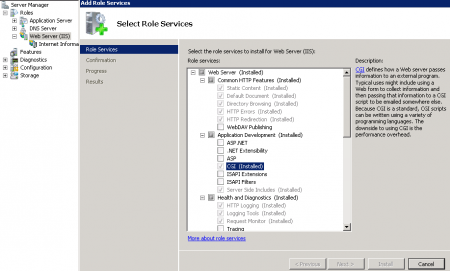
- Click Next to continue.
- Click Install to begin the installation.
- After installation has finished, click Close.
To check the installation, you can follow this steps:
- Navigate to Start\Control Panel\Administrative Tools and open Internet Information Services (IIS) Manager.
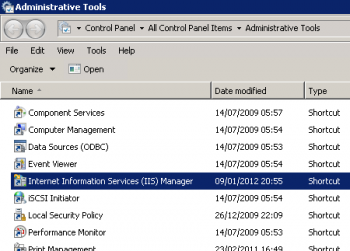
If it's installed properly you'll be introduced with the IIS Manager window, shown below.
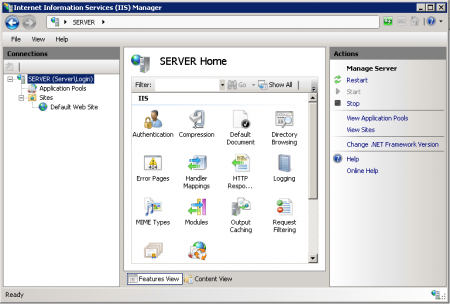
That's it, IIS 7.5 is now installed and ready to be put into service.