October 9, 2013 10:08 by
 Ben
BenTCP / IP (which stands for Transmission Control Protocol / Internet Protocol ) is a data communications standard used by the Internet community in the process of exchanging data from one computer to another computer on the network Internet . This protocol can not stand alone , because this protocol is a set of protocols ( protocol suite ) . This protocol is the most widely used protocol today . Data are implemented in software ( software ) in the operating system . The term given to this software is the TCP / IP stack
TCP / IP was developed in the late 1970s and early 1980s as a standard protocol for connecting computers and networks to form a vast network ( WAN ) . TCP / IP is an open network standard that is independent of physical network transport mechanism that is used , so it can be used anywhere . This protocol uses a simple addressing scheme known as IP address ( IP Address) that allows up to several hundred million computers to be able to relate to each other on the Internet . This protocol is routable, which means that the protocol is suitable for connecting different systems ( such as Microsoft Windows and UNIX family ) to establish a heterogeneous network .

TCP / IP has always evolved over time , given the increasing demand for computer networks and the Internet . Development is done by several agencies , such as the Internet Society ( ISOC ) , the Internet Architecture Board ( IAB ) and the Internet Engineering Task Force ( IETF ) . Various protocol that runs on top of TCP / IP addressing scheme , and the concept of TCP / IP defined in documents called Request for Comments ( RFC ) issued by the IETF .
And now I wanna tell you how to assign an IP automatically and manually to a client machineon windows.
1. open "Network and sharing Center" by clicking on the "Net Connection" Icon shown at the Task Bar.
2. Now your Control Panel window will be opened. Here in this window you will find an option for "Change Adapter Settings" that is on the extreme left hand side of the window. Click on this option.
3. Now your "Local Area Connection" will be opened. Right-click on this connection and click on "Properties".
4. Now the Property window for Local Area Connections will be opened. Here first you must select the "Internet Protocol Version 4" and then click on it's "Properties."
5. The Properties window of Internet Protocol Version 4 is the area where we will provide the IP Address either Automatically or Manually. For getting the IP Address Automatically click on the "Obtain IP Address Automatically and Obtain DNS Server Address Automatically" and then click on the "OK" Button.
But remember one thing; You can only provide the Automatic IP Address only if your Organization has a DHCP Server otherwise the Automatic option will not work.
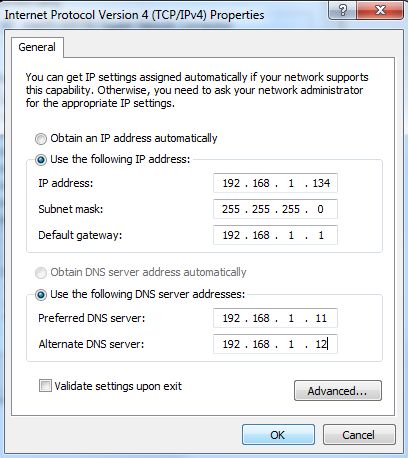
6. In the previous step we obtain the IP Address Automatically but now we will provide the IP Address Manually. For this click on "Use the following IP Address and Use the following DNS Server Address".
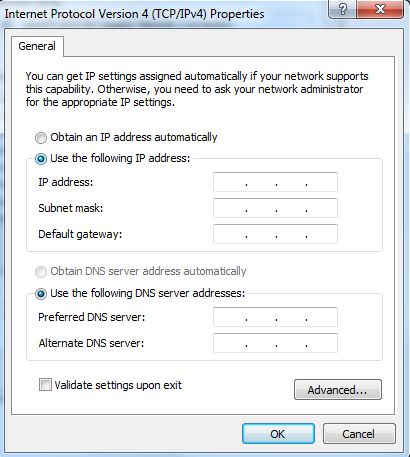
Now provide the IP Address, Default Gateway, Preferred DNS Server and Alternate DNS Server. The Subnet Mask will automatically appear after providing the IP Address. And Click OK.