
June 5, 2014 07:07 by
 Ben
BenSimply stated, SQL injection vulnerabilities are caused by software applications that accept data from an untrusted source (internet users), fail to properly validate and sanitize the data, and subsequently use that data to dynamically construct an SQL query to the database backing that application. For example, imagine a simple application that takes inputs of a username and password. It may ultimately process this input in an SQL statement of the form
string query = "SELECT * FROM users WHERE username = "'" + username + "' AND password = '" + password + "'";
Since this query is constructed by concatenating an input string directly from the user, the query behaves correctly only if password does not contain a single-quote character.

Impact of SQL Injection vulnerabilities
- Reading, Updating and Deleting arbitrary data from the database
- Executing commands on the underlying operating system
- Reading, Updating and Deleting arbitrary tables from the database
There are many way finding SQL Injection Vulnerabilities manually. But, in this article, I will show you how to find SQL Injection Vulnerabilities automatically. It’s no different than finding it manually. The process mainly involves three tasks :
- Identifying Data Entry.
- Inject Data to Database.
- And last, detect anomalies from it’s response
you will see that you can do it automatically to a certain process. Identifying data entry (1st step) is something that can be automated. You can do it by just crawl the website and finding GET and POST request. As well ass Data Injection (2nd step), can also be done in an automatic fashion. The main problem is the 3rd step ( Detect Anomalies Response of Remote Server ). Although this part is easy for human to detect. it sometimes very difficult for a bot or software to detect it and fully understand output of the remote server. For example, when the web application returns the SQL error from database or when the web application returns HTTP 500 code error.
How to Fix SQL Injection Vulnerabilities in ASP.NET
c# code:
string queryText = "SELECT * FROM Students WHERE City=@City";
SqlCommand cmd = new SqlCommand(queryText, conn);
cmd.Parameters.Add("@City",City);
SqlDataAdapter da = new SqlDataAdapter(cmd);
DataSet ds = new DataSet();
da.Fill(ds);
return ds;
ASP.NET code:
/*C# code*/
string commandText = "SELECT * FROM Customers WHERE Country=@CountryName";
SqlCommand cmd = new SqlCommand(commandText, conn);
cmd.Parameters.Add("@CountryName",countryName);
Stored Procedure:
var connect = ConfigurationManager.ConnectionStrings["NorthWind"].ToString();
var query = "GetProductByID";
using (var conn = new SqlConnection(connect))
{
using (var cmd = new SqlCommand(query, conn))
{
cmd.CommandType = CommandType.StoredProcedure;
cmd.Parameters.Add("@ProductID", SqlDbType.Int).Value = Convert.ToInt32(Request["ProductID"]);
conn.Open();
//Process results
}
}
Fixing the SQL Injection Vulnerabilities would not be enough to protect your web application. You need to protect it using Runtime Protection.
Cheap SQL Hosting with ASPHostPortal.com
Providing the best security, compliance, performance, and managed service separates ASPHostPortal.com from other hosting companies. MS SQL server supports our commitment to providing service options the businesses that choose ASPHostPortal.com demand. Use the Promo Code "DBSQL" (without quotes) and receive double SQL Server Space!
October 9, 2013 10:08 by
BenTCP / IP (which stands for Transmission Control Protocol / Internet Protocol ) is a data communications standard used by the Internet community in the process of exchanging data from one computer to another computer on the network Internet . This protocol can not stand alone , because this protocol is a set of protocols ( protocol suite ) . This protocol is the most widely used protocol today . Data are implemented in software ( software ) in the operating system . The term given to this software is the TCP / IP stack
TCP / IP was developed in the late 1970s and early 1980s as a standard protocol for connecting computers and networks to form a vast network ( WAN ) . TCP / IP is an open network standard that is independent of physical network transport mechanism that is used , so it can be used anywhere . This protocol uses a simple addressing scheme known as IP address ( IP Address) that allows up to several hundred million computers to be able to relate to each other on the Internet . This protocol is routable, which means that the protocol is suitable for connecting different systems ( such as Microsoft Windows and UNIX family ) to establish a heterogeneous network .

TCP / IP has always evolved over time , given the increasing demand for computer networks and the Internet . Development is done by several agencies , such as the Internet Society ( ISOC ) , the Internet Architecture Board ( IAB ) and the Internet Engineering Task Force ( IETF ) . Various protocol that runs on top of TCP / IP addressing scheme , and the concept of TCP / IP defined in documents called Request for Comments ( RFC ) issued by the IETF .
And now I wanna tell you how to assign an IP automatically and manually to a client machineon windows.
1. open "Network and sharing Center" by clicking on the "Net Connection" Icon shown at the Task Bar.
2. Now your Control Panel window will be opened. Here in this window you will find an option for "Change Adapter Settings" that is on the extreme left hand side of the window. Click on this option.
3. Now your "Local Area Connection" will be opened. Right-click on this connection and click on "Properties".
4. Now the Property window for Local Area Connections will be opened. Here first you must select the "Internet Protocol Version 4" and then click on it's "Properties."
5. The Properties window of Internet Protocol Version 4 is the area where we will provide the IP Address either Automatically or Manually. For getting the IP Address Automatically click on the "Obtain IP Address Automatically and Obtain DNS Server Address Automatically" and then click on the "OK" Button.
But remember one thing; You can only provide the Automatic IP Address only if your Organization has a DHCP Server otherwise the Automatic option will not work.
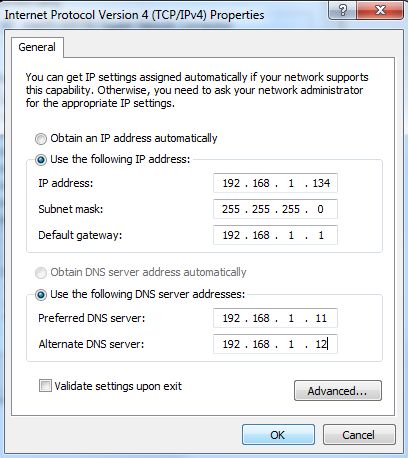
6. In the previous step we obtain the IP Address Automatically but now we will provide the IP Address Manually. For this click on "Use the following IP Address and Use the following DNS Server Address".
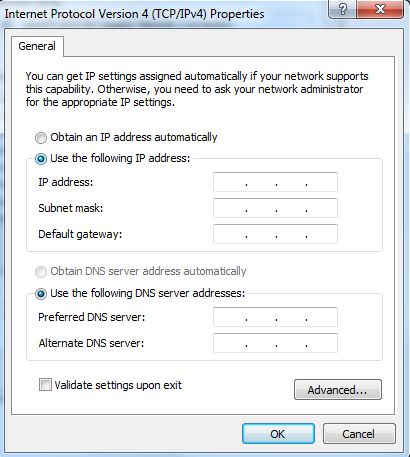
Now provide the IP Address, Default Gateway, Preferred DNS Server and Alternate DNS Server. The Subnet Mask will automatically appear after providing the IP Address. And Click OK.
October 3, 2013 10:28 by
Ben
ASPHostPortal.com is a premier Windows and ASP.NET Web hosting company that specializes in Windows and ASP.NET-based hosting. We proudly announces 7 Day Free Trial Windows and ASP.NET Hosting to all new customers. The intention of this FREE TRIAL service is to give our customers a "feel and touch" of our system. This free trial is offered for the next 7 days and at anytime, our customers can always cancel the service.

The 7 Day Free Trial is available with the following features:
- Unlimited Domains
- 5 GB Disk Space
- 60 GB of Bandwidth
- 2 MS SQL Database
- Unlimited Email Account
- Support ASP.NET 4.5
- Support MVC 4.0
- Support SQL Server 2012
- Free Installations of ASP.NET And PHP Applications
ASPHostPortal.com believes that all customers should be given a free trial before buying into a service and with such approach, customers are confident that the product / service that they choose is not faulty or wrong. Even we provide free trial service for 7 days, we always provide superior 24/7 customer service, 99,9% uptime guarantee on our world class data center. On this free trial service, our customer still can choose from our three different data centre locations, namely Singapore, United States and Amsterdam (The Netherlands)
Anyone is welcome to come and try us before they decide whether or not they want to buy. If the service does not meet your expectations, our customer can simply cancel before the end of the free trial period.
For all the details of packages available visit ASPHostPortal.com
About ASPHostPortal.com:
ASPHostPortal.com is a hosting company that best support in Windows and ASP.NET-based hosting. Services include shared hosting, reseller hosting, and sharepoint hosting, with specialty in ASP.NET, SQL Server, and architecting highly scalable solutions. As a leading small to mid-sized business web hosting provider, ASPHostPortal strive to offer the most technologically advanced hosting solutions available to all customers across the world. Security, reliability, and performance are at the core of hosting operations to ensure each site and/or application hosted is highly secured and performs at optimum level.