
January 21, 2014 05:19 by
 Ben
Ben
If you are receiving following error:
TITLE: Connect to Server
Cannot connect to Database Server.
ADDITIONAL INFORMATION:
An error has occurred while establishing a connection to the server. When connecting to SQL Server 2008, this failure may be caused by the fact that under the default settings SQL Server does not allow remote connections. (provider: Named Pipes Provider, error: 40 – Could not open a connection to SQL Server) (Microsoft SQL Server, Error: 1326)
Now if SQL Server can be connected perfectly from local system but can not be connected from remote system, in that case firewall of the server where SQL Server is installed can be issue.

Follow instructions of this article to fix the issue.
Go to control panel >> Firewall Settings >> Add SQL Server’s Port to Exception List.
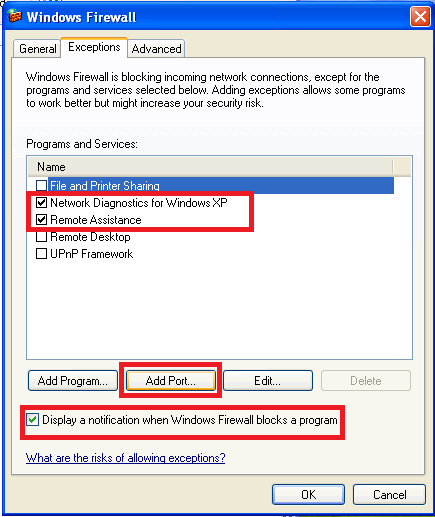
Click Add Port and fill this :
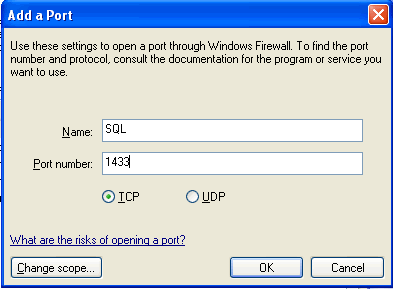
Now try to connect to SQL Server again. It will allow you to connect to server successfully.
About the Company
ASPHostPortal.com is a hosting company that best support in Windows and ASP.NET-based hosting. Services include shared hosting, reseller hosting, and sharepoint hosting, with specialty in ASP.NET, SQL Server, and architecting highly scalable solutions. As a leading small to mid-sized business web hosting provider, ASPHostPortal.com strive to offer the most technologically advanced hosting solutions available to all customers across the world. Come to the website to know more details.