
September 21, 2013 09:17 by
 Ben
BenNow, I will explain how to configure custom error pages in IIS (Internet Information Service). For this example we will be using IIS 7.5 which shipped with Windows Server 2008 R2.

First Step, Open Internet Information Services (IIS) Manager. Select your website. Note: This could also be set at the server level and applied to all sites on the server. DoubleClick on the “.NET Error Pages” icon.
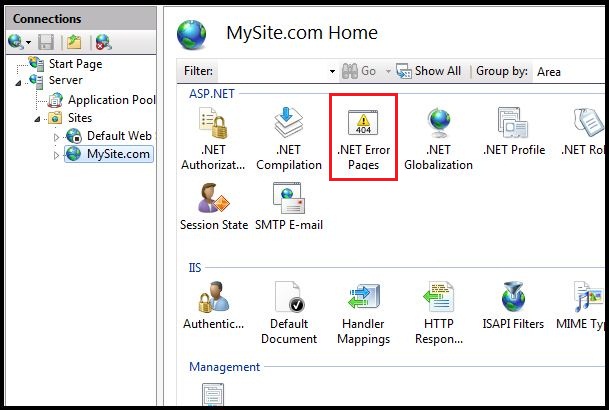
The .NET Error Pages features view will be displayed.
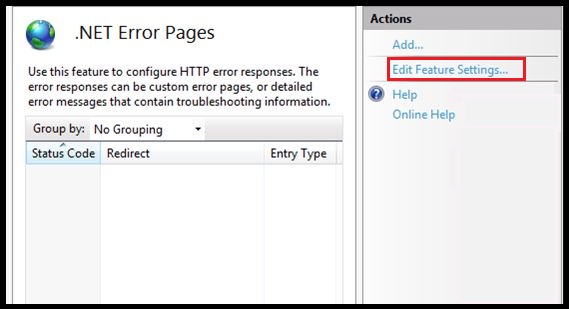
Click the “Edit Feature Settings” link to enable this feature. The “Edit Error Page Settings” dialog box will appear.
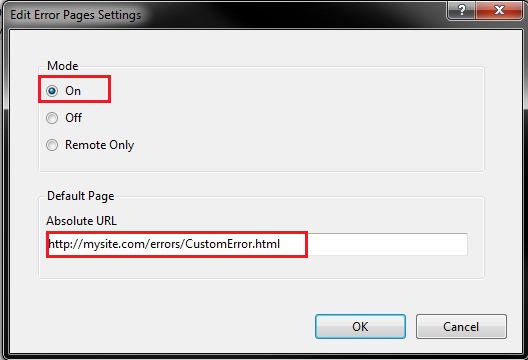
How to determine the error code 404 explicitly..
First, On the .NET Error Pages Actions menu click the Add link.
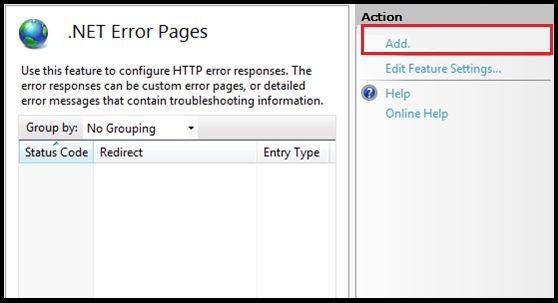
The “Add Custom Error Page” dialog will appear. This is where we define individual error pages per status code. For our example we will add a custom page for the HTTP 404 Error.
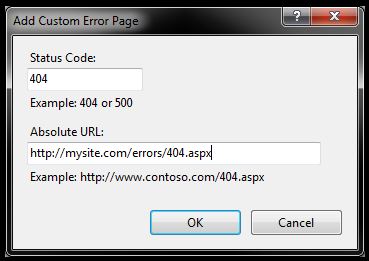
Now that we have turned on the feature and added a custom page for the 404 status code we can verify it is working. Please reload your website.
As mentioned above this can also be managed from the site’s web.config file. Consider the following configuration section from our site’s web.config file.
.jpg)
September 13, 2013 08:23 by
Mike
Problem 1:
When attempting to run an application that uses certain Telerik controls, you may run into the error below:
System.InvalidOperationException:
‘~/Telerik.Web.UI.WebResource.axd’ is missing in web.config.
RadStyleSheetManager requires a HttpHandler registration in web.config. Please,
use the control Smart Tag to add the handler automatically, or see the help for
more information: Controls > RadStyleSheetManager at
Telerik.Web.UI.RadStyleSheetManager.OnPreRender(EventArgs e) at
System.Web.UI.Control.PreRenderRecursiveInternal() at
System.Web.UI.Control.PreRenderRecursiveInternal() at
System.Web.UI.Control.PreRenderRecursiveInternal() at
System.Web.UI.Page.ProcessRequestMain(Boolean includeStagesBeforeAsyncPoint,
Boolean includeStagesAfterAsyncPoint)
Solution:
I’ve seen that error on new DotNetNuke installations but it certainly isn’t specific to DNN, nor is it a problem with the Telerik controls. The issue is that the Integrated Pipeline Mode and Classic Modes handle the registration slightly differently within the web.config file.
To resolve this error you can make changes to your web.config file, or, a perhaps faster and easier solution, is to change your site’s ASP.NET version to Classic Mode – both seem to work equally well.

Problem 2:
When you place RadScriptManager on aspx page and compile it gives error like,
" '~/Telerik.Web.UI.WebResource.axd' is missing in web.config. RadScriptManager requires a HttpHandler registration in web.config.
Please, use the control Smart Tag to add the handler automatically, or see the help for more information: Controls > RadScriptManager "
Solution:
Its Simple And fast you Just Have to register The radScriptmanager and it will modify the web config file automatically.
- Click RadScriptManager Menu Cursor .It Will Display RadScript Manager Tasks click on Regiter Telerik.Web>UI.WebResource.axd
- Telerik.WebUI.WebResources.axd Is Now Succeessfully Register in Web Config.