
July 23, 2014 06:29 by
 Ben
BenYetAnotherForum.NET (YAF) is a Open Source discussion forum or bulletin board system for web sites running ASP.NET with SQL Server as the back-end database. The source code is entirely written in C#, and is licensed with the GPL license. And now YetAnotherForum.NET (YAF) has release the new version YAF.NET 1.9.6.2
Here is the important features of YetAnotherForum.NET 1.9.6.2:
- Added Admin Page to Import List of Banned Ip Adresses (You can find Huge list of Bot IP Lists here: StopForumSpam.com)
- DNN YAF Whats New Menu List Item is now fully Templatable
- Host Admins can control admin groups access to YAF event log by event type. They can set permissions to delete events by type too, i.e. readonly mode for each event.
- Added New Host Admin Page for Host Admins to restrict simply admins to various admin pages individually.
- Added New Notification Bar for System Messages (In the Host Settings you can choose Between Modal Dialog or Notification Bar for Messages, also the Display Duration can be defined there). Also added an option to show the alert dialog for messages on Mobile Devices.
- Added new "Fancy" Theme
- Added Keystroke For Quotes to the YAF BBCode Editor you can now use CTRL+Q for inserting and "[quote]"..."[/quote]"
- Added Indicator to a Private Message if its an Reply
- Added new BB Code Feature to the Editor for indent text
- Added HoverCards to Username. If enabled it shows an Hover Card (Which shows some quick info about the user) when you hover an user name. This will also show an Hover Card on the Twitter & Facebook Profile Button.
- Added Display Options for the Event Log, you can define Start and End Date and also Event Type
- Added settings to control number of records in the event log.
- Added Option to send PM to all Buddies of a User
- Added DNN Option to Remove Tab Name/Title from the Current Page Title you can choose between "Dont Remove", "Always Remove", "Remove only if matches the Board Name". Default Value : "Always Remove"

This article will give you a step by step guide on how to install YetAnotherForum.NET on your server:
Make sure your server / Host has the following requirements:
- Microsoft .NET Framework 3.5 SP1 (Use version 1.9.3 or earlier for .NET Framework 2.0) or the latest .NET Framework.
- Microsoft SQL Server 2005 or above. SQL Server 2000 works, but requires removal of some SQL forum database optimizations.
1. Download YAF from http://www.yetanotherforum.net. Note that current version available is YAF 1.9.6.2 and my article is based on this version. For future versions the installation and Integration instructions may change.
2. Create a virtual directory in IIS pointing to D:\YAF-v1.9.6.2-FINAL-SRC\YetAnotherForum.NET. Above is the assumed path where you have downloaded YAF.
3. SQL Server database is required for installing the YAF. SO keep SQL Server installed on the machine. Then Create an empty SQL Server database for YAF named yafnet(say).
4. If Web.Config is not present in the forum root,copy one of the samples provided in the "webconfigs" folder into the root of the web application and rename it to web.config.
5. Setup a valid connection string in db.config as per the format provided by YAF.
6. Configure the SMTP settings in mail.config as per your hosting environment and as per the format provided by YAF.
7. Then try to open http://localhost/YetAnotherForum.NET/install/Default.aspx and install the forum as per instructions appearing on the installation wizard. It will create/update the forum database and create admin user. Note that all the passwords should have a special charector in it.
8. After the installation the URL will come something like http://localhost/yaf/default.aspx if the above page opens without any error that means your installation is complete.
9. Then you need to copy your installation folder to the root of your website.
10. Suppose you want the forum to appear on the Default.aspx Page, Then Merge the Default.aspx page from the forum with Default.aspx page from your website.Also you need the merge the web.config file from the forum to web.config file of existing website.
11. Now run the default.aspx page of the website and forum should appear on the page.
Best and Cheap YetAnotherForum.NET Web Hosting with ASPHostPortal.com
ASPHostPortal.com YetAnotherForum.NET optimised hosting infrastructure features independent email, web, database, DNS and control panel servers and a lightning fast servers ensuring your site loads super quick! Reason why you should choose us to host your YetAnotherForum.NET site:
- Top of the line servers optimized for your YetAnotherForum.NET installation
- 24/7/35 Technical support from YetAnotherForum.NET hosting experts
- We provide full compatability with YetAnotherForum.NET hosting and all popular plug-in.
- Free professional installation of YetAnotherForum.NET.
- We provide 30 days money back guarantee
July 22, 2014 10:48 by
BenASP.NET Web API 2.2 was released last week, and one of the key new features is the ability to extend and plug in your own custom logic into the attribute routing engine.
Commonly known as “attribute routing”, it’s actually officially called “direct routing”, because, as they are about to show here, it’s not necessary to use it with attributes at all, and you can plug in any route provider into it. The Web API 2.2 release is particularly noteworthy as it is the first Web API release with support for OData v4 with selected highly demanded features.
ASPHostPortal.com is Microsoft No #1 Recommended Windows and ASP.NET Spotlight Hosting Partner in United States. Microsoft presents this award to ASPHostPortal.com for the ability to support the latest Microsoft and ASP.NET technology, such as: WebMatrix, WebDeploy, Visual Studio 2012, .NET 4.5.2/ASP.NET 4.5.1, ASP.NET MVC 6.0/5.2, Silverlight 5 and Visual Studio Lightswitch. Click here for more information
Here is New features :
1. Protocol and format changes from V3 to V4.
2. OData attribute routing: This release allows you to define the routes in your controllers and actions using attributes.
3. Support for functions: This release allows you to define functions in your OData model and bind them to actions in your controller that implement them.
4. Model aliasing: This release allows to change the names of the types and properties in your OData model to be different than the ones in your CLR types.
5. Support for limiting allowed queries: This feature release the service to define limitations on the properties of the model that can be filtered, sorted, expanded or navigated across.
6. Support for ETags: This release allows to generate an @odata.etag annotation based on some properties of the entity that can be used in IfMatch and IfNoneMatch headers in following requests.

7. Support for Enums
8. Support for $format: Added support for $format, so clients are able to specify the desired format of the response in the URL.
The OData v4.0 protocol includes a lot of new features and many changes to existing ones that improve the protocol and the modeling capabilities for the services implementers, but at the same time, those changes make difficult to support multiple versions of the protocol in a single implementation.
For that reason, we have decided to create a new assembly to support the v4.0 version of the protocol while maintaining the current assembly for those people who want to implement services based on previous versions.
Here are the most important changes:
1. The package ID for the v4.0 is Microsoft.AspNet.OData.
2. The assembly name and the root namespace are now System.Web.OData instead of System.Web.Http.OData.
3. All the extension methods have been moved to System.Web.OData.Extensions.
4. We have removed all the extension methods that used to exist for HttpRequestMessage like GetODataPath or GetEdmModel and we have added a single extension method, ODataProperties that returns an object containing the common OData properties that were accessible by the old extension methods, like the IEdmModel of the service or the ODataPath of the request.
5. MapODataRoute has been changed to MapODataServiceRoute.
6. QueryableAttribute has been changed to EnableQueryAttribute.
Recommended extras for your Web API 2.2 hosting website:
Feature Rich Services
Offering feature rich, on-demand reliable and secure web hosting services is why our customers stay here. We are constantly working to improve our services and the product line we offer. We firmly believe in a long lasting customer relationship. We want our customers to stay and grow their business with us.
Cost Effective Pricing
We provide our services at the lowest cost possible by utilizing our in house architecture coupled with carefully chosen software. We strive to keep our operating costs low so we can deliver quality web hosting services at very reasonable prices.
Money Back Guarantee
We are absolutely sure that you will be satisfied with our service that we offer our unconditional money back guarantee. Feel free to take a ride with us without any risk!
July 18, 2014 07:35 by
BenReporting Services is a server-based reporting platform that provides comprehensive reporting functionality for a variety of data sources. Reporting Services includes a complete set of tools for you to create, manage, and deliver reports, and APIs that enables developers to integrate or extend data and report processing in custom applications. Reporting Services tools work within the Microsoft Visual Studio environment and are fully integrated with SQL Server tools and components.

Today we're going to cover how to configure available memory for SQL Server Reporting Services 2014. If you need to configure the amount of memory available to an instance of SSRS 2014 you have to get your hands dirty and edit the RsReportServer.config file. The RsReportServer.config file stores settings that are used by Report Manager, the Report Server Web service, and background processing.
The location of the rsconfile file is generally:
\Program Files\Microsoft SQL Server\MSRS1111.MSSQLSERVER\Reporting Services\ReportServer
Within the RsReportServer.config file, configuration settings that control memory allocation for the report server include WorkingSetMaximum, WorkingSetMinimum, MemorySafetyMargin, and MemoryThreshold. If you were to open the file you will see that the WorkingSetMinimum and WorkingSetMaximum are not present by default.
<Service>
<IsSchedulingService>True</IsSchedulingService>
<IsNotificationService>True</IsNotificationService>
<IsEventService>True</IsEventService>
<PollingInterval>10</PollingInterval>
<WindowsServiceUseFileShareStorage>False</WindowsServiceUseFileShareStorage>
<MemorySafetyMargin>80</MemorySafetyMargin>
<MemoryThreshold>90</MemoryThreshold>
<RecycleTime>720</RecycleTime>
<MaxAppDomainUnloadTime>30</MaxAppDomainUnloadTime>
<MaxQueueThreads>0</MaxQueueThreads>
This is because you have to enter them yourself, as if you are hosting multiple applications on the same computer and you determine that the report server is using a disproportionate amount of system resources relative to other applications on the same computer.
<Service>
<IsSchedulingService>True</IsSchedulingService>
<IsNotificationService>True</IsNotificationService>
<IsEventService>True</IsEventService>
<PollingInterval>10</PollingInterval>
<WindowsServiceUseFileShareStorage>False</WindowsServiceUseFileShareStorage>
<MemorySafetyMargin>80</MemorySafetyMargin>
<MemoryThreshold>90</MemoryThreshold>
<RecycleTime>720</RecycleTime>
<WorkingSetMaximum>786432</WorkingSetMaximum>
<WorkingSetMinimum>524288</WorkingSetMinimum>
<MaxAppDomainUnloadTime>30</MaxAppDomainUnloadTime>
<MaxQueueThreads>0</MaxQueueThreads>
The Reasons To Use SQL Reporting Service (SSRS) 2014 Hosting with ASPHostPortal.com
- Fully Integrated with SharePoint
- The report development environment is a Standard Microsoft Platform - SSRS Reports are developed in BIDS (Business Intelligence Development Studio).
- Customizable Report Rendering - SSRS provides a .NET Web Service programmatically accessible to extend the delivery of reports beyond the browser. The SSRS reports can be rendered to HTML. PDF(Portable Document Format), Microsoft Excel, XML, MHTML (MIME HTML), TIFF (Tagged Image File Format). Microsoft Word, and ATOM. The SSRS .NET Web Service allows embedding reports in custom applications where the look and feel of the report viewer can be easily controlled and customized.
- Mobile Support - Starting SQL Server 2012 Service Pack 1 (SP1), SSRS supports viewing and basic interactivity with reports on Microsoft Surface devices and devices with Apple iOS6 and Apple Safari Browser such as iPAD. SSRS reports can also be view on Windows 8 devices.
July 16, 2014 07:27 by
BenASPHostPortal.com, a leading innovator in Windows Server hosting, announces support for Moodle 2.7 on their Windows Server 2012 hosting platform and available for all of the ASPHostPortal Windows hosting plans.
Moodle 2.7, the latest major release from Moodle.org was released yesterday May 12th. With Moodle 2.7 there are a few major enhancements and improvements such as Atto text editor and the More and Clean themes as the only that will ship by default. An additional point of interest is that Moodle 2.7 will receive long term support of Moodle HQ.
Moodle 2.7 brings a suite of new features, improved tools and streamlined workflows to administrators, educators and students. The free Moodle learning platform continues to strengthen with several new capabilities and improvements, including:
Modern Appearance
Moodle now uses Bootstrap themes by default for improved responsive design and usability.
Easily Create and Manage Quiz
A number of productivity improvements have been added to Quiz and Question Bank, including an added option ‘Save changes and continue editing’, improved quiz reports, and an updated question type selector makes duplicating and moving questions much easier.
Support the Cloud
Moodle now is linking with the cloud and other clustered systems to enable this. Systems administrators will find more features than ever which will enable them to scale Moodle to millions of learners if required.
Improved Logging
A new logging subsystem with plugins allowing detailed and external logs provides opportunities for improved reporting as well as advancements in better learning analytics.
Improved Conditional Activities Supporting More Complex Boolean Operations and Plugins
Adding a restriction
Within the settings for the activity or resource you want to restrict access to, first click the Add restriction button. A dialogue box appears allowing you to select the type of restriction you wish to apply to the current activity, resource or section.
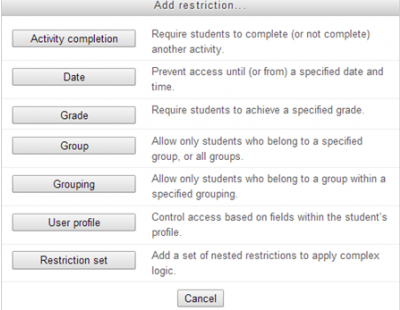
Adding the restriction type
Having chosen the restriction type, you can then define the specifics of the restriction. In the case of the example below, participants have to complete the Holidays quiz.

Scheduled Tasks Management
With an improved scheduling system, tasks can be scheduled precisely, even on complex clustered servers.
Support
There’s another thing that will make administrators happy. Moodle 2.7 is a long term supported release. It will have an extended support of 3 years (until May 2017) for security and data-loss fixes.
Big Data
You will have heard this term mentioned several times before, now, Moodle has incorporated better use of data and reporting.
Improve Assignments
Teachers can now notify students when providing feedback, easily keep track, edit or delete student submissions, set a word limit and add comments directly to text assignments.
Reasons to choose ASPHostPortal.com as your cheap Moodle 2.7 Hosting
ASPHostPortal.com have Moodle™ experts on staff who are available 24/7 to help, a one click install script to make installation a breeze, and we guarantee our service, money back. What makes ASPHostPortal.com the premier place to host Moodle? Here are 5 reasons why we are the best:
Easy to Use Tools
ASPHostPortal.com use World Class Plesk Control Panel that help you with single-click Moodle installation.
Best Programming Support
ASPHostPortal.com hosting servers come ready with the latest PHP version. You can get access directly to your MySQL from our world class Plesk Control Panel.
Best Server Technology
The minimal specs of our servers includes Intel Xeon Dual Core Processor, RAID-10 protected hard disk space with minimum 8 GB RAM. You dont need to worry about the speed of your site.
Best and Friendly Support
Our customer support will help you 24 hours a day, 7 days a week and 365 days a year to assist you.
Uptime & Support Guarantees
We are so confident in our hosting services we will not only provide you with a 30 days money back guarantee, but also we give you a 99.9% uptime guarantee.
July 15, 2014 11:04 by
BenASPHostPortal.com Web Services launch its first data center in London on 01st August 2014 with room for more than 10,000 physical servers, and allowing customers’ to meet their UK data residency requirements.
The new facility will provide customers and their end users with ASPHostPortal.com services that meet in-country data residency requirements. It will also complement the existing ASPHostPortal.com Amsterdam data center, to provide European customers redundancy options within the region. The London data center will offer the full range of ASPHostPortal.com web hosting infrastructure services, including bare metal servers, virtual servers, storage and networking.
The new data center will allow customers to replicate or integrate data between London and Amsterdam data centers with high transfer speeds and unmetered bandwidth (at no charge) between facilities.
London, itself, is a major center of business with a third of the world’s largest companies headquartered there, but it also boasts a large community of emerging technology startups, incubators, and entrepreneurs.
“We already have a large customer base in London and the region; we’re excited to give those customers a full ASPHostPortal.com data center right in their backyard, with all the privacy, security, and control the ASPHostPortal.com platform offers,” said Dean Thomas, Manager at ASPHostPortal.com.
For more information about new data center in London, please visit http://www.asphostportal.com.
About ASPHostPortal.com:
ASPHostPortal.com is a hosting company that best support in Windows and ASP.NET-based hosting. Services include shared hosting, reseller hosting, and sharepoint hosting, with specialty in ASP.NET, SQL Server, and architecting highly scalable solutions. As a leading small to mid-sized business web hosting provider, ASPHostPortal.com strive to offer the most technologically advanced hosting solutions available to all customers across the world. Security, reliability, and performance are at the core of hosting operations to ensure each site and/or application hosted is highly secured and performs at optimum level.
June 10, 2014 12:14 by
BenASPHostPortal.com, a Microsoft Golden hosting partner has been offering well priced Windows and ASP.NET hosting plans for many years. Founded in 2008 and operated in New York, US. ASPHostPortal.com has become an important resource for cutting-edge, high-value hosting solutions. We're a proudly the company with over 35.000 satisfied customers and a reputation as one of the top internet service providers. We also offers low priced enterprise-level hosting plans by focusing their resources on needs by ASP.NET Windows’s developers.
ASPHostPortal.com claims to be proud of our management staff who have years of experience working in web hosting industry. ASPHostPortal’s aim is to offer the best web hosting value to our clients by offering products and solution in an efficient and effective way.

We support almost all the latest ASP.NET technology and provides plenty of server resources for every hosting account. Below are the list of key features, but definitely it provides more:
- Unlimited Website
- Latest MS SQL Server 2012 R2
- ASP.NET 4.5.2/4.5.1/4.5/3.5/2.0
- IIS 8 with Full trust allowed
- SmarterMail email System
- Web-based Plesk Panel hosting
- Unlimited FTP, Sub domains, mail boxes
- PHP, MySQL 5 Database
With ASPHostPortal.com, customers are always able to run websites with at least 99.9% uptime. ASPHostPortal has 3 top data centers located in New York, USA, Europe and Singapore both of which are equipped with hundreds of 100% Dell servers with 64 bit operating system, dual quad processors, 32 GB Ram and RAID 10 disk arrays. And also our system still reliable in South Africa. Part of our success is down to the fact that we've partnered with one of the biggest network providers in Africa to ensure the quickest and most reliable internet experience for our customers.
Why ASPHostPortal.com is the Best ASP.NET Hosting in South Africa?
Reliable Server and Data Center
We now operate 5 different data centers, namely Seattle data center, Houston data center, Washington DC data center, Amsterdam (The Netherland) data center and the newest Singapore (Asia) data center.
Fastest Network
ASPHostPortal has architected its network like no other hosting company. Every facet of our network infrastructure scales to gigabit speeds with no single point of failure.
World Class PLESK Control Panel
We provide one of the most comprehensive customer control panels available. Providing maximum control and ease of use, our Control Panel serves as the central management point for your ASPHostPortal account.
Excellent Expertise in Technology
The reason we can provide you with a great amount of power, flexibility, and simplicity at such a discounted price is due to incredible efficiencies within our business.
In addition, ASPHostPortal.com technicians are monitoring the data centers and server 24×7, so we are able to find and resolve sudden issues to avoid any sudden interruption. The following chart shows the real ASPHostPortal.com uptime in the past 30 days.
ASPHostPortal.com also provide our customers a chance to make some money by providing reseller hosting accounts. You can purchase our reseller hosting account, host unlimited websites on it and also have the chance to sell some of your hosting space to others. This can be one of the easiest ways of making some money online. You do not need to worry about hosting stuff as we will take care of all the hosting needs of your clients.
May 30, 2014 07:58 by
BenASPHostPortal windows hosting is compatible with the YetAnotherForum.NET. We offer YetAnotherForum.NET based hosting plan from just $5/month (see our YetAnotherForum.NET Hosting Plan).
The ASPHostPortal.com ASP.NET hosting platform is compatible with YetAnotherForum (YAF) Forum application. YetAnotherForum.NET (YAF) is a Open Source discussion forum or bulletin board system for web sites running ASP.NET.
It is 100% written in C#, YAF is a combination of Open Source, Microsoft's .NET platform and an international collaboration of the .NET developer community. ASP.NET forum solutions are not so much on the market and YAF is absolutely the best solution.

The YAF project is lead by Jaben Cargman of Tiny Gecko and grows and changes daily. YAF runs on any hosting server that's configured with Asp.net 2.0+ and SQL Server service. Some key features for YetAnotherForum:
- Licensed under GPL
- Web Based Administration
- Unlimited number of boards forums and categories
- Template-based design
- Unicode (UTF-8) encoding
- DotNetNuke, Umbraco, MojoPortal Modules
YAF is actually a simple support by ASPHostPortal ASP.NET hosting service. Besides YAF, ASPHostPortal.com is golden partner over lots of asp.net projects. By powering thousands of popular .net web applications, ASPHostPortal.com is official recommendation for such softwares.
You can get YetAnotherForum.NET CMS Hosting installed with a click of a mouse at ASPHostPortal.com. Here are 5 reasons why we are the best:
Easy to Use Tools - ASPHostPortal.com use World Class Plesk Control Panel that help you with single-click YetAnotherForum.NET CMS installation.
Best Server Technology - The minimal specs of our servers includes Intel Xeon Dual Core Processor, RAID-10 protected hard disk space with minimum 8 GB RAM. You dont need to worry about the speed of your site.
Best Programming Support - ASPHostPortal.com hosting servers come ready with the latest PHP version. You can get access directly to your MySQL from our world class Plesk Control Panel.
Best and Friendly Support - Our customer support will help you 24 hours a day, 7 days a week and 365 days a year to assist you.
Uptime & Support Guarantees - We are so confident in our hosting services we will not only provide you with a 30 days money back guarantee, but also we give you a 99.9% uptime guarantee.
May 16, 2014 07:56 by
Ben
Finally, the long awaited release of ASP.NET 4.5.2, ASPHostPortal are happy to announce the availability of the .NET Framework 4.5.2 for all our hosting packages. It is a highly compatible, in-place update to the .NET Framework 4, 4.5 and 4.5.1.
The Microsoft .NET Framework 4.5.2 is a highly compatible, in-place update to the Microsoft .NET Framework 4, Microsoft .NET Framework 4.5 and Microsoft .NET Framework 4.5.1.
The .NET Framework 4.5.2 Preview is the first update of .NET Framework 4.5. It contains critical fixes, improvements, and opt-in features and is part of the Visual Studio 2013 and Windows 8.1 Previews. But it is also available as direct download without the requirement of having an existing .NET Framework 4.5 installation.

The .NET 4.5.2 Preview Framework update provides some fixes and multiple performance enhancements. There are no major language features, but nonetheless those upgrades become very handy and will allow for a more seamless and productive software development experience.
The .NET Framework 4.5.2 contains a variety of new features, such as:
- ASP.NET improvements
- High DPI Improvements - As part of recently released .NET 4.5.2, Windows Forms is seeing some improvements for its high DPI support.
- Distributed transactions enhancement - This service provides applications with a way to support transactions that span multiple processes or even multiple machines.
- More robust profiling
- Improved activity tracing support in runtime and framework - The .NET Framework 4.5.2 enables out-of-process, Event Tracing for Windows (ETW)-based activity tracing for a larger surface area.
- Event tracing changes - The ASP.NET Framework 4.5.2 enables out-of-process, Event Tracing for Windows (ETW)-based activity tracing for a larger surface area. This enables Advanced Power Management (APM) vendors to provide lightweight tools that accurately track the costs of individual requests and activities that cross threads.
Unique ASP.NET 4.5.2 Hosting Performance on our Shared Servers:
Build Your Website
Use ASPHostPortal.com's website building tools to get that special, customized look for your website. A nifty wizard will walk you through the process.
All-inclusive prices unbeatable value
Other companies promise cheap hosting, but then charge extra for setup fees, higher renewal rates, or promotional services. With ASPHostPortal.com, the listed price is the number you’ll pay, and you can expect a fully loaded, comprehensive suite of web services.
Fast and Secure Server
Our powerfull servers are especially optimized and ensure the best ASP.NET 4.5.2 performance. We have best data centers on three continent and unique account isolation for security.
Easy to Use and ManageASPHostPortal.com webspace explorer lets you manage your website files with a browser. A control panel lets you set up and control your server functions with ease.
April 29, 2014 07:54 by
BenmojoPortal is another open source CMS option based upon the .NET framework. It has a very active developer group and is consistently being updated. While it is free to download and use, there are a number of commercial add-ons that are used to help fund the project. When it comes to developing your own applications, many people prefer mojoPortal because it can act as a starter kit for advanced .NET sites or portals.
mojoPortal is also considered to be very strong as a standalone CMS. It is easy to learn and very simple to use. It includes a variety of different tools such as blogs, photo galleries, chat, newsletters, pools, forums, and much more. It also has a very strong community which makes troubleshooting extremely simple.

Here is the tutorial how to recover password login on your mojoPortal site :
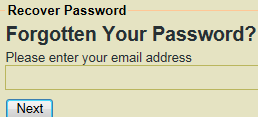
However, in order to use this feature you require login e-mail which you used either at the time of installation or while updating the site later on.
Sometimes, you will forget password but your login e-mail id will be the default provided by the installer – [email protected]
In such a scenario, you need to dig deep into the database to find out the password as mentioned below
- Open SQL Server 2008 / 2012
- You will view a dialog named – Connect to Server
- Provide the database name, database username and password which you provided at the time of mojoportal installation process.
- If you installed MojoPortal through Web App Gallery from within WebsitePanel then you need to search for “user.config” file from the file manager and fetch the required credentials.
- If the provided credentials are correct then you will be logged into SQL Server. Locate your database from the navigation panel located on the left hand side.
- Expand the database name, then Tables and locate the table name – dbo.mp_Users
- Right click on the above mentioned table and select the option – Select Top 1000 Rows
- SQL Server will display the list of entries under each column. By default, it will only show details of Admin user. However, you will view more entries if your site is bit old and users have registered on the site.
- In order to view the password of admin user, you need to scroll horizontally until you see the column name – Pwd.
It is to be noted that MojoPortal displays passwords as such without any kind of encryption. Hence, you should use very strong password for the database, FTP and administrator user account.
April 14, 2014 08:19 by
Kenny
nopCommerce is one of the most popular ASP.NET shopping cart applications which you can use it for designing your business website for free. nopCommerce is an open source e-commerce solution that contains both a catalog frontend and an administration tool backend. nopCommerce is a fully customizable shopping cart. It's stable and highly usable. From downloads to documentation, nopCommerce.com offers a comprehensive base of information, resources, and support to the nopCommerce community. nopCommerce is a complete open source shopping cart softare, the first edition was released in October 2010, we can say this is still a very new shopping cart application in the market, but their users are growing super-fast in the past 3 years. nopCommerce is a fully customizable shopping cart and you can easily installed it in your hosting account. You just need to download the instalaltion file from official website and use FTP to upload it into your hosting server and unzip the file, then you have to create MSSQL 2005 or 2008 database, and you can install it for your website now.

As the Internet grows as a medium of communication, commerce and interaction, so do the prevalence of risks and security threats. One way to effectively protect your domain is with an SSL certificate. The primary reason why SSL is used is to keep sensitive information sent across the Internet encrypted so that only the intended recipient can understand it. This is important because the information you send on the Internet is passed from computer to computer to get to the destination server. Any computer in between you and the server can see your credit card numbers, usernames and passwords, and other sensitive information if it is not encrypted with an SSL certificate. When an SSL certificate is used, the information becomes unreadable to everyone except for the server you are sending the information to. This protects it from hackers and identity thieves.
In this article, i'm going to explain about how to enable SSL in nopCommerce, you will first need to purchase an SSL certificate and dedicated IP. This article assumes that you already purchase an SSL from SSL provider.
- Install SSL on your web server
- Open web.config file
- Set UseSSL value to true (<add key=”UseSSL” value=”true” /> )
- Then just save the file.
nopCommerce automatically switched to SSL when required ( for example, register, login and checkout admin ect.)
Get SharedSSLUrl from your hosting provider
Open the web.config and edit the following values
<add key=”UseSSL” value=”true” />
<add key=”SharedSSLUrl” value=”https://secure.yourhostingcompany.com/~username” />
<add key=”NonSharedSSLUrl” value=”https://secureyourhostingcompany.com/~username” />