Windows 2012 Hosting - MVC 6 and SQL 2014 BLOG

Tutorial and Articles about Windows Hosting, SQL Hosting, MVC Hosting, and Silverlight Hosting

ASP.NET MVC 4 Hosting - Mobile Views Setting in MVC 4

clock February 27, 2013 07:54 by author andy_yo

MVC 4 has a new way to deal with mobile views.  You can now set up individual display modes for mobile and desktop views.  First you need to register the new display mode in the app_start method of the global.asax file.

DisplayModeProvider.Instance.Modes.Insert(0

       , new DefaultDisplayMode("mobile")

       {    

          ContextCondition = (ctx => ctx.Request.Browser.IsMobileDevice)

       });

Here we added a display mode called “mobile” that we set the condition to use this new mode to mobile devices.  Now we would create a controller and view as usual.  Say we create a Home controller with an Index action.  Next we create a new view using the razor engine called Index.cshtml.  To use the newly created display mode we would just create a second view and call it index.mobile.cshtml.  By using this naming convention we are telling MVC to use the index.cshml view for all requests to the Home controller and Index action, but if the condition of the display mode is met, use the index.mobile.cshtml view.  One of the real nice things about this approach is that if a request meets the condition for a mobile view, but one doesn’t exist, it will default back to the desktop view.

You can also use this same convention with master pages.  For the _layout.cshtml, you would add a _layout.mobile.cshtml.  Be careful though, as a side effect of the view defaulting back to the desktop view if the mobile one doesn’t exist, you can get a mismatch of master page and view.  If this is not desirable, then can add the following line into your _ViewStart.cshtml file of your site:

DisplayModeProvider.Instance.RequireConsistentDisplayMode  = true;

This is a great way to set up you site with a mobile view and a desktop view and use the same controller for both.


ASP.NET MVC 4 Hosting - Razor 2.0 Features in ASP.NET MVC 4

clock February 19, 2013 12:26 by author andy_yo

First version of razor is shipped with ASP.NET MVC 3. ASP.NET MVC 4 come with Razor V2.0. Razor V2.0 includes some new features.

About ASPHostPortal.com
ASPHostPortal.com is Microsoft No #1 Recommended Windows and ASP.NET Spotlight Hosting Partner in United States. Microsoft presents this award to ASPHostPortal.com for ability to support the latest Microsoft and ASP.NET technology, such as: WebMatrix, WebDeploy, Visual Studio 2012, ASP.NET 4.5, ASP.NET MVC 4.0, Silverlight 5 and Visual Studio Lightswitch. Click here for more information


URL Resolution Enhancements:

We use the relative URL for any resources (images, scripts, css) in code , for example :

<script src=”~/Scripts/jquery-1.8.2.js”></script>

But in runtime we should resolve the full path of the resource (absolute URL), to do this in ASP.NET MVC 3 we use Content() method of UrlHelper class.

<script src=’@Url.Content(“~/Scripts/jquery-1.8.2.js”)’></script>

In Razor V2.0 no need to use @Url.Content() method, razor v2.0 now resolves (absolute path/URL) ~/ (tilde-slash) within all standard HTML attributes, razor v2.0 now allows you to just write  :

<script src=”~/Scripts/jquery-1.8.2.js”></script>

Conditional Attribute Enhancements:

Hers is a classic example for conditional attributes, I have a <div> tag with class attribute. The class name is a dynamic value, It will be resolved at runtime based on some condition in razor code. If the condition is satisfied  class attribute will have some value, else it will be null. When there is a value no issues, but when value is null  we should not apply it for class attribute, to be strict when there is no value for class attribute we should not render it. This scenario involves with writing some ugly code with if condition & <text> tag, in Razor1.0 (ASP.NET MVC 3) code snippet as follows.
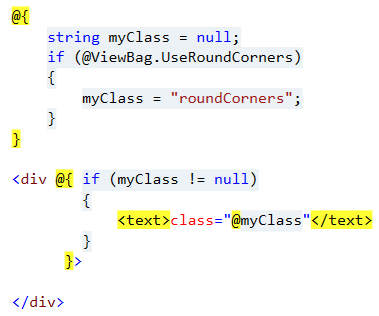
 

In Razor 2.0 (ASP.NET MVC 4) now we can write:
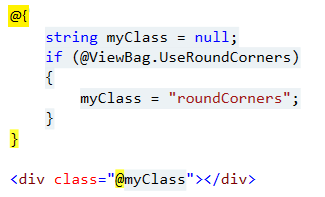


Above code returns the same results as earlier, for example if the @ViewBag.UseRoundCorners value is true, then myClass value is roundCorners, then  razor will render :

<div class=”roundCorners ”></div>

If @ViewBag.UseRoundCorners value is false, then myClass value is null, then razor will render <div> tag with out class attribute:

<div></div>

Razor V2.0 can handle multiple values in conditional attributes:

For example class attribute has multiple values <div class=”@myClass heading”></div>, now razor will render <div class=”roundCorners  heading”></div> if @myClass is not null, if @myClass is null, then razor will simply render <div class=”heading”></div>.

Razor V2.0  can handle Boolean values in conditional attributes:

Not only null values & multiple values, razor can handle boolean values also in conditional attributes.

<input type=”checkbox”  checked=”@ViewBag.Checked” />

If @ViewBag.Checked value is true then razor will render:

<input type=”checkbox”  checked=”checked” />

If @ViewBag.Checked value is false then razor will render:

<input type=”checkbox”  />


About ASPHostPortal.com

We’re a company that works differently to most. Value is what we output and help our customers achieve, not how much money we put in the bank. It’s not because we are altruistic. It’s based on an even simpler principle. "Do good things, and good things will come to you".

Success for us is something that is continually experienced, not something that is reached. For us it is all about the experience – more than the journey. Life is a continual experience. We see the Internet as being an incredible amplifier to the experience of life for all of us. It can help humanity come together to explode in knowledge exploration and discussion. It is continual enlightenment of new ideas, experiences, and passions

 photo ahp banner aspnet-01_zps87l92lcl.png

Author Link

Corporate Address (Location)

ASPHostPortal
170 W 56th Street, Suite 121
New York, NY 10019
United States

Sign in