
February 12, 2014 06:01 by
 Ben
BenIn this blog I will run the steps to install Internet Information Services (IIS Version 8.5) on Windows Server 2012 R2. IIS 8.5 will be released with the Windows Server 2012 R2 product. With IIS 8.5, the IIS team continued its focus on scalability and manageability improvements.

1. Open Server Manager by clicking the Server Manager icon on the desktop, next to Start icon.
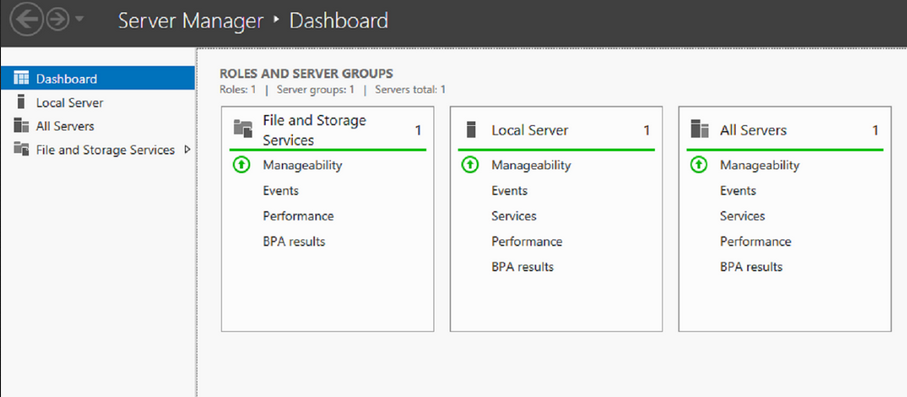
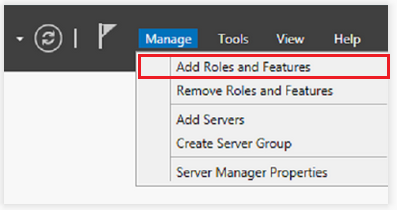
2. In the Server Manager window, with the Dashboard selected, click the Manage menu, and then click Add Roles and Features - click Next.
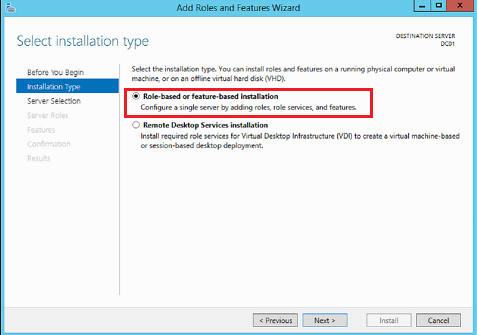
3. Select Role-Based o feature-based installation and Next
4. Select a server from the server pool and Next.
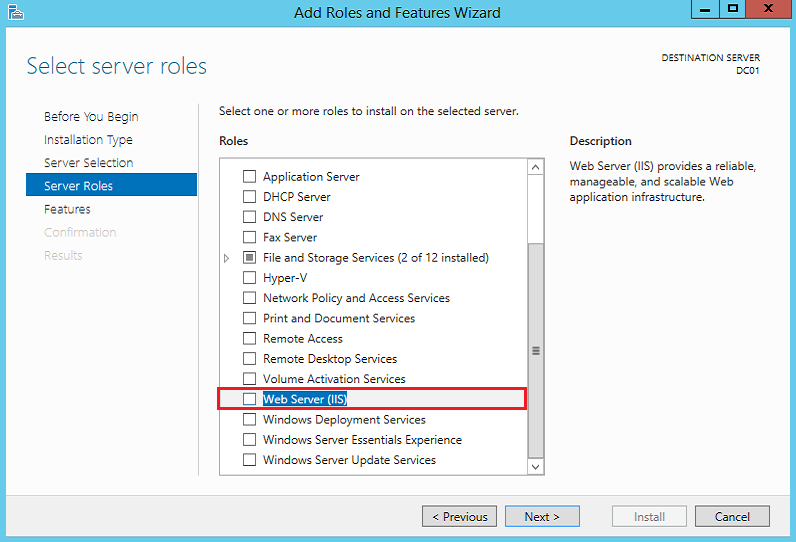
5. On the Select server roles, select Web Server (IIS) role. Click Next.
6. On the Add features that are required for Web Server (IIS), select Include management tools (if application). Click Add Features then click Next.
7. On the Select role services, select all the components depending on your requirement. Click Next.
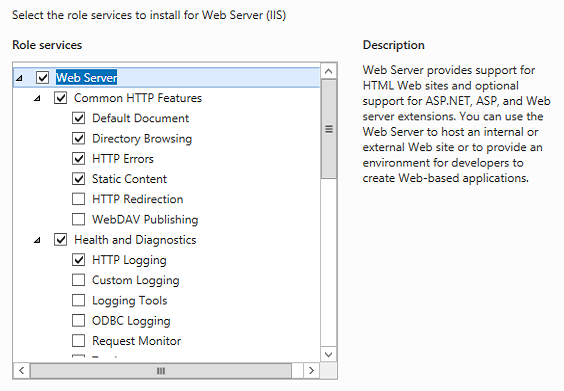
8. On the Confirm installation selections, check Restart the destination server automatically if required. Click Yes to confirm automatic restart. Click Install.
9. On the Installation progress screen, click Close once the installation is completed. It can be closed before installation is completed and it would not interrupt the installation.
10. To confirm if the installation is successful or not, open Internet Explorer and type http://localhost, hit Enter. Default IIS page will be displayed. It is a confirmation that IIS
is successfully installed.
US Affordable IIS 8.5 Hosting with ASPHostPortal.com :
"ASPHostPortal.com is proud to be one of the first ASP.NET Hosting providers to offer IIS 8.5 Hosting on our most improved Windows 2012 R2 hosting platform. It makes easy to use the most current version of websites tools like Visual Studio and WebMatrix. With our IIS 8.5 Hosting will increase your website security and reliability. We also allow Full Trust on our IIS 8.5 Hosting."
February 7, 2014 12:15 by
BenMicrosoft was release of the new Windows Server 2012 R2. This latest Server has been produced with great enthusiasm by Microsoft, giving their users the highest quality product to date. The much anticipated release of the Windows R2 Sever will enable users to create their very own secure, private and hybrid infrastructure.

Windows Server 2012 R2 brings a host of new features that greatly enhance the functionality of the operating system. Many of these improvements expand on existing capabilities of Windows Server 2012. Here out 5 new features elsewhere in Windows Server 2012 R2 that will make an impact on your day-to-day operations,such as :
Storage Pinning - Closely related to Storage Tiering is the ability to pin selected files to a specific tier. Pinning makes it possible to ensure that files you always want on the fastest storage, such as boot disks in a Virtual Desktop Infrastructure deployment, will never be moved to the slower storage tier.
Write Back Cache - When you create a new storage volume in Windows Server 2012 R2, you also have the option to enable something called the Write Back Cache. This feature sets aside an amount of physical storage, typically on a fast SSD, to use as a write cache to help smooth out the ups and downs of I/O during write-intensive operations.
Work Folders - Install this role on a Windows Server 2012 R2 system, and you get a fully functional, secure file replication service.
Workplace Join - Windows Server 2012 R2 addresses the need to incorporate personal devices like iPads into the enterprise environment. At the simplest level is a new Web Application Proxy that allows you to provide secure access to internal corporate websites, including SharePoint sites, to any authorized user.
Windows Server Essentials role - The Windows Server Essentials role in Windows Server 2012 R2 brings with it a number of other features -- including BranchCache, DFS Namespaces, and Remote Server Administration Tools -- that are typically implemented in remote office settings.
Professional Windows Server 2012 R2 Hosting with ASPHostPortal.com
ASPHostPortal.com is focused on providing the best value in innovative Microsoft Windows hosting for Microsoft/ASP.NET developers. We work hard to be an early adopter of new Microsoft technology. Our team is proud to be one of the first hosts to launch the latest Windows 2012 R2 Hosting with IIS 8.5! The Windows 2012 R2 Hosting platform is ideal for developers that want to be on the cutting edge of new technology. On this new platform, we support the latest .NET Framework - ASP.NET 4.5.1. Try our FREE Trial Hosting with risk free, including a free automated installation in Windows Server 2012 R2 , to get you up and running quickly.