
July 22, 2014 09:37 by
 Ben
BenJSON is a text format that is completely language independent but uses conventions that are familiar to programmers of the C-family of languages, including C, C++, C#, Java, JavaScript, Perl, Python, and many others. These properties make JSON an ideal data-interchange language. JSON is very useful when developing a web application where fast, compact and convenient serialisation of data is required, however it's flexible nature is the very thing that makes it less suitable than XML for transferring data between separate systems, or storing data that will be read by 3rd parties.

JSON is built on two structures:
- A collection of name/value pairs. In various languages, this is realized as an object, record, struct, dictionary, hash table, keyed list, or associative array.
- An ordered list of values. In most languages, this is realized as an array, vector, list, or sequence.
These are universal data structures. Virtually all modern programming languages support them in one form or another. It makes sense that a data format that is interchangeable with programming languages also be based on these structures.
Advantages of JSON
- Smaller message size
- More structural information in the document
- Can easily distinguish between the number 1 and the string "1" as numbers, strings (and Booleans) are represented differently in JSON.
- Can easily distinguish between single items and collections of size one (using JSON arrays).
- Easier to represent a null value
- Easily consumed by JavaScript
Sometimes we need to create JSON in a text file with extension .json, however by default IIS 7 or any of the IIS are not configure to handle .json extension. So below is a very simple method to do that. You can apply the method on the root of IIS so .json can be handled by every site or virtual folder in the IIS or just to the specific site.
- Open IIS Manager
- Display properties for the IIS Server
- Click MIME Types and then add the JSON extension:
File name extension: .json
MIME type: application/json
- Go back to the properties for IIS Server
- Click on Handler Mappings
Add a script map
Request path: *.json
Executable: C:\WINDOWS\system32\inetsrv\asp.dll
Name: JSON
Reasons To Use IIS 7 Hosting
IIS 7 makes extending Web server functionality easier. A new integrated pipeline lets developers create custom modules that can be plugged into the IIS7’s new request-processing pipeline. Developers can write native modules with C++ or managed modules in a .NET language such as C# or Visual Basic.Net. The advanced features of the .NET Framework, combined with deep integration into the IIS 7 pipeline, lets developers create custom modules quickly and easily. Any application can leverage the .NET Role and Membership providers, which are integrated in the new IIS 7 pipeline. Existing ISAPI applications built for IIS6 will also run without modification in IIS 7’s Classic mode.
IIS 7 builds on the security and reliability established by IIS 7.0. The modular design lets you reduce the attack surface of your server by uninstalling the modules that you do not need for your application. You can also write your own modules to support your custom security requirements. New automatic application isolation adds a layer of protection to keep applications safe from each other. IIS 7’s ability to set up rules to control access to URLs and filter requests lets administrators manage access to sites, folders, and files without requiring ACLs. And admin delegation lets you assign limited administrative rights to users for specific sites instead of granting server-wide admin rights.
February 12, 2014 06:01 by
BenIn this blog I will run the steps to install Internet Information Services (IIS Version 8.5) on Windows Server 2012 R2. IIS 8.5 will be released with the Windows Server 2012 R2 product. With IIS 8.5, the IIS team continued its focus on scalability and manageability improvements.

1. Open Server Manager by clicking the Server Manager icon on the desktop, next to Start icon.
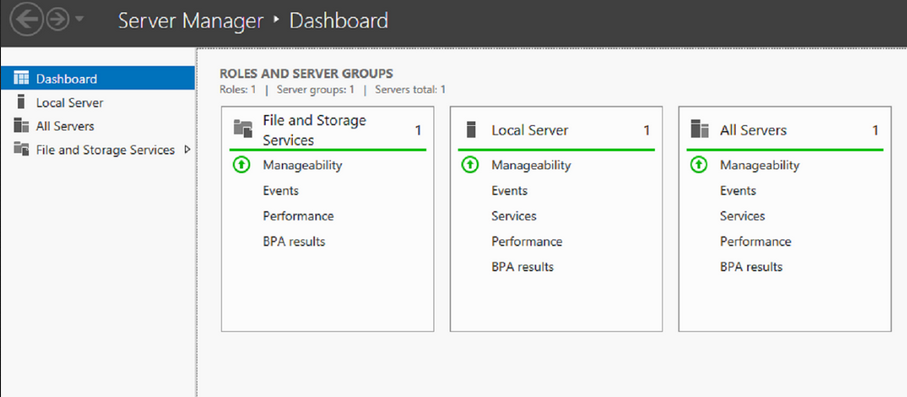
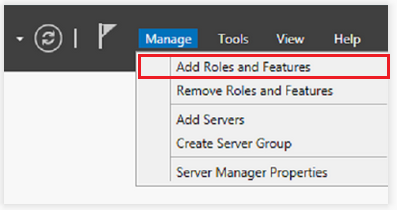
2. In the Server Manager window, with the Dashboard selected, click the Manage menu, and then click Add Roles and Features - click Next.
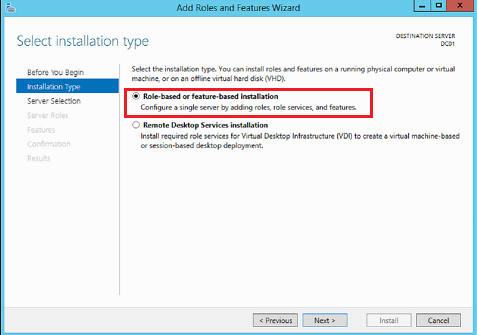
3. Select Role-Based o feature-based installation and Next
4. Select a server from the server pool and Next.
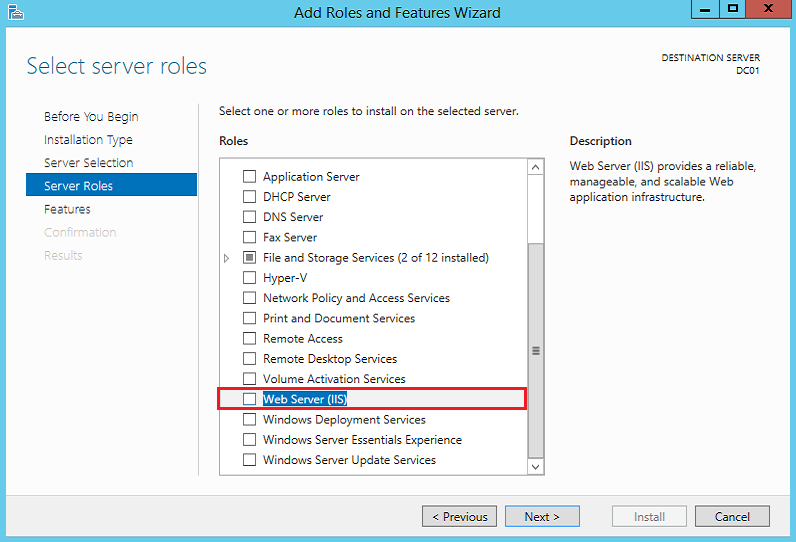
5. On the Select server roles, select Web Server (IIS) role. Click Next.
6. On the Add features that are required for Web Server (IIS), select Include management tools (if application). Click Add Features then click Next.
7. On the Select role services, select all the components depending on your requirement. Click Next.
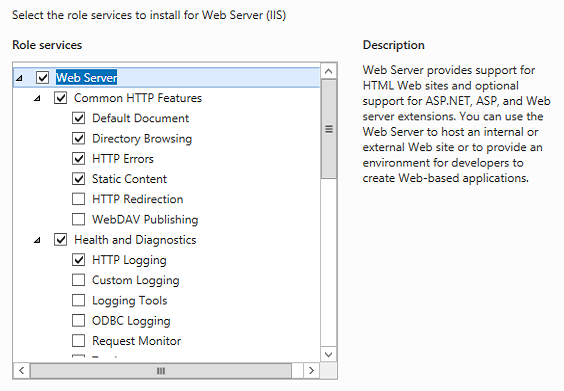
8. On the Confirm installation selections, check Restart the destination server automatically if required. Click Yes to confirm automatic restart. Click Install.
9. On the Installation progress screen, click Close once the installation is completed. It can be closed before installation is completed and it would not interrupt the installation.
10. To confirm if the installation is successful or not, open Internet Explorer and type http://localhost, hit Enter. Default IIS page will be displayed. It is a confirmation that IIS
is successfully installed.
US Affordable IIS 8.5 Hosting with ASPHostPortal.com :
"ASPHostPortal.com is proud to be one of the first ASP.NET Hosting providers to offer IIS 8.5 Hosting on our most improved Windows 2012 R2 hosting platform. It makes easy to use the most current version of websites tools like Visual Studio and WebMatrix. With our IIS 8.5 Hosting will increase your website security and reliability. We also allow Full Trust on our IIS 8.5 Hosting."
February 10, 2014 09:30 by
BenASPHostPortal.com proudly launches the support of IIS 8.5 on all their newest Windows Server 2012 R2 environment. ASPHostPortal.com IIS 8.5 Hosting plan starts from just as low as $1.00/month only.
ASPHostPortal.com,a leading web hosting provider and ASP.NET specialist, today launched the latest update of the Microsoft IIS technology. The IIS 8.5, introduces many new features including several that focus on premium media experiences and business application development for faster loading websites, business services and applications regardless of an organisations requirements.

IIS 8.5 will be released with the Windows Server 2012 R2 product. With IIS 8.5, the IIS team continued its focus on scalability and manageability improvements. IIS 8.5 adds sophisticated features like Dynamic Website Activation, Enhanced Logging and Logging to Event Tracing for Windows in IIS .8.5.
Another wonderful feature of IIS 8.5 is Suspended AppPools. This new feature allows applications hosted on IIS 8.5 to be suspended instead of being terminated, so when the site is shutdown because of the idle timeout, instead of completely killing the worker process, all the state is saved into disk.
“Our customers have been asking us about IIS 8.5 and we are happy to deliver a hosting platform that supports all the latest in the Microsoft Web Stack. With the launched of IIS 8.5 hosting services, we hope that developers and our existing clients can try this new features.” said Dean Thomas, Manager at ASPHostPortal.com.
Where to look for the best IIS 8.5 hosting service? How to know more about the different types of hosting services? Read more about it on http://www.asphostportal.com.
As a leading hosting provider, ASPHostPortal.com offers a comprehensive range of services including domain name registrations, servers, online backup solutions and dedicated web hosting. ASPHostPortal.com is well placed to deliver a high quality service.
About ASPHostPortal.com:
ASPHostPortal.com is a hosting company that best support in Windows and ASP.NET-based hosting. Services include shared hosting, reseller hosting, and sharepoint hosting, with specialty in ASP.NET, SQL Server, and architecting highly scalable solutions. As a leading small to mid-sized business web hosting provider, ASPHostPortal.com strive to offer the most technologically advanced hosting solutions available to all customers across the world. Security, reliability, and performance are at the core of hosting operations to ensure each site and/or application hosted is highly secured and performs at optimum level.