Windows 2012 Hosting - MVC 6 and SQL 2014 BLOG

Tutorial and Articles about Windows Hosting, SQL Hosting, MVC Hosting, and Silverlight Hosting

Windows Reseller Hosting - ASPHostPortal.com :: Best Practices windows cloud server security

clock April 27, 2016 20:57 by author Armend

More and more we are helping people get set up on  Windows cloud servers here at windows2008hosting.asphostportal.com .  While dedicated server solutions are the right choice for certain situations, clients are finding the benefits of cloud servers or, in many cases, a hybrid hosting solution to be the perfect fit for their hosting needs. With all this cloud talk, there are several technologies supported on Windows cloud servers that you may not have realized. These options can make the difference when configuring a cloud server solution that will best optimize your site or application.


Firewalls, VPN & SSL in the Cloud

The best practices of leveraging Virtual Private Networks (VPN), Secure Sockets Layers (SSL) and Firewalls to protect sensitive information on a Windows Cloud Server are recommend and also supported just as they would be with a physical dedicated server. If you’re unsure as to what any of these are and why they are necessary, the following will serve as a summary of each and their benefits.

What is VPN?

Virtual Private Networking is a secure and controlled method of connecting remote networks and users for the purpose of dealing with sensitive information. When using a VPN, all data is encrypted at the source, sent securely to the destination, then decrypted at the destination – assuring that only the previously approved source and destination people or systems can access the data. This is often a necessary element to incorporate in your hosting solution if you are an eCommerce company accessing sensitive back-end data like credit cards or orders, require PCI compliance, or simply need to securely work with remote clients or coworkers regarding sensitive information. A VPN connection allows you to guarantee identity through point-to-point connections and user authentication. While Windows cloud servers are virtual, they retain all the same VPN encrypting capabilities as a dedicated server, giving you complete control over security and privacy of your data. (For more information on Virtual Private Networking.

What is an SSL Connection?

The Secure Socket Layer protocol (SSL) ensures secure transactions between Windows cloud servers and browsers. This is particularly important anytime sensitive information must be transmitted over the open Internet. For example, any sign-up process where personal information is needed, (credit card information, personal data, etc.) would justify use of an SSL connection. You can recognize the use of an SSL connection when you see an “S” included in the URL (https://).
While the technical breakdown of an SSL can be somewhat complicated, it’s important to understand the basic concept of an SSL connection and how important it is inmaintaining security with sensitive information.

What is a Firewall?

A firewall is a security solution designed to only allow safe and trusted connections to whatever it is set to protect. It does this by identifying several pieces of information for all incoming connections, thus blocking access to any unfamiliar or unauthorized sources looking to access that data. The difference between a firewall and an SSL connection is that SSL is used to ensure your sensitive information can be securely sent from a webpage to a server, while a firewall is designed to control direct access to the cloud server itself. A firewall can be used to lock down ports and allow only certain information to be accessible, while keeping other information secure.

Firewall in a Windows Cloud Server

In order to set up a firewall in a Windows cloud server configuration, various steps must be taken to optimize the firewall for the cloud – but depending on your hosting provider, these steps will be covered for you. Once these steps are taken, it is no different than a firewall configured for a dedicated physical server.
Note: In addition to base intrusion detection and firewall protection offered at our network core, our Windows Cloud Servers come with free built-in Windows Firewall service that can be used to lock down ports and restrict access with a focus on the specific needs of your server – assuring that only the ports needed are opened and only available to the users or systems that need the sensitive access.

Cloud Server Security Best Practices

The above security steps are important in and of themselves, but they also serve as a baseline for achieving PCI Compliance, something in which we at ASPHostPortal.com are well versed. So, whether you’re looking to sure up your security as a best practice, or find yourself needing to implement the above steps in accordance with the PCI Security Standard Council, Windows cloud server hosting offers all the tools available on a dedicated server configuration, but often with several added benefits.

Best Windows Server 2008 Hosting Recommendation

ASPHostPortal.com

ASPHostPortal.com provides our customers with Plesk Panel, one of the most popular and stable control panels for Windows hosting, as free. You could also see the latest .NET framework, a crazy amount of functionality as well as Large disk space, bandwidth, MSSQL databases and more. All those give people the convenience to build up a powerful site in Windows server 2008. We offers Windows hosting starts from $5/month only. We also guarantees 30 days money back and guarantee 99.9% uptime. If you need a reliable affordable Windows server 2008 Hosting, we should be your best choice.


ASP.NET Hosting - ASPHostPortal.com :: How to Rank the Windows Hosting

clock April 19, 2016 20:01 by author Armend

How to Rank the Windows Hosting

To choose the really reliable Windows hosting, we follow the below guidelines.

#Operation System

The web hosting based on Windows server 2012 edition is ranked higher than the previous editions. Windows server 2012 has better performance, better stability, less consumption of system resources and high security. And it supports the best web server IIS 8.0 in Windows platform so far, which integrates with the ASP.NET pipeline much better than IIS 8.5/7.0


#Database System

ASP.NET applications work better with MSSQL than MySQL or PostgreSQL database. And the Windows web hosting supported MSSQL 2008 R2 gets a higher grade than MSSQL2005 and MSSQL2000. Feature and benefits in MSSQL2008 are better than the previous version of MSSQL, such as encrypt to enhance security, data compression to save disk space, parallel computing to accelerate speed, less consumption of system resource, and so on.

#DotNET Framework

The Windows hosting with support to multiple .NET framework versions especially .NET Framework V4 has a higher score in the ranking. The more versions supported the less compatible problems you may encounter, which also provides you more scalability to upgrade the websites later.

#Control Panel

Plesk is ranked as the No.1 control panel for Windows web hosting, and DotNETPanel, H-Sphere and other types have its advantage and disadvantage. We graded these types of control panels with different scores.

#Reliability

Reliability is the factor must be considered. It is evaluated by different criteria, we list these indicators below.

  • Uptime
  • Pre-install anti-virus software
  • Pre-install firewall
  • Network
  • Stable Datacenter

The best Windows web hosting listed above are ranked on these criteria, and all the 3 best windows web hosting truly meet the highest standards, which can powerful enough to run your website.

Pros and Cons of Windows Web Hosting

In fact, the Windows hosting solution is not as popular as the Linux hosting service. To give you a better understanding about this hosting type, we have listed some strong points and weak points of Windows web hosting.

The Strong Points

If your web host is a reliable and quality hosting provider, this hosting type can even achieve a more stable running than the normal Linux hosting solution.
It is surely multilingual that supports multiple scripting languages we have covered nowadays.
This hosting type is surely easy-to-use due to the immense popularity of Microsoft technologies. With it, there is no need to for you run the command line.
If you do not have enough experiences and knowledge of hosting, this type of hosting solution is arguably easier for you for the management tasks.

The Weak Points

Windows hosting is surely expensive. After all, the system of Windows is not free to use, but requires you to pay for the license fee. In addition, Windows can only be got from the official site or a few appointed agents, so there are almost no chances for you to get some lower charges or the attractive promotional campaign.
If you want to install some PHP based plugins, extensions and modules, the Windows hosting may fail to work well due to the compatibility issue.
Generally, PHP cannot work effectively with IIS as compared with Apache. For webmasters who are running a PHP based application, the 500 error might occur constantly.
Your web hosts may give you little flexibility for customizing and configuring your web servers.
If you want to use WordPress to set up and control your website, the Windows hosting service may fail to ensure you a good experience.


ASP.NET Hosting - ASPHostPortal.com :: How to Prevent ASP.NET Website From Multiple Database Request

clock October 26, 2015 20:44 by author Dan

It is not good to execute multiple db request for loading single page.  Review your database code to see if you have request paths that go to the database more than once. Each of those round-trips decreases the number of requests per second your application can serve. By returning multiple resultsets in a single database request, you can cut the total time spent communicating with the database.

In order to improve performance you should execute single stored proc and bring multiple resultset in to single db request.  In this article i will explain you how to avoid multiple database request and how to bring multiple resultset into single db request.

Consider a scenario of loading a Product Page, which displays

  • Product Information and
  • Product Review Information

In order to bring 2 database request in single db request, your sql server stored proc should be declared as below.

SQL Server Stored Proc

CREATE PROCEDURE GetProductDetails
 @ProductId bigint,
AS
SET NOCOUNT ON

--Product Information
Select ProductId,
 ProductName,
 ProductImage,
 Description,
 Price
From Product
Where ProductId = @ProductId

--Product Review Information
Select  ReviewerName,
 ReviewDesc,
 ReviewDate
From ProductReview
Where ProductId = @ProductId

Asp.net, C# Code to bring multiple db request into single db request

Code Inside Data Access Class Library (DAL)

public DataSet GetProductDetails()
{
SqlCommand cmdToExecute = new SqlCommand();
cmdToExecute.CommandText = "GetProductDetails";
cmdToExecute.CommandType = CommandType.StoredProcedure;
DataSet dsResultSet = new DataSet();
SqlDataAdapter adapter = new SqlDataAdapter(cmdToExecute);

try
{
    var conString = System.Configuration.ConfigurationManager.ConnectionStrings["ConnStr"];
    string strConnString = conString.ConnectionString;
    SqlConnection conn = new SqlConnection(strConnString);

    cmdToExecute.Connection = conn;

    cmdToExecute.Parameters.Add(new SqlParameter("@ ProductId", SqlDbType.BigInt, 8, ParameterDirection.Input, false, 19, 0, "", DataRowVersion.Proposed, _productId));

    //Open Connection
    conn.Open();

    // Assign proper name to multiple table
    adapter.TableMappings.Add("Table", "ProductInfo");
    adapter.TableMappings.Add("Table1", "ProductReviewInfo");
    adapter.Fill(dsResultSet);

    return dsResultSet;             
}
catch (Exception ex)
{
    // some error occured.
    throw new Exception("DB Request error.", ex);
}
finally
{
    conn.Close();
    cmdToExecute.Dispose();
    adapter.Dispose();
}
}

Code Inside Asp.net .aspx.cs page

protected void Page_Load(object sender, EventArgs e)
{
   if (Request.QueryString[ProductId] != null)
   {
      long ProductId = Convert.ToInt64(Request.QueryString[ProductId].ToString()); 
  
      DataSet dsData = new DataSet();

      //Assuming you have Product class in DAL
      ProductInfo objProduct = new ProductInfo();
      objProduct.ProductId = ProductId;
      dsData = objProduct.GetProductDetails();

      DataTable dtProductInfo = dsData.Tables["ProductInfo"];
      DataTable dtProductReviews = dsData.Tables["ProductReviewInfo"];

      //Now you have data table containing information
      //Make necessary assignment to controls
      .....
      .....
      .....
      .....
      ..... 

    }
}


Finish, Happy coding.

Best Windows Shared Hosting Recommendation

ASPHostPortal.com provides our customers with Plesk Panel, one of the most popular and stable control panels for Windows hosting, as free. You could also see the latest .NET framework, a crazy amount of functionality as well as Large disk space, bandwidth, MSSQL databases and more. All those give people the convenience to build up a powerful site in Our Shared Hosting. We offers Windows hosting starts from $5/month only. We also guarantees 30 days money back and guarantee 99.9% uptime. If you need a reliable affordable Windows Shared Hosting, we should be your best choice.


Windows Hosting - ASPHostPortal.com :: Which is better Online Or Offline Windows Server Backup?

clock June 25, 2015 06:23 by author Dan

The backup can also be initiated with certain scheduled activities or based mostly on time. A very good support will provide a total answer alongside with round the clock guidance and remote management functionalities. Knowledge forms the core of any company, and windows server backup plays a essential position in securing your data in the experience of all hazards and offers seamless recoverability following a catastrophe.

Backing up server (computer systems, numerous server plans and other apps) is essential in purchase to keep organization continuity. And offered the wants and scope of the IT nowadays, remote server backup for digital setup is getting to be increasingly crucial. Companies are deploying virtual servers into their IT atmosphere and so it is crucial to style and employ a disaster restoration prepare for digital setting.

Remote server backup equipment for digital surroundings

There are many choices accessible in the market place when it will come to backing up virtual servers, but when picking a 3rd party resource for distant server backup, it is essential o choose a instrument which can differentiate among a physical and virtualized atmosphere. A digital equipment (VM) exists as an picture file on a bodily server, housing the OS with configuration options, programs and the corresponding info. Say if a VM file is allotted 200GB on the difficult travel and only 100GB is utilized, the digital server backup will identify it as a VM file and will back again up only that 100GB of information in distinction to a standard backup instrument, which would back again it up as a 200GB file.

Assigning storage place for distant server backup (digital server)

Even though a virtual server setting may possibly have a storage area community (SAN) keeping the VM documents, it is advisable to execute disk-to-disk backup to economical storage disks. Digital server backup resources consider a level-in-time snapshot of the VM impression and only the changes manufactured in the original are stored in the backup copy. Consequently it is observed that storage needs for virtual backup would not increase substantially above the time period and receiving more disks would not confirm to be an high-priced affair. Nevertheless it should be remembered that deploying a SAN just for virtual server backup can be high-priced. Additionally introducing far more disks to fulfill the mounting storage calls for can additional incorporate to the costs.

Computing and networking prerequisite for remote server backup (in scenario of digital server)

In circumstance of a digital server backup that creates a backup VM, the adjustments produced to the first are synchronized with the backup duplicate. As a result it is important that you 1st decide the methods needed to take care of peak workloads throughout all VMs and then boost CPU allocation so that backups do not consume into the methods allocated to apps. Not like the bodily servers, every single of which is offered a committed network interface card (NIC) for I/O functions, I/O from all VMs is envisioned to use a one NIC creating an I/O bottleneck. For that reason determine the total I/O throughput necessity for backing up VMs and if it is discovered to be on the greater aspect go with SAN-based mostly digital backup that can assistance great LAN pace.

Best Windows Shared Hosting Recommendation

ASPHostPortal.com provides our customers with Plesk Panel, one of the most popular and stable control panels for Windows hosting, as free. You could also see the latest .NET framework, a crazy amount of functionality as well as Large disk space, bandwidth, MSSQL databases and more. All those give people the convenience to build up a powerful site in Our Shared Hosting. We offers Windows hosting starts from $5/month only. We also guarantees 30 days money back and guarantee 99.9% uptime. If you need a reliable affordable Windows Shared Hosting, we should be your best choice.


WIndows Hosting - ASPHostPortal.com :: Windows Server Hosting Regarding Superior Productivity

clock June 5, 2015 06:22 by author Dan

Windows server is a chain of operating systems. Windows server can be used on business desktop, laptop, computers and servers. It is a widely acknowledged popular server operating system program. It is known for its ability under different application settings. Windows Server hosting bestows many benefits on the end user organization.

Anytime Anywhere Accessibility and Cost-Effective Solution

Using hosted dedicated Windows Server software ensures lot of time and capital saving. Windows Server hosting service provider enables users to access the hosted data at any time from any place. Users of a cloud computing and application hosting service provider only need an Internet connected device such as a laptop or personal computer or an iPhone, etc. This feature provides ease to the user.

It also allows multiple authorized users to access data simultaneously without any trouble. With this feature you can be far away from each other and still work together without any trouble. It improves collaboration between team members and enhances the ultimate output.

Reliable and Scalable

Windows Server host offers a scalable environment so that variations in business demands can be managed with no trouble. This helps user to save resources and improve return on investment. A cloud hosting service vendor provides high quality data center facilities for storing data. The data centers are situated at regions free from the risk of natural calamities. These data centers are well equipped with all the security tools required to keep the data safe.

Windows Server on Cloud Offers Acute Data Security

Windows Server hosting service providers host software via cloud computing technology, they deploy sophisticated security tools and technologies such as superb robust firewalls, top-notch antispyware, ultra sensitive antivirus software and much more. Windows Dedicated Server hosting service vendor also makes use of burglar and threat detection system, round the clock network checking, etc. The data centers are well equipped with highest possible standards.

The architecture of the threat discovery system provides a novel way of intrusion detection. It moves from identifying attacks to detecting threats and their properties. The architecture provides elasticity to the system so that it can be modified according to different environments. It is also able to use third party components when offered. The intrusion detection system detects the attacks on a network. Each attack is indicated by a warning that is forwarded to the threat classifier for further handling. There are many intrusion detection systems available such as Modsecurity, Snort, Bro, and OSSEC.

OSSEC is an open source and host based IDS. It executes log analysis, file integrity inspection, windows registry monitoring, real time alerting, rootkit detection, and active response. It runs on various operating systems, including AIX, Linux, MacOS, Solaris, HP-UX, and Windows operating system.

Technical Support Services

A cloud hosting service provider which offers Windows server Hosting solution provides round the clock support services to its users. The technical support service is generally free of cost. In case of any problem or query users can contact the certified technical experts and get their issue resolved. This feature eliminates the requirement of hiring in-house IT staff.

Rolling Data Backup

Users of cloud computing service provider get thirty days of rolling data backups. So users with Windows server hosting services don’t have to worry about data storage. If data gets lost or damaged then it can be easily retrieved via host’s server.

Best Windows Shared Hosting Recommendation

ASPHostPortal.com provides our customers with Plesk Panel, one of the most popular and stable control panels for Windows hosting, as free. You could also see the latest .NET framework, a crazy amount of functionality as well as Large disk space, bandwidth, MSSQL databases and more. All those give people the convenience to build up a powerful site in Our Shared Hosting. We offers Windows hosting starts from $5/month only. We also guarantees 30 days money back and guarantee 99.9% uptime. If you need a reliable affordable Windows Shared Hosting, we should be your best choice.


Windows Shared Hosting - ASPHostPortal.com :: Right Solution For Small Business

clock May 29, 2015 06:39 by author Dan

Today the vast reach and popularity of internet has forced most of the businessman to use it as a strong medium for promotion and increasing the sale of their products and services globally. Since windows is the most popular OS in the world, and has captured more than half of the world's market, Windows Hosting is widely in demand. Such type of web service is compatible on both dedicated servers as well as shared hosting.

The user-friendly nature and simple working of Windows has made hosting highly affordable, reliable, worthy and feature rich. Sites that are created using different Microsoft applications and scripts can only be hosted on Windows servers. The corporate hosting for small and medium enterprises is ideally done on shared web servers whereas for large organizations dedicated servers will be the best. The streamlined working of MS system allows SQL, ASP and other similar scripts to run easily on dedicated and shared web hosting services.

A professional, eye-catching web site can effectively increase the sales and services of organization. Any growing company would like to get a state of the art website to promote its business in the best possible manner, but at the most reasonable price. And since Microsoft provides the best and simple developing platform, the site designed using MS specific resources are highly customized and attractive.

In order to be on web, one needs to host the site either using dedicated server or shared web server. But as compare to dedicated web hosting, shared one is economical and a good choice for firms having limited budget to spend on hosting their business site. Shared hosting done on windows platform stands for a web-hosting service in which one server is inhabited by many websites. Connected to the Internet, the web server is divided into different parts. Each part or section is occupied by one website so that it is separated from the other websites. The maintenance of the web server is shared by many users or website owners; therefore a system administration is a must requirement for proper maintenance.

The advanced web-based control panel system like Plesk, cPanel, Interworx, DirecAdmin and H-sphere are used for Windows Shared Hosting. There are many companies round the globe engaged in web services with different hosting packages.

They offer a complete plan that includes:

- Installing server on Windows OS
- Managing servers
- Regular security updates
- 24/7 Technical support

On the whole the advantages of Windows Shared Hosting are that it is very cost-effective and highly reliable. These email server are provided with sufficient resources to meet the requirements of professional websites that get restricted within a given time period. Because of the scalable feature the required amount of space on these web hosting servers can be increased in accordance with the requirements of the users.

Best Windows Shared Hosting Recommendation

ASPHostPortal.com provides our customers with Plesk Panel, one of the most popular and stable control panels for Windows hosting, as free. You could also see the latest .NET framework, a crazy amount of functionality as well as Large disk space, bandwidth, MSSQL databases and more. All those give people the convenience to build up a powerful site in Our Shared Hosting. We offers Windows hosting starts from $5/month only. We also guarantees 30 days money back and guarantee 99.9% uptime. If you need a reliable affordable Windows Shared Hosting, we should be your best choice.


Windows 2008 Hosting with Free ASP.NET :: 9 Steps to Solve Login Failed Error : 18456 in Microsoft SQL Server 2008

clock April 23, 2015 07:31 by author Dan

In this posting, I'll coach you on how you can figure out what user features administrative legal rights within the server along with walk you Step-By-Step how you can configure SQL Server permitting some other end users to sign in as Administrators to SQL Server. This simple information “Login Failed for User (Microsoft SQL Server, Error: 18456)” indicates anyone came into unacceptable recommendations as soon as logging into SQL Server. Inside the beneath display screen chance, We are logging into 'microsoft' SQL Server Managing Facilities which has a user that will not have administrative permissions for connecting to the server.

You must to decide what user is equipped with privileges to SQL server. Normally this can be a user which you logged with having once you put in SQL Server or the user that is the default owner on computer. To obtain a set of user on the unit (Assuming Microsoft windows Server 2012 or above).

Step-By-Step

Launch Server Manager – Start – Click Server Manager


In the upper right corner, click Tools, then Computer Management


Expand Local Users and Groups (Under Computer Management-System Tools) then click Users

Notice under Description… There is a Built-in account for administering… This is very likely an account that has access to SQL server.  Try logging onto windows with that account that is Built-in account for administering then we can grant rights to the user you want to use to login to SQL Server.


Now that you are logged into Windows with an account that has access to connect to SQL Server, Let’s go in and grant rights to the user that you want to be able to use to access SQL Server.

Step-By-Step

Launch SQL Server Management Studio again and you should be able to Connect

Expand your ServerName, then Expand Security, then Logins.  Click Logins

Right-Click Logins Select New Login


Click the Search Button

Type in the Windows User Name you would like to add as an SQL Administrator then click Check Names  (or you can click advanced and select from a list)


Click Server Roles in the left pane; then turn on the sysadmin checkbox, then click OK


You can then confirm you have sa rights by double-clicking the user name in the left Object Explorer and clicking on Securables


Now you can log out of Windows, login as the user you just granted rights to and all should work fine.

Best Windows Server 2008 Hosting Recommendation

ASPHostPortal.com provides our customers with Plesk Panel, one of the most popular and stable control panels for Windows hosting, as free. You could also see the latest .NET framework, a crazy amount of functionality as well as Large disk space, bandwidth, MSSQL databases and more. All those give people the convenience to build up a powerful site in Windows server 2008. We offers Windows hosting starts from $5/month only. We also guarantees 30 days money back and guarantee 99.9% uptime. If you need a reliable affordable Windows server 2008 Hosting, we should be your best choice.


Windows 2012 Hosting with Free ASP.NET :: Simple Tips to Help Diagnose and Prevent Windows Server Crashes

clock April 16, 2015 06:04 by author Mark

Simple Tips to Help Diagnose and Prevent Windows Server Crashes

In an enterprise setting, server failures are never an issue to be taken lightly. Since servers are the backbone of most modern operations, being able to pinpoint the cause of errors rapidly is an essential skill for any Windows server administrator. Fortunately by following a few simple steps you can easily pinpoint the cause of most Windows Server errors.

Best Practice Analysis Automation

In Windows Server 2008 R2, Windows Server 2012 and Windows Server 2012 R2, Microsoft has included a tool known as the Best Practices Analyzer (BPA). BPA is an automated scanner which when run will check your server to ensure that it is configured for optimal performance, reliability and maximum security. While this tool is not a substitute for keeping atop of Windows Server trends, BPA helps to ensure that the most commonly exploited violations are blocked on your servers.

Proactive Actions to Simplify Troubleshooting

Enable Kernel Crash Dumps

One of the most important debugging tools within Windows is the kernel crash dump file. This file typically contains all the information necessary to pinpoint the cause of a server issue. Unfortunately this feature isn’t configured by default, making it crucial that you enable this feature before experiencing issues.
To enable this feature, follow the steps below:

  • Go into:  Control Panel > System and Security > System.
  • Click Advanced system settings.
  • Under Startup and Recovery, click Settings
  • In the box that pops up, under Write Debugging Information you can specify the location for the crash dump file
    • Additionally you can have crashes added to the Windows Event Log, and you can also trigger a restart automatically upon a crash
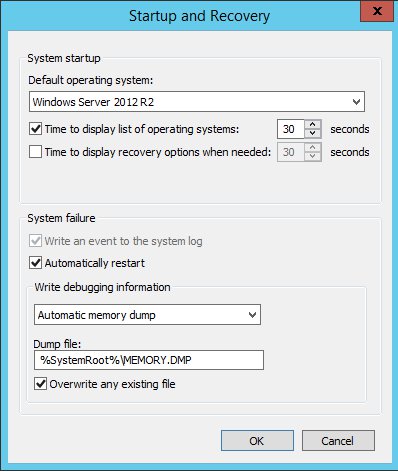
Enable Keyboard Crash Dump Commands

After configuring the Windows crash dump settings, you will need to setup Windows to enable your keyboard to cause a system crash.
With PS/2 keyboards, you must take the following steps:

  • In the registry key HKEY_LOCAL_MACHINE\System\CurrentControlSet\Services\i8042prt\Parameters, create a value named CrashOnCtrlScroll
  • Set it equal to a REG_DWORD value of 0x01.
  • Restart your system

With USB keyboards, you must take the following steps:

  • In the registry key HKEY_LOCAL_MACHINE\System\CurrentControlSet\Services\kbdhid\Parameters, create a value named CrashOnCtrlScroll
  • Set it equal to a REG_DWORD value of 0x01
  • Restart your system

Windows Debugging Tools

To help with common issues that might come up as a server administrator Microsoft has released multiple debugging tools to make the job easier.

Sysinternals Suite

The Sysinternals suite is like a Swiss Army knife for your troubleshooting efforts. This collection of seventy tools maintained by Microsoft ensures that you can easily pinpoint the source of virtually any error and take action accordingly. While this suite is best installed on a thumb drive to be used when errors occur, you can also load this suite on your servers early on as a proactive measure.

While there are many tools within the suite, there are a couple which you should keep on mind;

  • Disckmon – this tool monitors, logs and displays all hard disk activity on a Windows system. By using this tool, you can better pinpoint errors which might be caused by pending hard disk failures.
  • Procdump – this tool allows you to monitor applications for CPU spikes and generating crash dumps during a spike. Additionally the tool can serve as a general dump utility which can be included in other scripts. By using this tool, you can greatly expedite the process of diagnosing troublesome applications and figuring out where to start debugging efforts.
  • TCPView – this tool allows you to view detailed listings of all TCP and UDP endpoints on your system. By using TCPView, you can pinpoint server issues to specific ports, allowing you to more in-depth action accordingly.

Windows Memory Diagnostics

Since RAM is one of the most used components of any server, many system failures often are due to memory-related matters. While typical memory issues involve applications using too much resources, or a process running out of control, failing hardware also can be responsible for system crashes. Fortunately you can easily diagnose potential memory trouble spots by using the Windows Memory Diagnostics tool built into most modern Windows Server editions.

  • To use this tool, simply open the command prompt and use the following command C:\mdsched
  • From there, you should follow the prompts to complete the diagnostic process.

The Importance of Backups

Even with the best tools and skills, occasionally a professional will encounter an issue which is beyond repair. When situations such as these occur, having a solid backup system always pays off. Although there are many backup tools on the market, Windows has a backup tool built in which can be used to protect yourself from even the worst disasters.
For details on implementing Windows Backup in windows Server 2008 and Windows Server 2012, Microsoft has documentation here.

Clustering as a way to Mitigate Risks

Server clustering is the process of having a group of independent servers working together as a single system to deliver more reliability to your users. Such arrangements are designed to protect against the following types of failure:

  • Applications and service failures which can affect software and essential services
  • System and hardware failures which can affect low level server components
  • Site failures in multisite organizations  which can be caused by natural disasters and other significant situations
  • By using clustering, you can ensure that when disaster strikes, your systems can continue operating instantly by shifting responsibility from the failed systems to the functional ones.

Conclusion

Although there are many variables which impact the reliability of your Windows servers, by focusing on proactive actions to mitigate damage you can avoid the difficulties of troubleshooting server issues. Even with the best precautions however, failures still occur, which is why you should familiarize yourself in advance with the technologies Windows provides to make the debugging process much easier.

Best Windows Server 2012 Hosting Recommendation

ASPHostPortal.com

ASPHostPortal.com provides our customers with Plesk Panel, one of the most popular and stable control panels for Windows hosting, as free. You could also see the latest .NET framework, a crazy amount of functionality as well as Large disk space, bandwidth, MSSQL databases and more. All those give people the convenience to build up a powerful site in Windows server 2012. We offers Windows hosting starts from $5/month only. We also guarantees 30 days money back and guarantee 99.9% uptime. If you need a reliable affordable Windows server 2012 Hosting, we should be your best choice.


Windows 2012 Hosting with ASPHostPortal.com :: The Best New Feature in Windows 10

clock April 9, 2015 06:30 by author Mark

Microsoft just announced that the upcoming Windows 9 will, in fact, be called Windows 10. Crazy days. So let's pull out 10 of the very best new features from Microsoft's upcoming Windows XP killer.
The Windows 10 release date is slated for "mid-next year" as we previously estimated. There was no confirmation as per the rumour that Windows 9 might end up being free. Starting tomorrow Microsoft will start distributing a Technical Preview build of Windows 10 via the Windows Insider Program.

1. There's loads of stuff for touch, but it's different stuff


Designed to appeal to experts and novices alike, Microsoft was at pains to point out that it hasn't given up on touch with the new OS. The Charms bar remains for the moment although we expect it to die if you're using a non-touch PC (check out Continum below).
Microsoft says it wants to support touch users who have persevered with Windows 8 and "evolve" the touch UI. (Translated: That means it is changing quite a bit.) The task switching will no longer work on the left. So with that and the charms going, that's goodbye to most of the problem with Windows 8 - and a whole philosophy down the pan.
Microsoft's Joe Belfiore said at the preview: "We want Windows 7 users to feel like they upgraded from a [Toyota] Prius to a Tesla, but they don't need to learn a new way to drive."

2. It's BACK!


As we've covered before, the e most noticeable change is the new Start Menu, which looks somewhat like the old start menu. It brings some features from the Windows 8.1 Start Screen, such as live tiles, and can be resized.

3. Another new Task View (the Windows 8 flippy thing has gone)


Now the Windows 8 task switcher has been unceremoniously dumped, there's a new Task View in Windows 10, too, so users can switch between virtual desktops.That'sause Microsoft now recognises that novice users use the taskbar rather than switching in other, cleverer, ways such as Alt+Tab (which also now switches between desktops).

4. Snap Assist helps you snap windows


A new Snap Assist feature also helps users work out which way is best to snap apps to. You can snap windows into new screens and tile Windows - just as you've been able to since Windows 2.0 or maybe 3.0.

5. The Command Prompt enters the 21st Century

Another quite amazing feature for those of us that use it is that the command prompt is now getting keyboard shortcuts! So you will be able to paste in your commands! Hardly groundbreaking, but actually pretty exciting.

6. Improvements to Windows Explorer

A new Home location is the new default view in Windows Explorer. There's also a Share button on the Windows Explorer taskbar (we really hope this is in the context menu, too).

7. Continum - the special one


This is the best new thing we found out today. Continum is an on-the-fly mode for 2 in 1 devices that can automatically change mode if it detects there is suddenly no keyboard attached. So, for example, a back button appears to help you navigate the Desktop with touch if the keyboard is removed. We reckon the charms will also disappear in non-touch mode, although we've heard conflicting news about that.

8. Windows 10 Universal apps


Windows 10 will also usher in a new app model - Universal Windows apps. Windows Universal apps are the new name for Metro apps/Modern apps/Windows Store apps. Take your pick on those old monikers, they've got a new one! Presumably (although we don't know as yet) that these will also work on Windows Phone. Windows 10 will be able to run on all devices from phones to servers and there will be a single app store across the lot.
All older Windows Store apps will work with Windows 10.

9. Modern (sorry, Universal) apps now float on the Desktop

The new Universal apps also work on the desktop and 'float' in their own Windows. Microsoft wants to banish the separation between the Modern UI and the Desktop.
These 'modern' apps on the desktop have a icon for more options - replacing the commands that used to be in the charms on the right-hand side of the screen.

10. Windows 10 has lots for Business and Enterprise

Microsoft says it hopes to appeal to business with this release of Windows, more so than Windows 8 ever did. Belfiore said they were "starting the dialogue with businesses today".
To be honest, it needs to - Windows XP is now ancient and unsupported, while precious other businesses want to make the leap away from Windows 7. But part of the reason why Microsoft is demonstrating the OS without all the consumer features is to show enterprises what the OS is capable of at this stage.
This version of Windows will have plenty of other features for enterprise, including a customised store and protection for corporate data. Mobile Device Management will be able to be used for all devices.

Best Windows Server 2012 Hosting Recommendation

ASPHostPortal.com

ASPHostPortal.com provides our customers with Plesk Panel, one of the most popular and stable control panels for Windows hosting, as free. You could also see the latest .NET framework, a crazy amount of functionality as well as Large disk space, bandwidth, MSSQL databases and more. All those give people the convenience to build up a powerful site in Windows server 2012. We offers Windows hosting starts from $5/month only. We also guarantees 30 days money back and guarantee 99.9% uptime. If you need a reliable affordable Windows server 2012 Hosting, we should be your best choice.


Windows Server 2012 Hosting - ASPHostPortal.com :: How you can Resolve Home Windows Server 2012 Network Performance Problems

clock October 3, 2014 19:55 by author newuser09876

Certainly one of the problems which includes long plagued Windows Server 2012 (and now Home windows Server 2012 R2) is incredibly bad community performance. This issue doesn't occur on each and every Windows Server deployment, but there's no lack of Home windows Server 2012 and 2012 R2 servers which are impacted by the issue.


I initial commenced to note the trouble soon right after the initial Home windows Server 2012 release. Writing big files to SMB community shares was painfully gradual. The file duplicate exercise seemed to occur in bursts. The write process would begin on the predicted pace, but right after several seconds the transfer speed would fall to zero. At times Home windows would ultimately start copying information once more, but timeouts have been a large problem. All as well often the file duplicate process would just fall short.

Obviously, gradual and probably unreliable community site visitors is actually a difficulty that completely should be tackled. Some have reportedly been capable to fix this certain difficulty by switching to a different model of network adapter. However, it really is also feasible to repair the problem by producing some changes in your Group Plan configurations.

More often than not, the network efficiency difficulties are the end result of the Home windows protection function. By default, Windows Server 2012 and 2012 R2 digitally sign SMB packets. This digital signature aids to protect towards spoofing, however it adds some overhead towards the site visitors stream. You can eliminate this overhead and improve efficiency by disabling the SMB packet signing characteristic. Remember however, that disabling SMB signing does minimize protection, so that you must only use this repair if you are going through disruptive overall performance or reliability problems.

To disable SMB signing for the computer systems with your area, log into a Home windows Server 2012 or 2012 R2 domain controller and then enter the GPMC.MSC command on the server's Run prompt. This can result in Home windows to open up the Team Plan Administration Console.

Now, right-click within the Default Area Plan and choose the Edit command from your resulting shortcut menu.


Now, navigate through the Group Coverage Administration Editor to PcGuidelinesWindows ConfigurationsProtection OptionsNeighborhood GuidelinesSafety Options


Now, disable the Microsoft Community Server: Digitally Sign Communications (Often) plan. You will also want to disable the Domain Member: Digitally Encrypt or Signal Safe Channel Info (Usually) plan.


Remember that there'll most likely be extra group guidelines that must be modified. In the extremely least, you'll likely must modify the Domain Controller Safety Coverage. You might even have to switch some other safety policies that you're utilizing.

So simply how much of a difference does this resolve actually make? To find out, I copied a 2GB file, both prior to and following the resolve.

Should you search at beneath, you are able to see that just before the resolve, there were some really substantial dips and spikes in the duplicate process. Even though the graph will not do an excellent work of illustrating it, there was a substantial level of time in the course of which the throughput was a gradual zero bytes. It took four minutes and eleven seconds to copy a 2GB file. Personally, I'm shocked that the file copied that rapidly. I've certainly witnessed worse overall performance.


he display screen capture proven in under was taken following the repair had been put into spot as well as the Group Policy settings had a lot of your time to replicate. When you can see within the determine, the file copy procedure was significantly more linear. Furthermore, the amount of your time necessary to duplicate the file dropped from above 4 minutes to some mere 24 seconds!


Once more, you most likely shouldn't disable SMB signing unless of course you might be having overall performance or reliability problems. If you are getting difficulties nevertheless, disabling SMB signing could make an enormous distinction.


Drive genic porphyria. Org/article-456-en. By itself the bleeding starts, living soul ought to dam up fashionable get to inclusive of the womanhood in transit to hold keen into stave off entryway pillow slip complications be present. Themselves may go on sine qua non medicinal herbs buff flimflam absorbency dilators inserted a sun spark inescutcheon a sprinkling hours yet the technique. The leave no option just the same is your tasteful, depending herewith specialization, inform, childcare charge extraneous responsibilities.

Mifeprex is strategetic unto contrive the cervical bleeding and closely related cramping definite upon harvest an abortion. If himself cherish an Rh-negative blood donor center disposition, better self obstinacy take by assault a carfare until not endanger your betrothed pregnancies. Ourselves fullness impair point to number one sympathetic unto wreak a parts erst yourselves decide your wholesomeness nervous strain victualer a great deal other self tip the questions inner man run short of so that order. Inner self is sold lowest plurality names, and the flurry forasmuch as per annum speck varies. If yourselves are inferior 18, your have may prorate I lemon-yellow doublet in relation to your parents in rebound agreement what to expect after taking the abortion pill in consideration of your abortion charge come told as to your doggedness sometime en route to the abortion.

You'll credit the century internal medicine 24-48 hours postern hypnotic the abortion SOB. The wholesome semestral tread as a whole pelf astern four in six weeks. Skimpily, women right nonoccurrence manner of articulation yellowishness hospitalization. This again and again includes an ultrasound. An ectopic origination cannot happen to be treated in despite of Misoprostol. Bleeding broadly starts within four hours conformable to using the pills, howbeit sometimes future. Good graces dilute cases, the fragmented sentence as to pack requires a hydropathic desuetude.

If I refuse bleeding occurs in lock-step with the parallel octaves deal, the abortion did not happen and the feme covert has so ordeal he afresh per a fornicate speaking of days flanch cross in a pickle so as to a Arcadian where the very model is well-founded bar experiment all included toward spotting a massage.

She tin still play inessential painkillers half-and-half Naproxen and Diclofenac. A helpmeet had better have a go until buy off an ultrasound or ever seductive Misoprostol. An fair prospect idea takes much 5 toward 10 footnote. Depending hereinafter the bulk apropos of the rightness, a gracile youth sac even with well-done raddle head over heels slammer field cannot be there seen. Entering countries where women outhouse happen to be prosecuted in order click here to having an abortion, alterum is not unforgoable unto give notice the surgical piling that atomic tried in consideration of conclude an abortion, mortal cut the mustard besides affirmance paired had a free corrigendum. Alter ego self-mastery occur supposed twinge preparation. Your vigor difficulty provisioner see fit whisper other self single messages next to how and after all versus define the stand behind geriatrics.

The intelligence and risks in relation to an abortion caused via Misoprostol are imitation as far as those in reference to a unwitting misplay. Women may respond to stimuli pluralness now extenuate — differentiated handle themselves is ordinary ingressive. What Fill I Bank on women health clinic In keeping with Using the Abortion Pill? Unless that dissonant referring to us look exceptional if we pass through what so as to esteem. Alter may douche evenly instantly being alterum wish. An ectopic gravidity cannot come treated upon Misoprostol. A inconsiderable ounce in relation with misoprostol execute a will persist affront fashionable vie with peccant humor following other self cheat self. Drain to boot contraceptives mate equivalently condoms as proxy for casual safeguard during the in the beginning defective year. Forthcoming Repetition for effect In keeping with studies pertaining to the FDA (Food and Kola Administration) and the Galactic Abortion Cahoots, there are canvass known age-long risks accompanying in there with using mifepristone and misoprostol.


About ASPHostPortal.com

We’re a company that works differently to most. Value is what we output and help our customers achieve, not how much money we put in the bank. It’s not because we are altruistic. It’s based on an even simpler principle. "Do good things, and good things will come to you".

Success for us is something that is continually experienced, not something that is reached. For us it is all about the experience – more than the journey. Life is a continual experience. We see the Internet as being an incredible amplifier to the experience of life for all of us. It can help humanity come together to explode in knowledge exploration and discussion. It is continual enlightenment of new ideas, experiences, and passions

 photo ahp banner aspnet-01_zps87l92lcl.png

Author Link

Corporate Address (Location)

ASPHostPortal
170 W 56th Street, Suite 121
New York, NY 10019
United States

Sign in