
March 19, 2014 07:39 by
 Kenny
KennyASP.NET MVC 5 uses Bootstrap 3 as the CSS Framework in its default ASP.NET Web Application Tempate. This is a nice touch as most ASP.NET MVC developers have at least played with Bootstrap and are designing responsive websites. I'll mention the use of Bootstrap here briefly as there really isn't much to it.

When you create a new ASP.NET MVC 5 Web Application in Visual Studio 2013 it is using Bootstrap 3 as its default CSS Framework. You get the pleasure of the responsive navigation and website along with all the typography and other bells and whistles you expect from Bootstrap 3.

Inside the ASP.NET MVC 5 Website Template you will find the bootstrap.css and bootstrap.min.css stylesheets as well as the bootstrap.js and bootstrap.min.js scripts. The _Layout.cshtml view and other views are marked up appropriately using the CSS selectors in Bootstrap 3.
By default, the ASP.NET MVC Website Template uses a couple of bundles that use both Bootstrap 3 CSS as well as Modernizr. Check out the Layout.cshtml view to see the use of two of the bundles.
@Styles.Render("~/Content/css")
@Scripts.Render("~/bundles/modernizr")
You will find these bundles configured in the BundleConfig.cs file in App_Start.
bundles.Add(new ScriptBundle("~/bundles/modernizr").Include(
"~/Scripts/modernizr-*"));
bundles.Add(new StyleBundle("~/Content/css").Include(
"~/Content/bootstrap.css",
"~/Content/site.css"));
And, of course, the CSS selectors and markup in the new ASP.NET MVC 5 Views are based on Bootstrap 3.
This isn't a huge deal, but it's still nice to see ASP.NET MVC 5 using Bootstrap 3 by default. Certainly, you can remove it for Foundation, Skeleton, or other CSS and JavaScript Framework of your choice.
March 7, 2014 07:28 by
Diego
ASP.NET MVC 5 included with the recently released Visual Studio 2013 Developer Preview enables developers to apply authentication filters which provides an ability to authenticate users using various third party vendors or a custom authentication provider. However, these filters are applied prior to invoking of authorization filters. If you have used ASP.NET MVC before, you probably have used AuthorizationFilters. Authorization filters allow you to perform authorization tasks for an authenticated user. A good example is Role based authorization. When you authenticate a user, you are verifying the identity of a user. If you need to verify a user in an MVC application it is probably because you are building an application that restricts access to specific users. This is completely separate from authorization, which is determining whether a specific person is allowed to do certain action.

In this article i would like to explain how to use the new Authentication Filters included in the ASP.NET MVC 5 preview.
Here i am explaining about.
- Create New Project. Open Visual Studio 2010 >> New Project >> Select ASP.NET MVC5 Web Application and Click Ok, Then select MVC for the ASP.NET project type.
- In order to create an Authentication filter, you must implement the IAuthenticationFilter. Below is the implementation of ASP.NET MVC’s IAuthenticationFilter.
public class BasicAuthAttribute: ActionFilterAttribute, IAuthenticationFilter.
- Create the OnAuthenticationChallenge method accepts AuthenticationChallengeContext argument and its implentation looks like as shown below :
public void OnAuthenticationChallenge(AuthenticationChallengeContext filterContext)
{
var user = filterContext.HttpContext.User;
if (user == null || !user.Identity.IsAuthenticated)
{
filterContext.Result = new HttpUnauthorizedResult();
}
}
- write this code for BasicAuthAttribute implementation:
using System.Web.Mvc;
using System.Web.Mvc.Filters;
namespace VSMMvc5AuthFilterDemo.CustomAttributes{
public class BasicAuthAttribute : ActionFilterAttribute, IAuthenticationFilter{
public void OnAuthentication(AuthenticationContext filterContext){}
public void OnAuthenticationChallenge(AuthenticationChallengeContext filterContext){
var user = filterContext.HttpContext.User;
if (user == null || !user.Identity.IsAuthenticated)
{
filterContext.Result = new HttpUnauthorizedResult();
}
}
}
}
If you look at the above CustomAuthenticationAttribute, there are two interesting methods required to implement.
- OnAuthentication. This method creates an AuthenticationContext using the original principal, and executes each filter’s OnAuthentication method.
- OnAuthenticationChallenge. This method runs after the OnAuthentication method. You can use OnAuthenticationChallenge method to perform additional tasks on the request.
Note : The key thing to remember is that OnAuthenticationChallenge does not necessarily run before every other Action Filter. It can run at various stages.
The new IAuthenticationFilter provides a great ability to customize authentication within an ASP.NET MVC 5 application. This provides a clear separation between authentication and authorization filters. OnAuthentication and OnAuthenticationChallenge methods provide greater extensibility points to customize authentication within ASP.NET MVC framework.
- The BasicAuthAttribute class can be easily tested by applying it to the HomeController class by opening the file and adding the following line of code :
using VSMMvc5AuthFilterDemo.CustomAttributes;
- Here we execute the CustomAuthenticationAttribute only for HomeController’s class as shown below :
BasicAuthAttribute]
public class HomeController : Controller
- The last, when you run the application, you should now be automatically redirected to:
The login page.
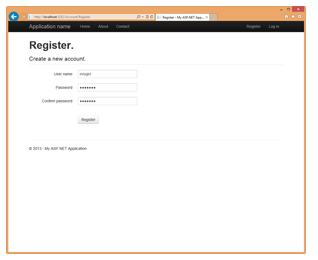
Register Page.
Once your user is registered, you'll be automatically redirected to the homepage.
If you looking for windows web hosting services who support ASP.Net MVC 5 please visit our Site ASPHostPortal.com
January 28, 2014 07:57 by
BenASPHostPortal.com officially launches ASP.NET MVC 5.1 hosting at affordable prices. Instant Setup, Fast and Friendly Support!
ASPHostPortal.com, a leading innovator in Windows Hosting, announces the launch of ASP.NET MVC 5.1 Hosting. The ASP.NET MVC 5.1 Framework is the latest evolution of Microsoft’s ASP.NET web platform. It provides a high-productivity programming model that promotes cleaner code architecture, test-driven development, and powerful extensibility, combined with all the benefits of ASP.NET.

ASP.NET MVC 5.1 contains a number of advances over previous versions, including the ability to define routes using C# attributes and the ability to override filters,Enum support in Views, Support for current Context in Unobtrusive Ajax, Filter Overrides and etc. The user experience of building MVC applications has also been substantially improved.
“Our customers have been asking us about MVC 5.1 and we are happy to deliver a hosting platform that supports all the latest in the Microsoft Web Stack.” said said Dean Thomas, Manager at ASPHostPortal.com. "And it proves that we remain at the forefront in Microsoft technology".
Where to look for the best ASP.NET MVC 5.1 hosting service? How to know more about the different types of hosting services? Read more about it on http://www.asphostportal.com.
About ASPHostPortal.com:
ASPHostPortal.com is a hosting company that best support in Windows and ASP.NET-based hosting. Services include shared hosting, reseller hosting, and sharepoint hosting, with specialty in ASP.NET, SQL Server, and architecting highly scalable solutions. As a leading small to mid-sized business web hosting provider, ASPHostPortal.com strive to offer the most technologically advanced hosting solutions available to all customers across the world. Security, reliability, and performance are at the core of hosting operations to ensure each site and/or application hosted is highly secured and performs at optimum level.