One of the new features of ASP.NET MVC 3 is a controller-level attribute to control the availability of session state. In the RC the attribute, which lives in the System.Web.SessionState namespace, is [ControllerSessionState];.
The Setup
I started with an empty MVC 3 project and the Razor view engine. We'll let a view model figure out what's going on with our controller's Session:
public class SessionModel
{
public SessionModel(Controller controller, bool delaySession = false)
{
SessionID = delaySession ? "delayed" : GetSessionId(controller.Session);
Controller = controller.GetType().Name;
}
public string SessionID { get; private set; }
public string Controller { get; private set; }
private static string GetSessionId(HttpSessionStateBase session)
{
try
{
return session == null ? "null" : session.SessionID;
}
catch (Exception ex)
{
return "Error: " + ex.Message;
}
}
}
The model is rendered by two shared views. Index.cshtml gives us some simple navigation and renders actions from our various test controllers:
@model SessionStateTest.Models.SessionModel
@{
View.Title = Model.Controller;
Layout = "~/Views/Shared/_Layout.cshtml";
}
<h2>Host: @Model.Controller (@Model.SessionID)</h2>
<ul>
<li>@Html.ActionLink("No Attribute", "Index", "Home")</li>
<li>@Html.ActionLink("Exception", "Index", "Exception")</li>
<li>@Html.ActionLink("Default", "Index", "DefaultSession")</li>
<li>@Html.ActionLink("Disabled", "Index", "DisabledSession")</li>
<li>@Html.ActionLink("ReadOnly", "Index", "ReadOnlySession")</li>
<li>@Html.ActionLink("Required", "Index", "RequiredSession")</li>
</ul>
@{
Html.RenderAction("Partial", "Home");
Html.RenderAction("Partial", "Exception");
Html.RenderAction("Partial", "DefaultSession");
Html.RenderAction("Partial", "DisabledSession");
Html.RenderAction("Partial", "ReadOnlySession");
Html.RenderAction("Partial", "RequiredSession");
}
Partial.cshtml just dumps the model:
@model SessionStateTest.Models.SessionModel
<div>Partial: @Model.Controller (@Model.SessionID)</div>
Finally, we need a few test controllers which will all inherit from a simple HomeController:
public class HomeController : Controller
{
public virtual ActionResult Index()
{
return View(new SessionModel(this));
}
public ActionResult Partial()
{
return View(new SessionModel(this));
}
}
[ControllerSessionState(SessionStateBehavior.Default)]
public class DefaultSessionController : HomeController { }
[ControllerSessionState(SessionStateBehavior.Disabled)]
public class DisabledSessionController : HomeController { }
[ControllerSessionState(SessionStateBehavior.ReadOnly)]
public class ReadOnlySessionController : HomeController { }
[ControllerSessionState(SessionStateBehavior.Required)]
public class RequiredSessionController : HomeController { }
And finally, a controller that uses the SessionModel constructor's optional delaySession parameter. This parameter allows us to test RenderAction's Session behavior if the host controller doesn't use Session:
public class ExceptionController : HomeController
{
public override ActionResult Index()
{
return View(new SessionModel(this, true));
}
}
The Reveal
So what do we find? Well the short answer is that the host controller's SessionStateBehavior takes precedence. In the case of Home, Default, ReadOnly, and Required, we have access to Session information in all rendered actions:

If the host controller is marked with SessionStateBehavior.Disabled, all the rendered actions see Session as null:
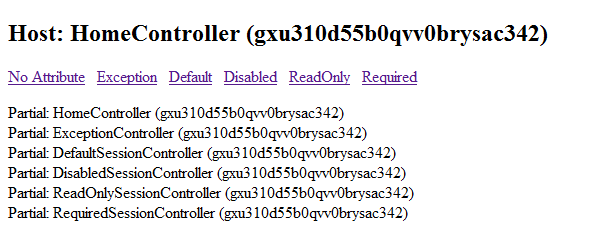
I see this is the key finding to remember: an action that depends on Session, even if its controller is marked with SessionStateBehavior.Required, will be in for a nasty NullRef surprise if it's rendered by controller without. It would be nice if the framework either gave some sort of warning about this, or if they used a Null Object pattern instead of just letting Session return null.
Finally, things get really weird if a Session-dependent action is rendered from a host controller that doesn't reference Session, even if SessionState is enabled:
It's pretty clear the issue has something to do with where RenderAction() happens in the request lifecycle, but it's unclear how to resolve it short of accessing Session in the host controller.
So there we have it...a comprehensive testing of sessionless controllers and RenderAction for the ASP.NET MVC 3 Release Candidate. Hopefully the inconsistencies of the latter two cases will be resolved or at least documented before RTM.
Reasons why you must trust ASPHostPortal.com
Every provider will tell you how they treat their support, uptime, expertise, guarantees, etc., are. Take a close look. What they’re really offering you is nothing close to what ASPHostPortal does. You will be treated with respect and provided the courtesy and service you would expect from a world-class web hosting business.
You’ll have highly trained, skilled professional technical support people ready, willing, and wanting to help you 24 hours a day. Your web hosting account servers are monitored from three monitoring points, with two alert points, every minute, 24 hours a day, 7 days a week, 365 days a year. The followings are the list of other added- benefits you can find when hosting with us:
- DELL Hardware
Dell hardware is engineered to keep critical enterprise applications running around the clock with clustered solutions fully tested and certified by Dell and other leading operating system and application providers.
- Recovery Systems
Recovery becomes easy and seamless with our fully managed backup services. We monitor your server to ensure your data is properly backed up and recoverable so when the time comes, you can easily repair or recover your data.
- Control Panel
We provide one of the most comprehensive customer control panels available. Providing maximum control and ease of use, our Control Panel serves as the central management point for your ASPHostPortal account. You’ll use a flexible, powerful hosting control panel that will give you direct control over your web hosting account. Our control panel and systems configuration is fully automated and this means your settings are configured automatically and instantly.
- Excellent Expertise in Technology
The reason we can provide you with a great amount of power, flexibility, and simplicity at such a discounted price is due to incredible efficiencies within our business. We have not just been providing hosting for many clients for years, we have also been researching, developing, and innovating every aspect of our operations, systems, procedures, strategy, management, and teams. Our operations are based on a continual improvement program where we review thousands of systems, operational and management metrics in real-time, to fine-tune every aspect of our operation and activities. We continually train and retrain all people in our teams. We provide all people in our teams with the time, space, and inspiration to research, understand, and explore the Internet in search of greater knowledge. We do this while providing you with the best hosting services for the lowest possible price.
- Data Center
ASPHostPortal modular Tier-3 data center was specifically designed to be a world-class web hosting facility totally dedicated to uncompromised performance and security
- Monitoring Services
From the moment your server is connected to our network it is monitored for connectivity, disk, memory and CPU utilization – as well as hardware failures. Our engineers are alerted to potential issues before they become critical.
- Network
ASPHostPortal has architected its network like no other hosting company. Every facet of our network infrastructure scales to gigabit speeds with no single point of failure.
- Security
Network security and the security of your server are ASPHostPortal’s top priorities. Our security team is constantly monitoring the entire network for unusual or suspicious behavior so that when it is detected we can address the issue before our network or your server is affected.
- Support Services
Engineers staff our data center 24 hours a day, 7 days a week, 365 days a year to manage the network infrastructure and oversee top-of-the-line servers that host our clients’ critical sites and services.