Windows 2012 Hosting - MVC 6 and SQL 2014 BLOG

Tutorial and Articles about Windows Hosting, SQL Hosting, MVC Hosting, and Silverlight Hosting

ASP.NET 4 Hosting - with ASPHostPortal.com :: Retrieving Image From SQL via Image Path in ASP.NET

clock March 13, 2014 12:04 by author Diego

In this article, we will explore how to store images in the database with the help of FileUpload Control and also how to display those images in asp.net GridView Control. For the purpose of this article I have created a table in SQL Server called Images, with three columns, Image Name, Image Type and the Image itself. Now let’s take a look at the form we are going to use, to upload images to this table.
The concept behind this technique is to store the images on disk in a folder that resides in the WebSite root directory while the relative path of the images along with filename is stored in SQL Server database.

Let us start off by first creating a sample database and adding a table that will store the image path. The figure below describes the table structure.
set the ID field to auto increment using the identity property.

Next I’ll add a FileUpload and Button to the aspx page.
<div>
    <asp:FileUpload ID="FileUpload1" runat="server"/>
    <asp:Button ID="btnUpload" runat="server" Text="Upload"
        OnClick="btnUpload_Click" />

</div>

Adding a folder called "images" in my website root directory.
Adding a connection string key to the web.config which will be used to connect to the SQL server Database.
<connectionStrings>
  <add name="conString"

     connectionString="Data Source=.\SQLEXPRESS;database=GridDB;
       Integrated Security=true"/>
</connectionStrings >

Upload and Storing the Image Files. The snippet below gets executed when the upload button is clicked. It gets the uploaded image filename and saves the image in images folder. And then inserts the image file path into the database.protected void btnUpload_Click(object sender, EventArgs e){
    if (FileUpload1.PostedFile != null)

    {

        string FileName = Path.GetFileName(FileUpload1.PostedFile.FileName); 

        //Save files to disk

        FileUpload1.SaveAs(Server.MapPath("images/" +  FileName));

        //Add Entry to DataBase

        String strConnString = System.Configuration.ConfigurationManager

            .ConnectionStrings["conString"].ConnectionString;

        SqlConnection con = new SqlConnection(strConnString);

        string strQuery = "insert into tblFiles (FileName, FilePath)" +

            " values(@FileName, @FilePath)";

        SqlCommand cmd = new SqlCommand(strQuery);

        cmd.Parameters.AddWithValue("@FileName", FileName);

        cmd.Parameters.AddWithValue("@FilePath", "images/" + FileName); 

        cmd.CommandType = CommandType.Text;

        cmd.Connection = con;

        try

        {

            con.Open();

            cmd.ExecuteNonQuery();

        }

        catch (Exception ex)

        {

            Response.Write(ex.Message);

        }

        finally

        {

            con.Close();

            con.Dispose();

        }

    }

}

Display Images. Now the next job is to display the images in GridView control. As you can see the below GridView, I have added 2 Bound Fields which displays ID and File Name and a Image Field which displays the image based on the image path that comes from the database.
<div>
<br />

    <asp:GridView ID="GridView1" runat="server" AutoGenerateColumns = "false"

       Font-Names = "Arial" >

    <Columns>

       <asp:BoundField DataField = "ID" HeaderText = "ID" />

       <asp:BoundField DataField = "FileName" HeaderText = "Image Name" />

       <asp:ImageField DataImageUrlField="FilePath" ControlStyle-Width="100"

        ControlStyle-Height = "100" HeaderText = "Preview Image"/>

    </Columns>

    </asp:GridView>

</div>

The snippet below is used to display the images in the GridView control. As you will notice I am firing a simple select query and the returned datatable is then bind to the GridView Control.

protected void Page_Load(object sender, EventArgs e)
{

    DataTable dt = new DataTable();

    String strConnString = System.Configuration.ConfigurationManager.

        ConnectionStrings["conString"].ConnectionString;

    string strQuery = "select * from tblFiles order by ID";

    SqlCommand cmd = new SqlCommand(strQuery);

    SqlConnection con =  new SqlConnection(strConnString);

    SqlDataAdapter sda = new SqlDataAdapter();

    cmd.CommandType = CommandType.Text;

    cmd.Connection = con;

    try

    {

        con.Open();

        sda.SelectCommand = cmd;

        sda.Fill(dt);

        GridView1.DataSource = dt;

        GridView1.DataBind(); 

    }

    catch (Exception ex)

    {

        Response.Write(ex.Message);

    }

    finally

    {

        con.Close();

        sda.Dispose();

        con.Dispose();

    }

}

The GridView with images is shown in the figure below.

I hope you will enjoy reading this article you should have learned how to Retrieve images using a file path stored in database in ASP.Net that you can use in your own code. Stay tuned and stay connected for more technical updates with ASPHostPortal.


Cheap ASP.Net MVC 5 Hosting - with ASPHostPortal.com :: Creating a new custom Authentication Filter with ASP.NET MVC 5

clock March 7, 2014 07:28 by author Diego

ASP.NET MVC 5 included with the recently released Visual Studio 2013 Developer Preview enables developers to apply authentication filters which provides an ability to authenticate users using various third party vendors or a custom authentication provider. However, these filters are applied prior to invoking of authorization filters. If you have used ASP.NET MVC before, you probably have used AuthorizationFilters. Authorization filters allow you to perform authorization tasks for an authenticated user. A good example is Role based authorization. When you authenticate a user, you are verifying the identity of a user. If you need to verify a user in an MVC application it is  probably because you are building an application that restricts access to specific users. This is completely separate from authorization, which is determining whether a specific person is allowed to do certain action.

In this article i would like to explain how to use the new Authentication Filters included in the ASP.NET MVC 5 preview.
Here i am explaining about.

  • Create New Project. Open Visual Studio 2010 >> New Project >> Select ASP.NET MVC5 Web Application and Click Ok, Then select MVC for the ASP.NET project type.

  • In order to create an Authentication filter, you must implement the IAuthenticationFilter. Below is the implementation of ASP.NET MVC’s IAuthenticationFilter.
    public class BasicAuthAttribute: ActionFilterAttribute, IAuthenticationFilter.

  • Create the OnAuthenticationChallenge method accepts AuthenticationChallengeContext argument and its implentation looks like as shown below :
    public void OnAuthenticationChallenge(AuthenticationChallengeContext filterContext)
    {

    var user = filterContext.HttpContext.User;

    if (user == null || !user.Identity.IsAuthenticated)

    {

    filterContext.Result = new HttpUnauthorizedResult();

    }

    }

  • write this code for BasicAuthAttribute implementation:
    using System.Web.Mvc;
    using System.Web.Mvc.Filters;

    namespace VSMMvc5AuthFilterDemo.CustomAttributes
    {
    public class BasicAuthAttribute : ActionFilterAttribute, IAuthenticationFilter
    {

    public void OnAuthentication(AuthenticationContext filterContext)
    {}
    public void OnAuthenticationChallenge(AuthenticationChallengeContext filterContext)
    {
    var user = filterContext.HttpContext.User;

            if (user == null || !user.Identity.IsAuthenticated)
            {
                filterContext.Result = new HttpUnauthorizedResult();
            }
        }
    }
}

If you look at the above CustomAuthenticationAttribute, there are two interesting methods required to implement.

  1. OnAuthentication. This method creates an AuthenticationContext using the original principal, and executes each filter’s OnAuthentication method.
  2. OnAuthenticationChallenge. This method runs after the OnAuthentication method. You can use OnAuthenticationChallenge method to perform additional tasks on the request.
    Note : The key thing to remember is that OnAuthenticationChallenge does not necessarily run before every other Action Filter. It can run at various stages.

The new IAuthenticationFilter provides a great ability to customize authentication within an ASP.NET MVC 5 application. This provides a clear separation between authentication and authorization filters. OnAuthentication and OnAuthenticationChallenge methods provide greater extensibility points to customize authentication within ASP.NET MVC framework.

  • The BasicAuthAttribute class can be easily tested by applying it to the HomeController class by opening the file and adding the following line of code :
    using VSMMvc5AuthFilterDemo.CustomAttributes;

  • Here we execute the CustomAuthenticationAttribute only for HomeController’s class as shown below :
    BasicAuthAttribute]
    public class HomeController : Controller

  • The last, when you run the application, you should now be automatically redirected to:

The login page.

Register Page.

Once your user is registered, you'll be automatically redirected to the homepage.

If you looking for windows web hosting services who support ASP.Net MVC 5 please visit our Site ASPHostPortal.com


ASPHostPortal Web Hosting - Great Improvements from SQL Server 2005 until SQL Server 2014

clock March 4, 2014 10:20 by author Diego

Many New Features have been provided with the New SQL Server 2014. Microsoft SQL Server 2014 brings to market, new in-memory capabilities built into the core database, and provides new cloud capabilities to simplify cloud adoption for your SQL databases and help you unlock new hybrid scenarios. In this Blog I had provided these features in the way of difference between the older and New version of SQl Server.


New features or changes to existing features in Microsoft SQL Server 2014.

  • Memory-optimized Tables.  will help you quickly analyze your tables and walks you through reviewing and migrating disk-based table to In-Memory OLTP tables.
  • SQL Server Backup to URL
  • Encryption for Backups
  • New Design for Cardinality Estimation
  • Delayed Durability
  • AlwaysOn Enhancements
  • Business Intelligence Enhancement

The older version 2005, 2008 and 2012

  • SQL Server AlwaysOn. A high availability solution that increases application availability while also lowering total cost of ownership and making it easier to use.
  • Contained Databases, which intends to reduce or eliminate the dependencies that a database has on the SQL Server instance, making it easier to migrate a database to a new instance with less of the work involved in reproducing and validating these dependencies.
  • Web Development and Business Intelligence Enhancements. While business intelligence features were upgraded in SQL Server 2008 R2, Microsoft really improved Excel PowerPivot by adding more drill and KPI through.
  • ColumnStore Indexes. What a ColumnStore index does is essentially turn a traditional index on its side.
  • SQL 2008 also allows you to disable lock escalation on specific tables.
  • Transparent Database Encryption.  The ability to encrypt an entire database without having to change any code in your application adding an additional layer to your data security.
  • Intellisense in SQL Server Management Studio. Interactive help as you type giving object names and syntax support similar to Visual Studio.
  • In SQL 2005, even with the ROWLOCK hint on delete statements locks can be escalated which can lead to deadlocks. In my testing, an application which I have developed had concurrency issues during small table manipulation due to lock escalation on SQL 2005. In SQL 2008 this problem went away.

The new features are really great and its meets the very important factors of current age. For .Net people it's always be a boon to use SQL Server, I hope using the latest version we will have better security and better performance as well as the introduction of compression the size of the database. The backup encryption utility is also phenomenon.
Once again thanks to Microsoft for their great thoughts in form of software.


SQL 2012 Hosting with ASPHostPortal.com :: How to Make Connection String in C# with SQL Server 2012

clock March 3, 2014 10:17 by author Diego

How to I create database with C#? And how to I set Connection String in C# with SQL Server 2012 ? . In this article I will explain how to write connection strings. I have one web application that contains many pages and each page contains relationship with database connection to get data from database and display it on page because of that I need to write database connections for each page to interact with database. Now the server name or credentials of database server has changed in that situation it will create problem because we need to modify the database connections of each page using asp.net.

Two Type of SqlConnection String First for sql file and Second for sql server you have to almost use 2nd type. Passing IP address of Database server , database name , User id & password.

write the following code in code behind :

Standard Connection

using System.Data.SqlClient;
SqlConnection conn = new SqlDbConnection();

Server name or ip address is come there , Initial Catalog for Database name;UserName for user id and secret for password // is sql user id and password by defaul sql user is 'UserName' and password you should be set it

conn.ConnectionString ="Data Source=ServerName; Initial Catalog=DataBaseName; User id=UserName; Password=Secret;";
conn.Open();

Or u can try this one for Trusted Connection :

conn.ConnectionString ="Data Source=ServerName; Initial Catalog=DataBaseName; User id=UserName; Password=Secret;";conn.Open();using System.Data.SqlClient;SqlConnection conn = new SqlConnection();conn.ConnectionString = "Data Source=ServerName; Initial Catalog=DataBaseName; Integrated Security=SSPI;";
conn.Open();


SQL 2014 Hosting with ASPHostPortal.com :: How to Get Data in Textbox from SQL 2014 Database in ASP.NET

clock February 19, 2014 11:42 by author Kenny

Learning SQL can be very rewarding. Once you have a basic understanding of SQL, you can start to develop more advanced websites, and you can (hopefully) charge more money for doing so!
Now, we will give you tutorial about how to get data from Database and that Database can be fetched as Label text or textbox text:

Basically, there are six step for this tutorial:

1. Design View


2. Source View

3. Code Behind

Here I've using Student database

4. Output After Debugging Before Giving Input Data:

5. Student Database 

6. Output 


IIS 8.5 Hosting with ASPHostPortal.com :: How to Install IIS 8.5 on Windows Server 2012 R2

clock February 12, 2014 06:01 by author Ben

In this blog I will run the steps to install Internet Information Services (IIS Version 8.5) on Windows Server 2012 R2. IIS 8.5 will be released with the Windows Server 2012 R2 product. With IIS 8.5, the IIS team continued its focus on scalability and manageability improvements.

1.  Open Server Manager by clicking the Server Manager icon on the desktop, next to Start icon.


2.  In the Server Manager window, with the Dashboard selected, click the Manage menu, and then click Add Roles and Features - click Next.

3. Select Role-Based o feature-based installation and Next


4. Select a server from the server pool and Next.

5. On the Select server roles, select Web Server (IIS) role. Click Next.


6. On the Add features that are required for Web Server (IIS), select Include management tools (if application). Click Add Features then click Next.
7. On the Select role services, select all the components depending on your requirement. Click Next.

8. On the Confirm installation selections, check Restart the destination server automatically if required. Click Yes to confirm automatic restart. Click Install.
9. On the Installation progress screen, click Close once the installation is completed. It can be closed before installation is completed and it would not interrupt the installation.
10. To confirm if the installation is successful or not, open Internet Explorer and type http://localhost, hit Enter. Default IIS page will be displayed. It is a confirmation that IIS
is successfully installed.

US Affordable IIS 8.5 Hosting with ASPHostPortal.com :
"ASPHostPortal.com is proud to be one of the first ASP.NET Hosting providers to offer IIS 8.5 Hosting on our most improved Windows 2012 R2 hosting platform. It makes easy to use the most current version of websites tools like Visual Studio and WebMatrix. With our IIS 8.5 Hosting will increase your website security and reliability. We also allow Full Trust on our IIS 8.5 Hosting."


ASPHostPortal.com Proudly Launches IIS 8.5 Hosting

clock February 10, 2014 09:30 by author Ben

ASPHostPortal.com proudly launches the support of IIS 8.5 on all their newest Windows Server 2012 R2 environment. ASPHostPortal.com IIS 8.5 Hosting plan starts from just as low as $1.00/month only.

ASPHostPortal.com,a leading web hosting provider and ASP.NET specialist, today launched the latest update of the Microsoft IIS technology. The IIS 8.5,  introduces many new features including several that focus on premium media experiences and business application development for faster loading websites, business services and applications regardless of an organisations requirements.


IIS 8.5 will be released with the Windows Server 2012 R2 product. With IIS 8.5, the IIS team continued its focus on scalability and manageability improvements.  IIS 8.5 adds sophisticated features like Dynamic Website Activation, Enhanced Logging and Logging to Event Tracing for Windows in IIS .8.5.

Another wonderful feature of IIS 8.5  is Suspended AppPools. This new feature allows applications hosted on IIS 8.5 to be suspended instead of being terminated, so when the site is shutdown because of the idle timeout, instead of completely killing the worker process, all the state is saved into disk.

“Our customers have been asking us about IIS 8.5 and we are happy to deliver a hosting platform that supports all the latest in the Microsoft Web Stack. With the launched of IIS 8.5 hosting services, we hope that developers and our existing clients can try this new features.” said Dean Thomas, Manager at ASPHostPortal.com.

Where to look for the best IIS 8.5 hosting service? How to know more about the different types of hosting services? Read more about it on http://www.asphostportal.com.

As a leading hosting provider, ASPHostPortal.com offers a comprehensive range of services including domain name registrations, servers, online backup solutions and dedicated web hosting. ASPHostPortal.com is well placed to deliver a high quality service.

About ASPHostPortal.com:

ASPHostPortal.com is a hosting company that best support in Windows and ASP.NET-based hosting. Services include shared hosting, reseller hosting, and sharepoint hosting, with specialty in ASP.NET, SQL Server, and architecting highly scalable solutions. As a leading small to mid-sized business web hosting provider, ASPHostPortal.com strive to offer the most technologically advanced hosting solutions available to all customers across the world. Security, reliability, and performance are at the core of hosting operations to ensure each site and/or application hosted is highly secured and performs at optimum level.


Windows Server 2012 R2 Hosting :: Top Features of Windows Server 2012 R2 Hosting with ASPHostPortal.com

clock February 7, 2014 12:15 by author Ben

Microsoft was release of the new Windows Server 2012 R2. This latest Server has been produced with great enthusiasm by Microsoft, giving their users the highest quality product to date. The much anticipated release of the Windows R2 Sever will enable users to create their very own secure, private and hybrid infrastructure.


Windows Server 2012 R2 brings a host of new features that greatly enhance the functionality of the operating system. Many of these improvements expand on existing capabilities of Windows Server 2012.  Here out 5 new features elsewhere in Windows Server 2012 R2 that will make an impact on your day-to-day operations,such as :

Storage Pinning - Closely related to Storage Tiering is the ability to pin selected files to a specific tier. Pinning makes it possible to ensure that files you always want on the fastest storage, such as boot disks in a Virtual Desktop Infrastructure deployment, will never be moved to the slower storage tier.

Write Back Cache - When you create a new storage volume in Windows Server 2012 R2, you also have the option to enable something called the Write Back Cache. This feature sets aside an amount of physical storage, typically on a fast SSD, to use as a write cache to help smooth out the ups and downs of I/O during write-intensive operations.

Work Folders - Install this role on a Windows Server 2012 R2 system, and you get a fully functional, secure file replication service.

Workplace Join - Windows Server 2012 R2 addresses the need to incorporate personal devices like iPads into the enterprise environment. At the simplest level is a new Web Application Proxy that allows you to provide secure access to internal corporate websites, including SharePoint sites, to any authorized user.

Windows Server Essentials role - The Windows Server Essentials role in Windows Server 2012 R2 brings with it a number of other features -- including BranchCache, DFS Namespaces, and Remote Server Administration Tools -- that are typically implemented in remote office settings.


Professional Windows Server 2012 R2 Hosting with ASPHostPortal.com

ASPHostPortal.com is focused on providing the best value in innovative Microsoft Windows hosting for Microsoft/ASP.NET developers. We work hard to be an early adopter of new Microsoft technology. Our team is proud to be one of the first hosts to launch the latest Windows 2012 R2 Hosting with IIS 8.5! The Windows 2012 R2 Hosting platform is ideal for developers that want to be on the cutting edge of new technology. On this new platform, we support the latest .NET Framework - ASP.NET 4.5.1. Try our FREE Trial Hosting with risk free, including a free automated installation in Windows Server 2012 R2 , to get you up and running quickly.


Windows 2008 R2 Hosting :: Fix Blank RDP Screen on Windows Container

clock February 4, 2014 06:07 by author Ben

Windows Server 2008 R2 is the most advanced Windows Server operating system yet, designed to power the next generation of networks, applications, and Web services. Use the links below to learn more about Windows Server 2008 R2. Windows Server 2008 R2 builds on the award-winning foundation of Windows Server 2008, expanding existing technology and adding new features to enable IT professionals to increase the reliability and flexibility of their server infrastructures. New virtualization tools, Web resources, management enhancements, and exciting Windows 7 integration help save time, reduce costs, and provide a platform for a dynamic and efficiently managed data center.

Here is the tips to fix blank RDP screen on Windows Cointainer :
Description:
While logging into Administrator account through RDP on a server after a reboot, a blank screen or recycled svchost.exe property page is shown. Rebooting the server does not resolve the issue.

Cause:
This problem is caused by corruption of the Administrator account profile.

Solution:
On the hardware node run the following command from command prompt, in order to enter the container.

vzctl enter <Container_ID>

(Conatiner_ID can be obtained by running the vzlist –a command.)

Now you will get the C:\Windows\system32> prompt in the terminal, indicating that you have entered the container. In the C:\Windows\system32> prompt run the following commands, in order to create another account and make it a member of Administrators group on the container.

net user <username> <password> /add

net localgroup administrators <username> /add

Now RDP into the affected container, using this new username and password.

After you successfully login into the container, make sure from task manager that Administrator account is not logged into the container. If Administrator account is still logged into the container, then log off Administrator from Task Manager, running with elevated privilege.

Then copy all important files from C:\Users\Administrator folder to another folder for safekeeping and delete the C:\Users\Administrator folder.

Next login into the Administrator account. This account will use a temporary profile path due to absence of C:\Users\Administrator folder. Now create the C:\Users\Administrator folder again.

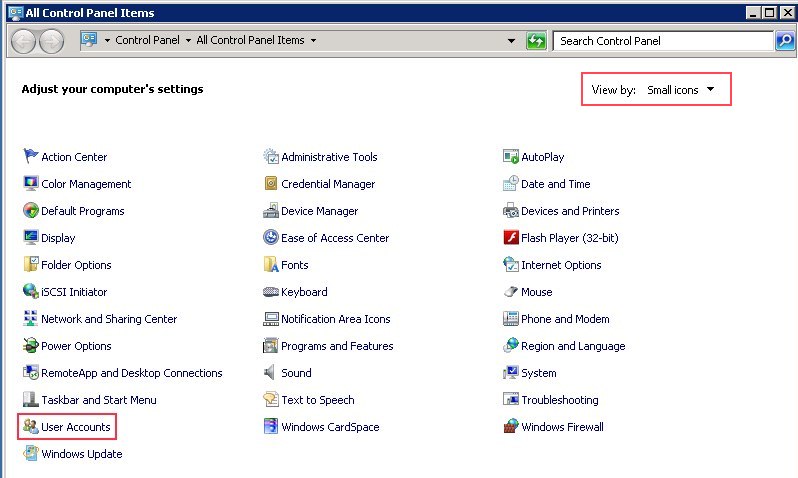
Then go to the windows Control Panel. Inside control panel select Small Icon view and click the User Accounts icon or link.


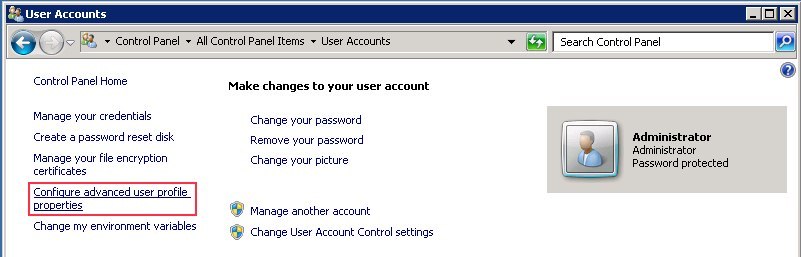
Inside User Accounts click on the Configure advanced user profile properties link on the left panel. It will popup User Profiles dialog.


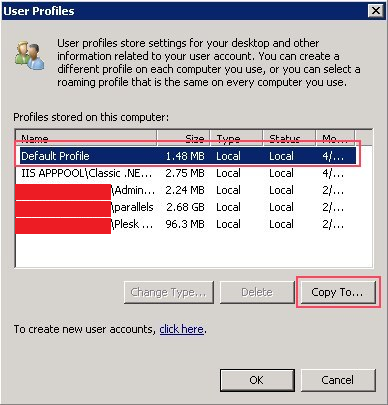
Inside User Profiles dialog, select the Default Profile and then click Copy To button. It will pop up the Copy To dialog.


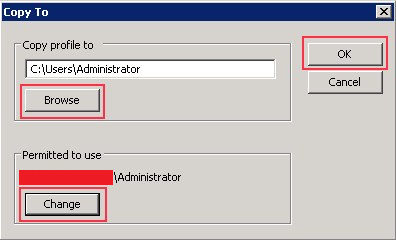
In Copy profile to section, browse and select the path C:\Users\Administrator and in Permitted to use section click change and select the Administrator user. Then click Ok.


Now the Confirm Copy message box will pop up with the message – “C:\Users\Administrator already exists. The current contents of this directory or this file will be deleted during this operation. Are you sure you want to continue?”. Click Ok to confirm.

Now logoff from Administrator account and login again. Now the account will use the permanent profile path C:\Users\Administrator and everything should be fine.

About ASPHostPortal.com:
ASPHostPortal.com is a hosting company that best support in Windows and ASP.NET-based hosting. Services include shared hosting, reseller hosting, and sharepoint hosting, with specialty in ASP.NET, SQL Server, and architecting highly scalable solutions. As a leading small to mid-sized business web hosting provider, ASPHostPortal strive to offer the most technologically advanced hosting solutions available to all customers across the world. Security, reliability, and performance are at the core of hosting operations to ensure each site and/or application hosted is highly secured and performs at optimum level.


Press Release - ASPHostPortal.com Proudly Launches osCommerce 3.0.2 Hosting

clock January 30, 2014 10:10 by author Mike

ASPHostPortal.com is a premiere web hosting company that specializes in Windows and ASP.NET-based hosting with innovative technology  solutions, proudly announced the best osCommerce 3.0.2 hosting service with a combination of affordable price, high customer  satisfaction rate and commendable quality in all ASP.NET and Windows web hosting plans.

osCommerce 3.0.2 are made to showcase the new features being worked on and to generalize a version specific for testing to help fix  and improve subsequent alpha releases for a final, stable, secure, and production ready 3.0.2 releases. The osCommerce solution offers  great flexibility and empowers even amateur webmasters to develop highly competitive ecommerce websites.

Until recently, the cost involved in hiring a web development company to develop a similar ecommerce web site was prohibiting several  small businesses from selling on-line. The osCommerce solution is one of the best fruits of the open source community and which poses  a serious challenge to other similar commercial software products.


Installation for this software can be performed easily from within the web hosting control panel, even by customers with poor  programming experience. The installation process takes up to a minute to perform, thus enabling customers to deploy an entire  ecommerce storefront for their business within a few clicks of the mouse.

ASPHostPortal.com
is the among the few top web hosting company that tested and offer ASP.NET hosting plan that compliance with  osCommerce 3.0.2 hosting. There are several companies out there that offer e-Commerce hosting plan but at ASPHostPortal.com, we provide quality e-Commerce  hosting plan at affordable prices that will not only keep your operating costs low but also help you to maximize your profits.

ASPHostPortal.com
development teams have fully tested and deployed the latest osCommerce 3.0.2 in hosting control panel systems.  Clients can install and use osCommerce 3.0.2 hosting with few clicks of installation steps. For more information about this topics or  have any enquiries related to osCommerce hosting, please visit http://www.asphostportal.com/osCommerce-Hosting.

About the Company
ASPHostPortal.com is a hosting company that best support in Windows and ASP.NET-based hosting. Services include shared hosting,  reseller hosting, and sharepoint hosting, with specialty in ASP.NET, SQL Server, and architecting highly scalable solutions. As a  leading small to mid-sized business web hosting provider, ASPHostPortal.com strive to offer the most technologically advanced hosting  solutions available to all customers across the world. Security, reliability, and performance are at the core of hosting operations to  ensure each site and/or application hosted is highly secured and performs at optimum level.


About ASPHostPortal.com

We’re a company that works differently to most. Value is what we output and help our customers achieve, not how much money we put in the bank. It’s not because we are altruistic. It’s based on an even simpler principle. "Do good things, and good things will come to you".

Success for us is something that is continually experienced, not something that is reached. For us it is all about the experience – more than the journey. Life is a continual experience. We see the Internet as being an incredible amplifier to the experience of life for all of us. It can help humanity come together to explode in knowledge exploration and discussion. It is continual enlightenment of new ideas, experiences, and passions

 photo ahp banner aspnet-01_zps87l92lcl.png

Author Link

Corporate Address (Location)

ASPHostPortal
170 W 56th Street, Suite 121
New York, NY 10019
United States

Sign in