Windows 2012 Hosting - MVC 6 and SQL 2014 BLOG

Tutorial and Articles about Windows Hosting, SQL Hosting, MVC Hosting, and Silverlight Hosting

Windows Server 2012 R2 Hosting :: Top Features of Windows Server 2012 R2 Hosting with ASPHostPortal.com

clock February 7, 2014 12:15 by author Ben

Microsoft was release of the new Windows Server 2012 R2. This latest Server has been produced with great enthusiasm by Microsoft, giving their users the highest quality product to date. The much anticipated release of the Windows R2 Sever will enable users to create their very own secure, private and hybrid infrastructure.


Windows Server 2012 R2 brings a host of new features that greatly enhance the functionality of the operating system. Many of these improvements expand on existing capabilities of Windows Server 2012.  Here out 5 new features elsewhere in Windows Server 2012 R2 that will make an impact on your day-to-day operations,such as :

Storage Pinning - Closely related to Storage Tiering is the ability to pin selected files to a specific tier. Pinning makes it possible to ensure that files you always want on the fastest storage, such as boot disks in a Virtual Desktop Infrastructure deployment, will never be moved to the slower storage tier.

Write Back Cache - When you create a new storage volume in Windows Server 2012 R2, you also have the option to enable something called the Write Back Cache. This feature sets aside an amount of physical storage, typically on a fast SSD, to use as a write cache to help smooth out the ups and downs of I/O during write-intensive operations.

Work Folders - Install this role on a Windows Server 2012 R2 system, and you get a fully functional, secure file replication service.

Workplace Join - Windows Server 2012 R2 addresses the need to incorporate personal devices like iPads into the enterprise environment. At the simplest level is a new Web Application Proxy that allows you to provide secure access to internal corporate websites, including SharePoint sites, to any authorized user.

Windows Server Essentials role - The Windows Server Essentials role in Windows Server 2012 R2 brings with it a number of other features -- including BranchCache, DFS Namespaces, and Remote Server Administration Tools -- that are typically implemented in remote office settings.


Professional Windows Server 2012 R2 Hosting with ASPHostPortal.com

ASPHostPortal.com is focused on providing the best value in innovative Microsoft Windows hosting for Microsoft/ASP.NET developers. We work hard to be an early adopter of new Microsoft technology. Our team is proud to be one of the first hosts to launch the latest Windows 2012 R2 Hosting with IIS 8.5! The Windows 2012 R2 Hosting platform is ideal for developers that want to be on the cutting edge of new technology. On this new platform, we support the latest .NET Framework - ASP.NET 4.5.1. Try our FREE Trial Hosting with risk free, including a free automated installation in Windows Server 2012 R2 , to get you up and running quickly.


Windows 2008 R2 Hosting :: Fix Blank RDP Screen on Windows Container

clock February 4, 2014 06:07 by author Ben

Windows Server 2008 R2 is the most advanced Windows Server operating system yet, designed to power the next generation of networks, applications, and Web services. Use the links below to learn more about Windows Server 2008 R2. Windows Server 2008 R2 builds on the award-winning foundation of Windows Server 2008, expanding existing technology and adding new features to enable IT professionals to increase the reliability and flexibility of their server infrastructures. New virtualization tools, Web resources, management enhancements, and exciting Windows 7 integration help save time, reduce costs, and provide a platform for a dynamic and efficiently managed data center.

Here is the tips to fix blank RDP screen on Windows Cointainer :
Description:
While logging into Administrator account through RDP on a server after a reboot, a blank screen or recycled svchost.exe property page is shown. Rebooting the server does not resolve the issue.

Cause:
This problem is caused by corruption of the Administrator account profile.

Solution:
On the hardware node run the following command from command prompt, in order to enter the container.

vzctl enter <Container_ID>

(Conatiner_ID can be obtained by running the vzlist –a command.)

Now you will get the C:\Windows\system32> prompt in the terminal, indicating that you have entered the container. In the C:\Windows\system32> prompt run the following commands, in order to create another account and make it a member of Administrators group on the container.

net user <username> <password> /add

net localgroup administrators <username> /add

Now RDP into the affected container, using this new username and password.

After you successfully login into the container, make sure from task manager that Administrator account is not logged into the container. If Administrator account is still logged into the container, then log off Administrator from Task Manager, running with elevated privilege.

Then copy all important files from C:\Users\Administrator folder to another folder for safekeeping and delete the C:\Users\Administrator folder.

Next login into the Administrator account. This account will use a temporary profile path due to absence of C:\Users\Administrator folder. Now create the C:\Users\Administrator folder again.

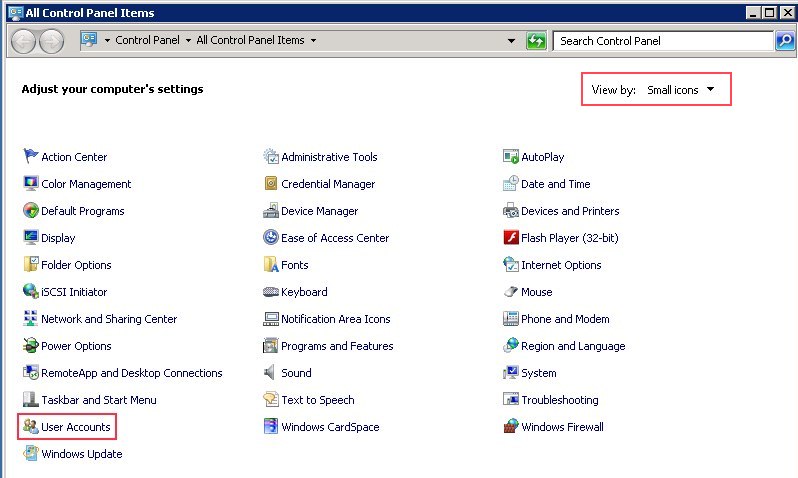
Then go to the windows Control Panel. Inside control panel select Small Icon view and click the User Accounts icon or link.


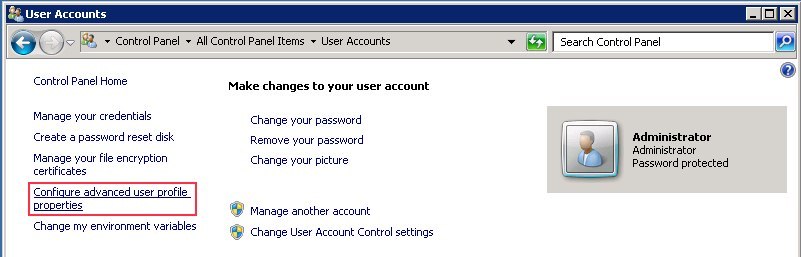
Inside User Accounts click on the Configure advanced user profile properties link on the left panel. It will popup User Profiles dialog.


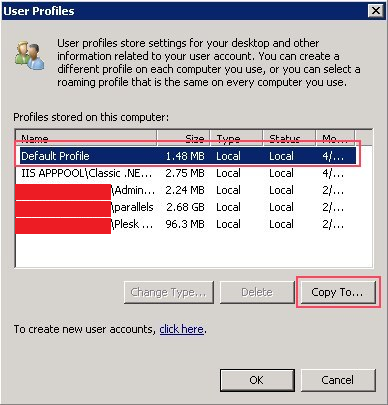
Inside User Profiles dialog, select the Default Profile and then click Copy To button. It will pop up the Copy To dialog.


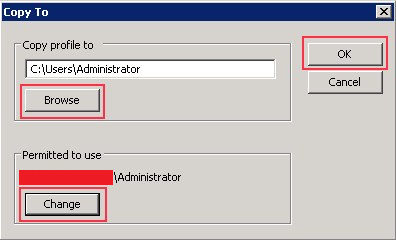
In Copy profile to section, browse and select the path C:\Users\Administrator and in Permitted to use section click change and select the Administrator user. Then click Ok.


Now the Confirm Copy message box will pop up with the message – “C:\Users\Administrator already exists. The current contents of this directory or this file will be deleted during this operation. Are you sure you want to continue?”. Click Ok to confirm.

Now logoff from Administrator account and login again. Now the account will use the permanent profile path C:\Users\Administrator and everything should be fine.

About ASPHostPortal.com:
ASPHostPortal.com is a hosting company that best support in Windows and ASP.NET-based hosting. Services include shared hosting, reseller hosting, and sharepoint hosting, with specialty in ASP.NET, SQL Server, and architecting highly scalable solutions. As a leading small to mid-sized business web hosting provider, ASPHostPortal strive to offer the most technologically advanced hosting solutions available to all customers across the world. Security, reliability, and performance are at the core of hosting operations to ensure each site and/or application hosted is highly secured and performs at optimum level.


ASP.NET MVC 5.1 Hosting :: ASPHostPortal.com Proudly Launches ASP.NET MVC 5.1 Hosting

clock January 28, 2014 07:57 by author Ben

ASPHostPortal.com officially launches ASP.NET MVC 5.1  hosting at affordable prices. Instant Setup, Fast and Friendly Support!

ASPHostPortal.com, a leading innovator in Windows Hosting, announces the launch of ASP.NET MVC 5.1 Hosting. The ASP.NET MVC 5.1 Framework is the latest evolution of Microsoft’s ASP.NET web platform. It provides a high-productivity programming model that promotes cleaner code architecture, test-driven development, and powerful extensibility, combined with all the benefits of ASP.NET.

ASP.NET MVC 5.1 contains a number of advances over previous versions, including the ability to define routes using C# attributes and the ability to override filters,Enum support in Views, Support for current Context in Unobtrusive Ajax, Filter Overrides and etc. The user experience of building MVC applications has also been substantially improved.

“Our customers have been asking us about MVC 5.1 and we are happy to deliver a hosting platform that supports all the latest in the Microsoft Web Stack.” said said Dean Thomas, Manager at ASPHostPortal.com.  "And it proves that we remain at the forefront in Microsoft technology".

Where to look for the best ASP.NET MVC 5.1 hosting service? How to know more about the different types of hosting services? Read more about it on http://www.asphostportal.com.


About ASPHostPortal.com:

ASPHostPortal.com is a hosting company that best support in Windows and ASP.NET-based hosting. Services include shared hosting, reseller hosting, and sharepoint hosting, with specialty in ASP.NET, SQL Server, and architecting highly scalable solutions. As a leading small to mid-sized business web hosting provider, ASPHostPortal.com strive to offer the most technologically advanced hosting solutions available to all customers across the world. Security, reliability, and performance are at the core of hosting operations to ensure each site and/or application hosted is highly secured and performs at optimum level.


Free SQL Server Hosting :: How to Handle Error : 1326 Cannot connect to Database Server Error: 40 – Could not open a connection to SQL Server

clock January 21, 2014 05:19 by author Ben

If you are receiving following error:

TITLE: Connect to Server
Cannot connect to Database Server.
ADDITIONAL INFORMATION:
An error has occurred while establishing a connection to the server.  When connecting to SQL Server 2008, this failure may be caused by the fact that under the default settings SQL Server does not allow remote connections. (provider: Named Pipes Provider, error: 40 – Could not open a connection to SQL Server) (Microsoft SQL Server, Error: 1326)


Now if
SQL Server can be connected perfectly from local system but can not be connected from remote system, in that case firewall of the server where SQL Server is installed can be issue.

Follow instructions of this article to fix the issue.

Go to control panel >> Firewall Settings >> Add SQL Server’s Port to Exception List.


Click Add Port and fill this :


Now try to connect to SQL Server again. It will allow you to connect to server successfully.

About the Company
ASPHostPortal.com is a hosting company that best support in Windows and ASP.NET-based hosting. Services  include shared hosting, reseller hosting, and sharepoint hosting, with specialty in ASP.NET, SQL Server,  and architecting highly scalable solutions. As a leading small to mid-sized business web hosting  provider, ASPHostPortal.com strive to offer the most technologically advanced hosting solutions available to  all customers across the world.
Come to the website to know more details.


.NET 4.5.1 Hosting - ASPHostPortal.com :: Confirmation Before Deleting Data in ASP.NET Application

clock January 13, 2014 05:31 by author Ben

It is always great idea to ask before delete e.g. sometimes by mistake you can press the delete button that can delete important records from your website so its always suggested that there should be confirmation to delete before deletion of any record.

Allowing a user to delete a row from a database table using a Datagrid is handy, but dangerous if you just delete immediately upon pressing a button. A better way is to pop up a dialog asking the user to confirm his or her desire to delete the record. To do this requires a little javascript, as well as a change in the usual way of placing a delete button (linkbutton or pushbutton) in the datagrid. Following the Visual Studio .NET way, a ButtonColumn gets added to the datagrid. The ButtonColumn, however, has no ID property and we need one in order to associate the javascript function with the button. We can get around this by adding a template column with a button rather than adding a ButtonColumn.

We add the template column as shown below in the file, ConfirmDelDG.aspx. There are several things to take note of in the .aspx file. We'll take them in order of appearance. First, between the <head>...</head> tags is our javascript function named confirm_delete. This simply pops up a confirmation dialog asking the user if he is sure he wants to delete the record. If OK is clicked, the delete happens. If Cancel is clicked, nothing happens.

<%@ Page Language="vb" Src="ConfirmDelDG.aspx.vb" Inherits="ConfirmDelDG" AutoEventWireup="false" %>
 <html>
 <head>
 <title>ConfirmDelDG</title>
 <meta name="GENERATOR" content="Microsoft Visual Studio .NET 4.5.1">
 <meta name="CODE_LANGUAGE" content="Visual Basic .NET 4.5.1">
 <meta name=vs_defaultClientScript content="JavaScript">
 <meta name=vs_targetSchema content="">
 <script language="javascript">
 function confirm_delete()
 {
   if (confirm("Are you sure you want to delete this item?")==true)
     return true;
   else
     return false;
 }
 </script>
 </head>
 <body>
 <form method="post" runat="server" ID="Form1"><br><br>
 <asp:DataGrid id="dtgProducts" runat="server"
               CellPadding="6" AutoGenerateColumns="False"
               OnDeleteCommand="Delete_Row" BorderColor="#999999"
               BorderStyle="None" BorderWidth="1px"
               BackColor="White" GridLines="Vertical">
   <AlternatingItemStyle BackColor="#DCDCDC" />
   <ItemStyle ForeColor="Black" BackColor="#EEEEEE" />
   <HeaderStyle Font-Bold="True" ForeColor="White" BackColor="#000084" />
   <Columns>
     <asp:BoundColumn Visible="False" DataField="ProductID" ReadOnly="True" />
     <asp:BoundColumn DataField="ProductName" ReadOnly="True" HeaderText="Name" />
     <asp:BoundColumn DataField="UnitPrice" HeaderText="Price" DataFormatString="{0:c}"
                      ItemStyle-HorizontalAlign="Right" />
     <asp:TemplateColumn>
     <ItemTemplate>
     <asp:Button id="btnDelete" runat="server" Text="Delete" CommandName="Delete" />
     </ItemTemplate>
     </asp:TemplateColumn>
   </Columns>
 </asp:DataGrid>
 </form>
 </body>
 </html>


And now for the codebehind file ConfirmDelDG.aspx.vb. We will take a look at it in several sections for ease of discussion and hopefully easier reading. This first section just contains the usual declarations, the Page_Load subroutine and a BindTheGrid subroutine which creates a DataSet and binds the grid. Nothing out of the ordinary here.

 Imports System.Data
 Imports System.Data.SqlClient
 Imports System.Configuration
 Imports System.Web.UI.WebControls
 
 Public Class ConfirmDelDG
   Inherits System.Web.UI.Page
 
   Protected WithEvents dtgProducts As System.Web.UI.WebControls.DataGrid
   Private strConnection As String = ConfigurationSettings.AppSettings("NorthwindConnection")
   Private strSql As String = "SELECT ProductID, ProductName, UnitPrice " _
                            & "FROM Products WHERE CategoryID = 1"
   Private objConn As SqlConnection
 
   Private Sub Page_Load(ByVal Sender As System.Object, ByVal E As System.EventArgs) Handles MyBase.Load
     If Not IsPostBack Then
       BindTheGrid()
     End If
   End Sub
 
   Private Sub BindTheGrid()
     Connect()
     Dim adapter As New SqlDataAdapter(strSql, objConn)
     Dim ds As New DataSet()
     adapter.Fill(ds, "Products")
     Disconnect()
 
     dtgProducts.DataSource = ds.Tables("Products")
     dtgProducts.DataBind()
   End Sub

The next subroutine, dtgProducts_ItemDataBound, is the secret to making our confirmation dialog work. We must add an OnClick event handler to each delete button on the datagrid. We can make use of ItemDataBound to do this. We dimension a variable ("btn") as type Button. We then check that ItemType is type Item or type AlternatingItem. We then use the FindControl method to find a control of type Button with an ID of "btnDelete" (the ID we gave the delete button on the aspx page). Having an ID such as "btnDelete" is why we had to use a TemplateColumn rather than a ButtonColumn which has no ID property. Once we find the button, we use Attributes.Add to call our javascript routine confirm_delete().

Private Sub dtgProducts_ItemDataBound (ByVal sender As System.Object, _
     ByVal e As DataGridItemEventArgs) Handles dtgProducts.ItemDataBound
     Dim btn As Button
     If e.Item.ItemType = ListItemType.Item or e.Item.ItemType = ListItemType.AlternatingItem Then
       btn = CType(e.Item.Cells(0).FindControl("btnDelete"), Button)
       btn.Attributes.Add("onclick", "return confirm_delete();")
     End If
   End Sub


This last section, Delete_Row(), is where the row is actually deleted. The method presented here is out of the ordinary for me in that I usually use SQL to delete the record. The technique presented here, however, first marks the row as deleted in the Dataset, and then, in a commented out section, uses the update method to actually delete the row from the database table. Because this is being run from my hosting provider's Northwind database I cannot actually delete rows from the Products table. If you run the example program you may notice seemingly odd behaviour. If you delete a row, it will seem to be deleted (it will disappear from the grid). But if you then delete another row, it will disappear, but the first row you deleted will reappear. This is normal behavior since I am not really deleting the rows from the database, only from the dataset. If you uncomment out the lines where noted, the deletes will actually occur in the database also.

Public Sub Delete_Row(ByVal Sender As Object, ByVal E As DataGridCommandEventArgs)
     ' Retrieve the ID of the product to be deleted
     Dim ProductID As system.Int32 = System.Convert.ToInt32(E.Item.Cells(0).Text)
     dtgProducts.EditItemIndex = -1
     ' Create and load a DataSet
     Connect()
     Dim adapter As New SqlDataAdapter(strSql, objConn)
     Dim ds As New DataSet()
     adapter.Fill(ds, "Products")
     Disconnect()
     ' Mark the product as Deleted in the DataSet
     Dim tbl As DataTable = ds.Tables("Products")
     tbl.PrimaryKey = New DataColumn() _
                     { _
                       tbl.Columns("ProductID") _
                     }
     Dim row As DataRow = tbl.Rows.Find(ProductID)
     row.Delete()
     ' Reconnect the DataSet and delete the row from the database
     '-----------------------------------------------------------
     ' Following section commented out for demonstration purposes
     'Dim cb As New SqlCommandBuilder(adapter)
     'Connect()
     'adapter.Update(ds, "Products")
     'Disconnect()
     '-----------------------------------------------------------
     ' Display remaining rows in the DataGrid
     dtgProducts.DataSource = ds.Tables("Products")
     dtgProducts.DataBind()
   End Sub
 End Class

That's about Confirmation Before Deleting Data in ASP.NET Application. For more information please visit ASPHostPortal.com.


Enterprise Email Hosting :: ASPHostPortal.com Launches Reliable and Scalable Enterprise Email Hosting

clock December 17, 2013 05:13 by author Ben

ASPHostPortal.com, a leading Windows web hosting provider, proudly announces Enterprise Email Hosting for all costumer. With Enterprise Email Hosting Services from ASPHostPortal.com, you’ll find the perfect hosted email solution for your small business. These professional tools and features enable you to access and manage your email and communicate and collaborate from your desktop or mobile devices anywhere in the world.

Enterprise Email Hosting uses the Internet to communicate information about promotions, company offerings, product updates and more. It is a valuable dialogue between a prospective or current customer and a company. Enterprise Email Hosting is more cost effective, and achieves results faster than traditional direct mail marketing. Most importantly, This service is twice as effective as traditional direct mail in getting a response from the targeted audience.

ASPHostPortal.com offer Enterprise Email hosting with the following features:

  • 2 GB Mailbox Space
  • Support Blackberry
  • WebMail Access
  • POP/SMTP/IMAP
  • Total Bulk Email up to 10.000 emails/month

"An  enterprise email hosting account costs $8.00 per month and gives you 10 mailbox that you can access using your smartphone especially Blackberry, Webmail and POP3 Email programs like Outlook.  Once it is ordered it is available to use immediately."said Dean Thomas, Manager at ASPHostPortal.com.

Web hosting is gaining huge amount of popularity because of its several benefits. The most popular hosting of all is Email hosting. A good email hosting has the ability to protect all the important emails.

Where to look for the best email hosting service? How to know more about the different types of hosting services? Read more about it on http://www.asphostportal.com.


About ASPHostPortal.com:

ASPHostPortal.com is a hosting company that best support in Windows and ASP.NET-based hosting. Services include shared hosting, reseller hosting, and sharepoint hosting, with specialty in ASP.NET, SQL Server, and architecting highly scalable solutions. As a leading small to mid-sized business web hosting provider, ASPHostPortal.com strive to offer the most technologically advanced hosting solutions available to all customers across the world. Security, reliability, and performance are at the core of hosting operations to ensure each site and/or application hosted is highly secured and performs at optimum level.


Free, Best and Reliable Entity Framework 6 Hosting with ASPHostPortal.com

clock December 10, 2013 06:57 by author Ben

Entity Framework is actively developed by the Entity Framework team which is assigned to the Microsoft Open Tech Hub and in collaboration with a community of open source developers. Together we are dedicated to creating the best possible data access experience for .NET developers.
The Entity Framework version 6 Release Candidate is now available to developers for immediate download. The open source object-relational mapper is designed to enable .NET developers to work with relational data using domain-specific objects. Entity Framework allows programmers to create a model by writing code or using boxes and lines in the EF Designer. Both of these approaches can be used to target an existing database or create a new database.


There are The Top features of Entity Framework 6 :

  • Connection Resiliency - enables automatic recovery from transient connection failures.
  • Async Query and Save - dds support for the task-based asynchronous patterns that were introduced in .NET 4.5. With .NET 4.5 Microsoft introduced async and await keywords but in EF 5 Microsoft didn't have time to add support for async query and save but now with EF6 it is supported.
  • Code-Based Configuration - gives you the option of performing configuration - that was traditionally performed in a config file - in code.
  • Dependency Resolution - introduces support for the Service Locator pattern and we’ve factored out some pieces of functionality that can be replaced with custom implementations.
  • Interception/SQL logging - provides low-level building blocks for interception of EF operations with simple SQL logging built on top.
  • Testability improvements - make it easier to create test doubles for DbContext and DbSet.
  • Features that come for free - These are capabilities that are part of the core. You don’t even have to know they’re there to benefit from them, much less learn any new coding. This group includes features such as performance gains brought by a rewritten view-generation engine and query compilation modifications, stability granted by the ability of DbContext to use an already open connection, and a changed database setting for SQL Server databases created by Entity Framework.
  • DbContext can now be created with a DbConnection that is already opened - which enables scenarios where it would be helpful if the connection could be open when creating the context (such as sharing a connection between components where you can not guarantee the state of the connection).


Top Reasons To Choose Entity Framework 6 Hosting

  • Fast and Secure Server - Our powerfull servers are especially optimized and ensure the best Entity Framework 6 performance. We have best data centers on three continent, unique account isolation for security, and 24/7 proactive uptime monitoring.
  • Best and Friendly Support - Our support team is extremely fast and can help you with setting up and using Entity Framework 6 on your account. Our customer support will help you 24 hours a day, 7 days a week and 365 days a year.
  • Dedicated Application Pool - With us, your site will be hosted using isolated application pool in order to meet maximum security standard and reliability.
  • Uptime & Support Guarantees - We are so confident in our hosting services we will not only provide you with a 30 days money back guarantee, but also we give you a 99.9% uptime guarantee.
  • World Class Control Panel - We use World Class Plesk Control Panel that support one-click installation.

So, you'll get the best, cheap and reliable Entity Framework 6 hosting with us. Why wait longer?


Free Windows Server 2012 Hosting - ASPHostPortal.com :: New Powershell v3 with Windows Server 2012

clock December 7, 2013 06:25 by author Ben

PowerShell v3.0 is the version included with Server 2012. A great place for PowerShell newbies to get started is with PowerShell's IntelliSense. This feature will help you learn and create the proper PowerShell. As you type in a PowerShell command, you'll see a list of possible syntaxes to go with the command.


For example, you may want to install a feature through PowerShell, but are unsure of the proper syntax or exact feature name. Features can be installed through PowerShell with the command instaW-windowsfeature-name. If you go into the Windows PowВ­erShell ISE (integrated scripting engine) and start typing Install . You'll see a dropВ­down menu of all the possible commands that can be used with Install (image 1).

Image 1 - PowerShell IIntelliSense

Image 1 - that you also have a list of modules to scroll through to find the available cmdlets in PowerShell. PowerShell in Server 2012 provides command-line management , and with IntelliSense, also teaches you how to use correct PowerShell syntax at the same time.

WHile there are numerous new capabilities in PowerShell, another significant new feaВ­ture that many of you will want to get acquainted with is Windows PowerShell  Web Access. This feature allows you to manage remote machines using PowerShell through a web browser.


To set up this feature, follow these steps:

1. From Server Manager 's dashboard, click "Add roles and features." Click Next and select "Role-based or feature-based installation." Click Next. Select the server for installation. Click Next again. In the "Select server roles" window, click Features from the left-side menu. Scroll through the features until you see "Windows PowВ­erShell (Installed)." Expand this feature, and Windows PowerShell Web Access  is listed.


2. Select Windows PowerShell Web Access and click Add Features. Click Next three times and then click Install.

3. To automatically configure Windows PowerShell Web Access to use default settings, run Install-PswaWebApplication as an administrator in PowerShell.
After installation, you will see IIS listed in the Server Manager dashboard. The next step in setting up PowerShell Web Access is to configure IIS. In this example, you'll set up PowerShell Web Access in an IIS subfolder:


a. From Server Manager, click Tools and then IIS Manager. Now you need to create an application pool, which is done by expanding the IIS server name, right-clicking on Application Pools, and then selecting Add Application Pools.

b. Name the PowerShell Web Access application pool and click OK.


c. Right-click the Sites Folder under Default Web Site in the left hand IIS Manager pane. Select Add Application.

d. Enter an alias for the application and browse to select the application pool created in PowerShell Web Access. Also enter the physical path to PowerShell Web Access, which is file:///c:windowswebpowershellwebaccesswwwroot"C:WindowsWebPowerShellWebAccesswwwroot Configure and check authentication by using the "Connect as" and "Test settings" buttons. Click OK.

You can remotely use PowerShell Web Access through a browser by entering the name of the computer PowerShell Web Access is installed on and the name of the PowerShell Web Access Application as a URL in a browser.

SO, for this example, the machine name is DC1 and the PowerShell Web Access Application name is PSWA. After entering the URL http://dc1/pswa > Http://DC1/PSWA , We get the logon screen shown.


IIS Hosting - ASPHostPortal.com :: Trick Setting up Connection String with IIS Manager

clock November 27, 2013 05:27 by author Ben

The IIS Manager is the graphical user interface of IIS, Microsoft's web server. In this article I will give you a step by step guide on how to set up the connection string with IIS Manager.

1. Open IIS Manager and connect to your site. You can start it from the command prompt or Start menu.
Command prompt

  1. On your desktop, click Start > Run.
  2. Type inetmgr and click OK.

Start menu
On your desktop, click Start > Programs or All Programs > Administrative Tools > Internet Information Services (IIS) Manager.

2. Once connected, click on Connection Strings:


3. Click on Add to configure a new connection string:


4. First, add the connection string name. Make sure it is the same connection string that you use in your ASP application. Then add the server’s name and also the name of the database:
connection 45. Before saving, we have to set up the credentials to connect to your database. Set Credentials to ‘Specify Credentials‘ and then click on ‘Set…‘


6. Enter the username and password of the database that your application will be using and click ok:


7. Check that the information is correct and click on ‘Ok‘:


8. And that’s it! Your Connection String has been configured!


For more info please visit ASPHostPortal.com - Best Cheap and Reliable Windows ASP.NET Hosting


Windows Server 2012 Hosting - ASPHostPortal.com :: Import IP Address with IPAM into Windows Server 2012

clock November 21, 2013 07:17 by author Ben

IPAM leverages an intuitive point- and-click web interface to allow you to Easily investigate the IP address space issues . By scanning the network , IPAM maintains a dynamic list of IP addresses and Allows engineers to plan for network growth , Ensure IP space usage meets corporate standards , and reduce IP conflicts .

IPAM is an entirely new feature in Windows Server 2012 that provides highly customizable administrative and monitoring capabilities for the IP address on a corporate network infrastructure or IPAM is the new framework for finding , monitoring and managing it on a network .

IPAM is a feature of Windows Server 2012 and must be installed as such , either by using the Add Roles and Features Wizard or through PowerShell 3.0 and poorly documented in my opinion , making a useful feature harder to use and understand than it should be .

Even without formal organization IPAM applications keep track of their IP address information somehow - most typically in spreadsheets . IPAM lets you view IP address availability and configuration from a database perspective , enabling you to use your addresses more efficiently . IPAM features such as IP reconciliation and automation can Eliminate the need to use spreadsheets for tracking addresses .

IPAM is performed on a Microsoft network by an installable feature of Windows Server 2012 that you run on a domain member server to " watch and centrally manage " the other servers on your network that are actually doing the work . IPAM manages the functionality of the following Windows servers :

  • DHCP Service
  • DNS Server
  • Network Policy Server ( NPS )
  • Active Directory Domain Controller ( DC )


To do import IPAM , IPAM log on to your server and open Server Manager :

  • Click IPAM in far left pane of Server Manager .
  • In the IPAM client , select IP Address Blocks under IP ADDRESS SPACE , and the make sure that Current view is set to IP Addresses in the drop - down menu .
  • If you look along the top window , you will see the IP address listed along the top fields , such as IP Address and IP Address State . You can add or remove fields by right-clicking on one of the existing fields .


If you want to import and Assignment Type yhis information , you need to add these fields to the first line of your import file , without spaces , as shown below :

IPAddress , IPAddressState , AssignmentType , ManagedByService , ServiceInstance , AssetTag

10.160.50.12 , In - Use , Static , IPAM , localhost , BR12

10.160.50.13 , In - Use , Static , IPAM , localhost , BR13

10.160.50.14 , In - Use , Static , IPAM , localhost , BR14

10.160.50.15 , In - Use , Static , IPAM , localhost , BR15

Alternatively , you can keep the spaces in the field names and enclose with quotation marks , for example , " IP Address" and " IP Address State " . The actual IP address of the data should then follow , comma delimited in the same order that you specified the fields as shown above .

Some fields , such as IP Address State , will require you to look and see what the options are valid input . To find out what the possible options are :

Click Tasks in the far right corner of this client and select Add IP Address from the menu .

Select the drop - down menu by the side of the field to see the possible options. For instance , the field can be set to In - Use , Inactive or Reserved .

Now we need to change the status of any discovered servers to Managed . To do this , right click a server in the Server Inventory screen and select Edit Server from the menu .

In the Add or Edit Server window , change the Manageability status to Managed and click OK . Right click the server again , and select Retrieve All Data Server from the menu . Repeat this procedure for all discovered servers . Now you are ready to add the IP addresses , ranges and blocks to IPAM .


About ASPHostPortal.com

We’re a company that works differently to most. Value is what we output and help our customers achieve, not how much money we put in the bank. It’s not because we are altruistic. It’s based on an even simpler principle. "Do good things, and good things will come to you".

Success for us is something that is continually experienced, not something that is reached. For us it is all about the experience – more than the journey. Life is a continual experience. We see the Internet as being an incredible amplifier to the experience of life for all of us. It can help humanity come together to explode in knowledge exploration and discussion. It is continual enlightenment of new ideas, experiences, and passions

 photo ahp banner aspnet-01_zps87l92lcl.png

Author Link

Corporate Address (Location)

ASPHostPortal
170 W 56th Street, Suite 121
New York, NY 10019
United States

Sign in