
March 7, 2014 07:28 by
 Diego
Diego
ASP.NET MVC 5 included with the recently released Visual Studio 2013 Developer Preview enables developers to apply authentication filters which provides an ability to authenticate users using various third party vendors or a custom authentication provider. However, these filters are applied prior to invoking of authorization filters. If you have used ASP.NET MVC before, you probably have used AuthorizationFilters. Authorization filters allow you to perform authorization tasks for an authenticated user. A good example is Role based authorization. When you authenticate a user, you are verifying the identity of a user. If you need to verify a user in an MVC application it is probably because you are building an application that restricts access to specific users. This is completely separate from authorization, which is determining whether a specific person is allowed to do certain action.

In this article i would like to explain how to use the new Authentication Filters included in the ASP.NET MVC 5 preview.
Here i am explaining about.
- Create New Project. Open Visual Studio 2010 >> New Project >> Select ASP.NET MVC5 Web Application and Click Ok, Then select MVC for the ASP.NET project type.
- In order to create an Authentication filter, you must implement the IAuthenticationFilter. Below is the implementation of ASP.NET MVC’s IAuthenticationFilter.
public class BasicAuthAttribute: ActionFilterAttribute, IAuthenticationFilter.
- Create the OnAuthenticationChallenge method accepts AuthenticationChallengeContext argument and its implentation looks like as shown below :
public void OnAuthenticationChallenge(AuthenticationChallengeContext filterContext)
{
var user = filterContext.HttpContext.User;
if (user == null || !user.Identity.IsAuthenticated)
{
filterContext.Result = new HttpUnauthorizedResult();
}
}
- write this code for BasicAuthAttribute implementation:
using System.Web.Mvc;
using System.Web.Mvc.Filters;
namespace VSMMvc5AuthFilterDemo.CustomAttributes{
public class BasicAuthAttribute : ActionFilterAttribute, IAuthenticationFilter{
public void OnAuthentication(AuthenticationContext filterContext){}
public void OnAuthenticationChallenge(AuthenticationChallengeContext filterContext){
var user = filterContext.HttpContext.User;
if (user == null || !user.Identity.IsAuthenticated)
{
filterContext.Result = new HttpUnauthorizedResult();
}
}
}
}
If you look at the above CustomAuthenticationAttribute, there are two interesting methods required to implement.
- OnAuthentication. This method creates an AuthenticationContext using the original principal, and executes each filter’s OnAuthentication method.
- OnAuthenticationChallenge. This method runs after the OnAuthentication method. You can use OnAuthenticationChallenge method to perform additional tasks on the request.
Note : The key thing to remember is that OnAuthenticationChallenge does not necessarily run before every other Action Filter. It can run at various stages.
The new IAuthenticationFilter provides a great ability to customize authentication within an ASP.NET MVC 5 application. This provides a clear separation between authentication and authorization filters. OnAuthentication and OnAuthenticationChallenge methods provide greater extensibility points to customize authentication within ASP.NET MVC framework.
- The BasicAuthAttribute class can be easily tested by applying it to the HomeController class by opening the file and adding the following line of code :
using VSMMvc5AuthFilterDemo.CustomAttributes;
- Here we execute the CustomAuthenticationAttribute only for HomeController’s class as shown below :
BasicAuthAttribute]
public class HomeController : Controller
- The last, when you run the application, you should now be automatically redirected to:
The login page.
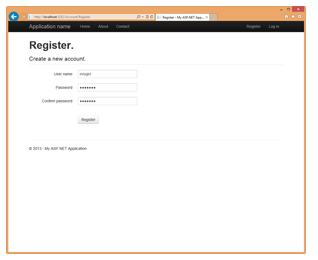
Register Page.
Once your user is registered, you'll be automatically redirected to the homepage.
If you looking for windows web hosting services who support ASP.Net MVC 5 please visit our Site ASPHostPortal.com
December 10, 2013 06:57 by
BenEntity Framework is actively developed by the Entity Framework team which is assigned to the Microsoft Open Tech Hub and in collaboration with a community of open source developers. Together we are dedicated to creating the best possible data access experience for .NET developers.
The Entity Framework version 6 Release Candidate is now available to developers for immediate download. The open source object-relational mapper is designed to enable .NET developers to work with relational data using domain-specific objects. Entity Framework allows programmers to create a model by writing code or using boxes and lines in the EF Designer. Both of these approaches can be used to target an existing database or create a new database.

There are The Top features of Entity Framework 6 :
- Connection Resiliency - enables automatic recovery from transient connection failures.
- Async Query and Save - dds support for the task-based asynchronous patterns that were introduced in .NET 4.5. With .NET 4.5 Microsoft introduced async and await keywords but in EF 5 Microsoft didn't have time to add support for async query and save but now with EF6 it is supported.
- Code-Based Configuration - gives you the option of performing configuration - that was traditionally performed in a config file - in code.
- Dependency Resolution - introduces support for the Service Locator pattern and we’ve factored out some pieces of functionality that can be replaced with custom implementations.
- Interception/SQL logging - provides low-level building blocks for interception of EF operations with simple SQL logging built on top.
- Testability improvements - make it easier to create test doubles for DbContext and DbSet.
- Features that come for free - These are capabilities that are part of the core. You don’t even have to know they’re there to benefit from them, much less learn any new coding. This group includes features such as performance gains brought by a rewritten view-generation engine and query compilation modifications, stability granted by the ability of DbContext to use an already open connection, and a changed database setting for SQL Server databases created by Entity Framework.
- DbContext can now be created with a DbConnection that is already opened - which enables scenarios where it would be helpful if the connection could be open when creating the context (such as sharing a connection between components where you can not guarantee the state of the connection).
Top Reasons To Choose Entity Framework 6 Hosting
- Fast and Secure Server - Our powerfull servers are especially optimized and ensure the best Entity Framework 6 performance. We have best data centers on three continent, unique account isolation for security, and 24/7 proactive uptime monitoring.
- Best and Friendly Support - Our support team is extremely fast and can help you with setting up and using Entity Framework 6 on your account. Our customer support will help you 24 hours a day, 7 days a week and 365 days a year.
- Dedicated Application Pool - With us, your site will be hosted using isolated application pool in order to meet maximum security standard and reliability.
- Uptime & Support Guarantees - We are so confident in our hosting services we will not only provide you with a 30 days money back guarantee, but also we give you a 99.9% uptime guarantee.
- World Class Control Panel - We use World Class Plesk Control Panel that support one-click installation.
So, you'll get the best, cheap and reliable Entity Framework 6 hosting with us. Why wait longer?
October 30, 2013 06:09 by
BenThere are primarily seven stages in the ASP.Net Request Life Cycle :
1. Routing
Asp.net Routing is the first step in MVC request cycle. Basically it is a pattern matching system that matches the request’s URL against the registered URL patterns in the Route Table. When a matching pattern found in the Route Table, the Routing engine forwards the request to the corresponding IRouteHandler for that request. The default one calls theMvcHandler. The routing engine returns a 404 HTTP status code against that request if the patterns is not found in the Route Table. When application starts at first time, it registers one or more patterns to the Route Table to tell the routing system what to do with any requests that match these patterns. An application has only one Route Table and this is setup in the Global.asax file of the application.

2. MVCRouteHandler
MVC handler is responsible for initiating MVC applications. The MvcRouteHandler object creates an instance of the MvcHandler and passes the instance of RequestContext to MvcHandler. MvcHandler is implemented from ITttpHandler and it cannot map as a handler. This class does not support a parameterless constructor. It takes RequestContext as a parameter.
3. Action Execution
Once the controller has been instantiated, Controller's ActionInvoker determines which specific action to invoke on the controller. Action to be execute is chosen based on attributes ActionNameSelectorAttribute (by default method which have the same name as the action is chosen) and ActionMethodSelectorAttribute(If more than one method found, the correct one is chosen with the help of this attribute).
ASPHostPortal.com is Microsoft No #1 Recommended Windows and ASP.NET Spotlight Hosting Partner in United States. Microsoft presents this award to ASPHostPortal.com for ability to support the latest Microsoft and ASP.NET technology, such as: WebMatrix, WebDeploy, Visual Studio 2012, ASP.NET 4.5, ASP.NET MVC 4.0, Silverlight 5 and Visual Studio Lightswitch. Click here for more information
4. Controller
MVCHandler receives a controller instance from the MVC controller factory (IControllerFactory). This controller handles further processing of the request. The MVCHandler object uses RequestContext (passed as a constructor parameter) instance to identify the IControllerFactory object to create the controller instance. The MvcHandler instance calls the Execute method of controller.
5. View Engine
View Result is responsible for selecting and involving the appropriate View Engine. A View Engine is responsible for rendering HTML to the browser. The View Engine template has different syntax to implement the view. Currently there are four builtin View Engines (Razor, ASPX, Spark and NHaml) supported by MVC. We can also create our own custom View Engine to render a view. All the View Engines may not be supported in all versions of MVC. We can also use multiple View Engines simultaneously in ASP.NET MVC.
6. View Result
The action method receives user input, prepares the appropriate response data, and then executes the result by returning a result type. The result type can be ViewResult, RedirectToRouteResult, RedirectResult, ContentResult, JsonResult, FileResult, and EmptyResult.
October 24, 2013 12:25 by
andryC# ("C sharp")is HTML webpage file used by Razor, an ASP.NET view engine used for generating Web pages for a user's Web browser; similar to a standard ASP.NET webpage (.ASP or .ASPX file), but uses a slightly different syntax; runs on a Web server, which generates the HTML for the client Web browser; can be programmed with syntax highlighting.
If we build a website that contains .cshtml file, we must enable .cshtml file. At the below, there is an error message if we don’t enable .cshml file.
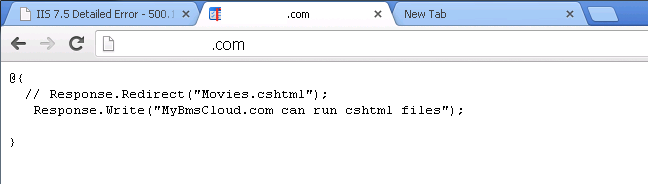
To enable .cshtml file on windows Server 2012, There are steps to solve that problem. Open your IIS.
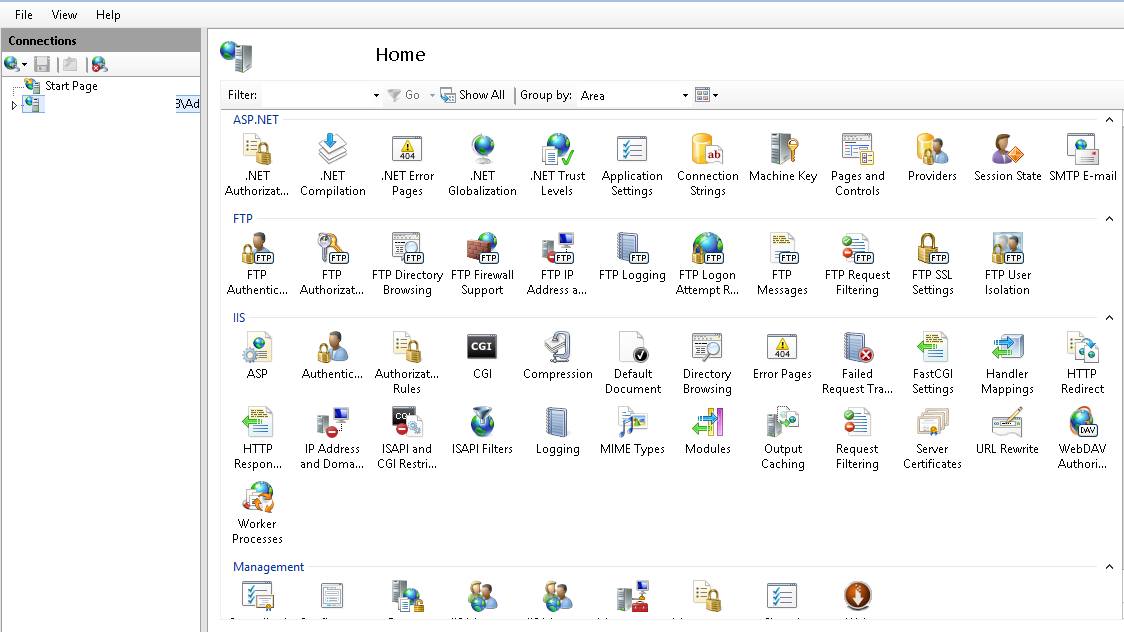
Expand “server”-> “sites” and choose “domain”. Then click on Handler Mapping.
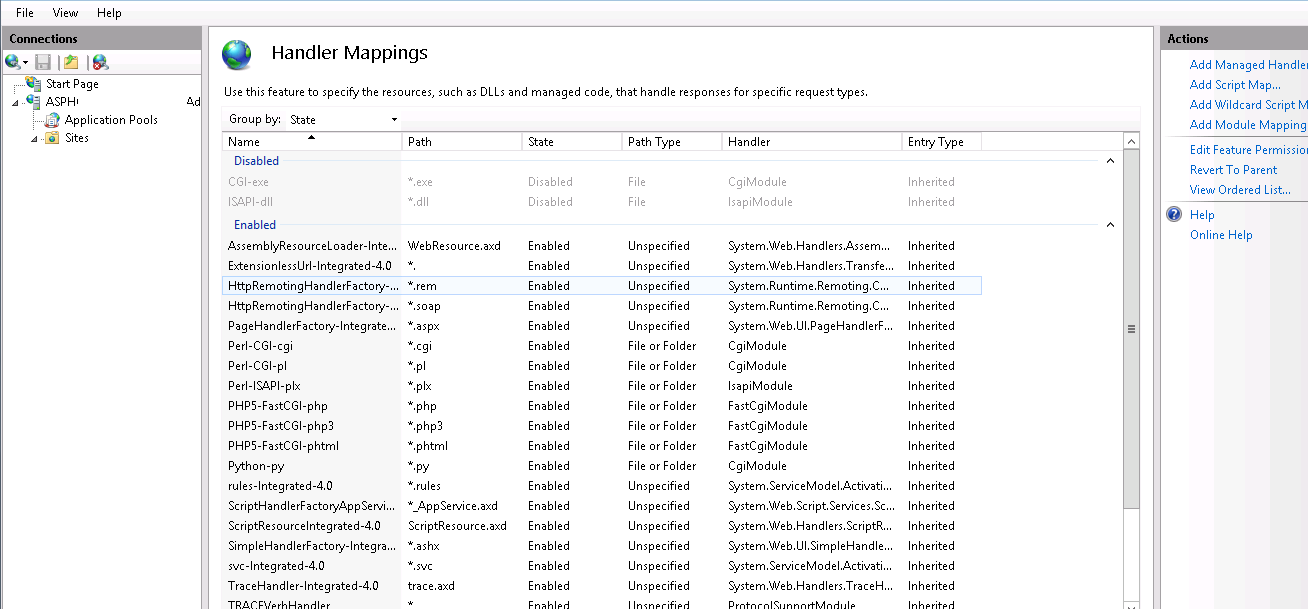
You can't find .cshtml. After that, choose “Revert to Parent” on right tab.
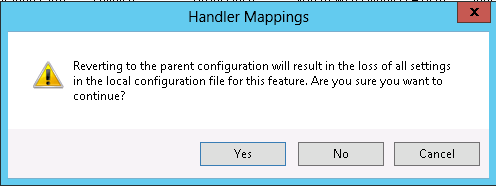
Select "Yes" and Look,what the difference with the previous image.
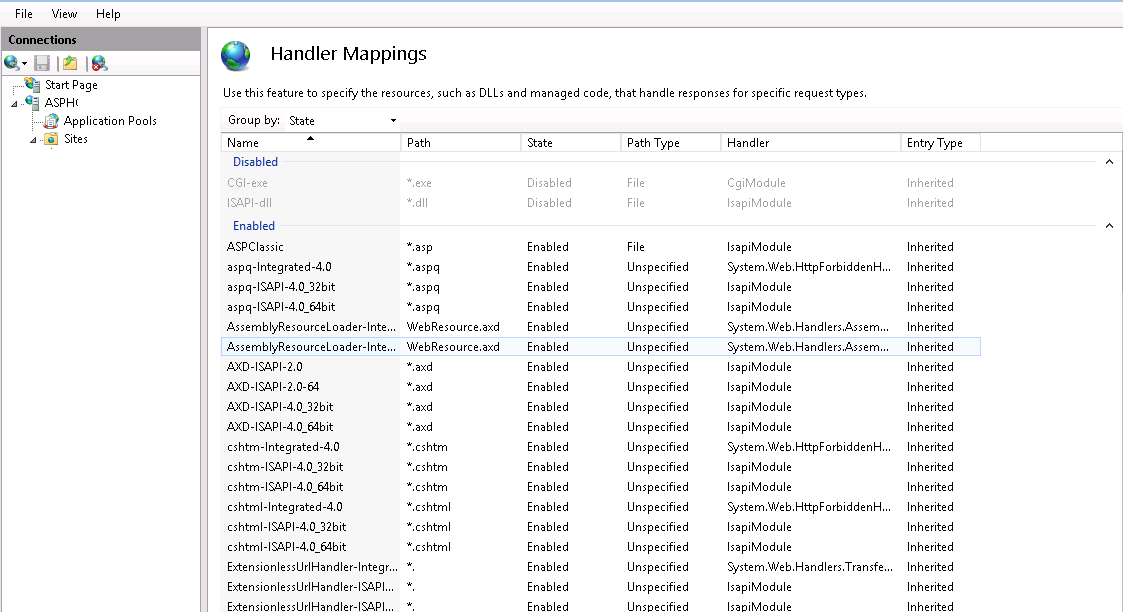
.cshtml file are enable and available. Now browse the domain. If you still can not access and have an error. You should check the .NET version. Remember that .Cshtml file can only be run on .NET version 4 and above.
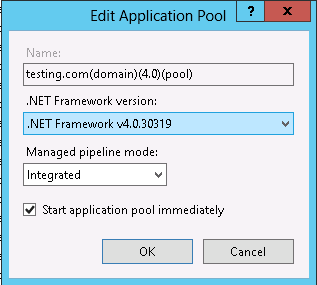
To check the .Net version, select "application pools" -> right click on "domain_name" -> "Basic settings" -> choose .Net 4 version -> "Ok".
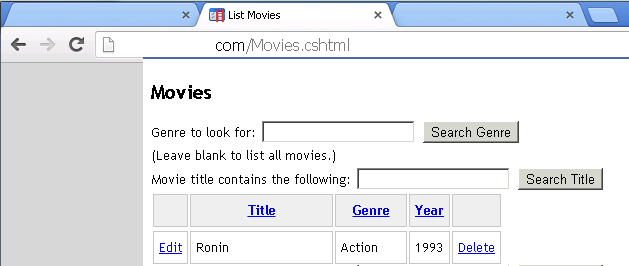
Now you can browse your domain with .cshtml file. Here is screenshot.
October 3, 2013 10:28 by
Ben
ASPHostPortal.com is a premier Windows and ASP.NET Web hosting company that specializes in Windows and ASP.NET-based hosting. We proudly announces 7 Day Free Trial Windows and ASP.NET Hosting to all new customers. The intention of this FREE TRIAL service is to give our customers a "feel and touch" of our system. This free trial is offered for the next 7 days and at anytime, our customers can always cancel the service.

The 7 Day Free Trial is available with the following features:
- Unlimited Domains
- 5 GB Disk Space
- 60 GB of Bandwidth
- 2 MS SQL Database
- Unlimited Email Account
- Support ASP.NET 4.5
- Support MVC 4.0
- Support SQL Server 2012
- Free Installations of ASP.NET And PHP Applications
ASPHostPortal.com believes that all customers should be given a free trial before buying into a service and with such approach, customers are confident that the product / service that they choose is not faulty or wrong. Even we provide free trial service for 7 days, we always provide superior 24/7 customer service, 99,9% uptime guarantee on our world class data center. On this free trial service, our customer still can choose from our three different data centre locations, namely Singapore, United States and Amsterdam (The Netherlands)
Anyone is welcome to come and try us before they decide whether or not they want to buy. If the service does not meet your expectations, our customer can simply cancel before the end of the free trial period.
For all the details of packages available visit ASPHostPortal.com
About ASPHostPortal.com:
ASPHostPortal.com is a hosting company that best support in Windows and ASP.NET-based hosting. Services include shared hosting, reseller hosting, and sharepoint hosting, with specialty in ASP.NET, SQL Server, and architecting highly scalable solutions. As a leading small to mid-sized business web hosting provider, ASPHostPortal strive to offer the most technologically advanced hosting solutions available to all customers across the world. Security, reliability, and performance are at the core of hosting operations to ensure each site and/or application hosted is highly secured and performs at optimum level.
August 20, 2013 05:56 by
BenThe MVC 4 release is building on a pretty mature base and is able to focus on some more advanced scenarios. Some top features include:
- ASP.NET Web API
- Enhancements to default project templates
- Mobile project template using jQuery Mobile
- Display Modes
- Task support for Asynchronous Controllers
- Bundling and minification
The following sections provide an overview of these features. We’ll be going into them in more detail throughout the book.
Developing MVC 4 applications with Visual Studio 2011 Developers Preview is quite jump-start for developers as it has inbuilt support for JQuery Mobile css & javascripts, nice intellisense for HTML 5 , CSS 3 media queries. MVC 4 developers preview was built keeping in mind the Mobile Web Developers who wants keen support of rich MVC in Mobile Web.
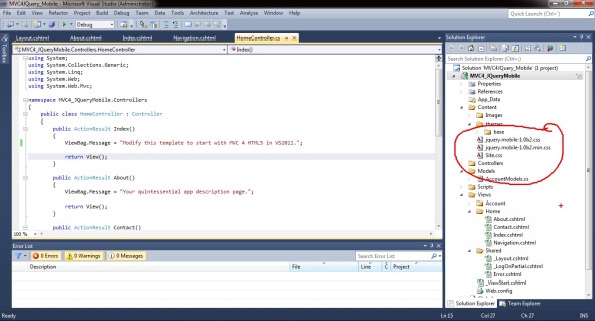
- Lets start to develop MVC 4 mobile application with JQuery Mobile, HTML5, CSS3 in VS 2011 developers preview.
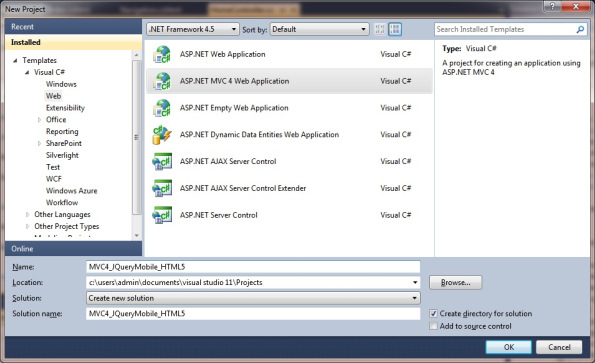
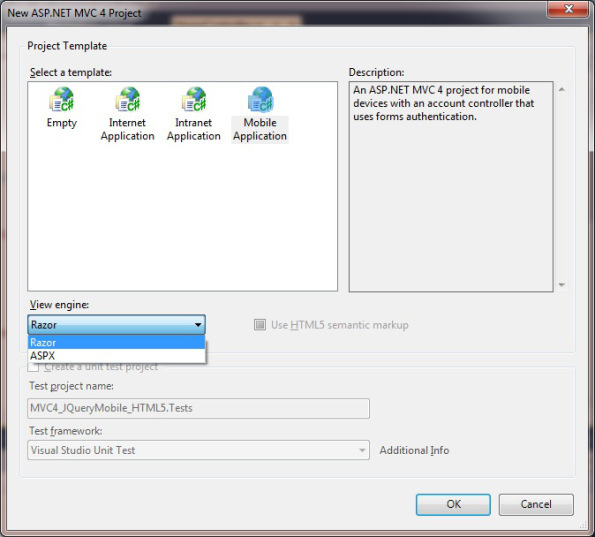
- Select your MVC 4 application domain either Internet/Intranet/Mobile Web application with default Razor or ASPX syntaxes. For my demo , selected Mobile Web application in VS 2011 Developer Preview.
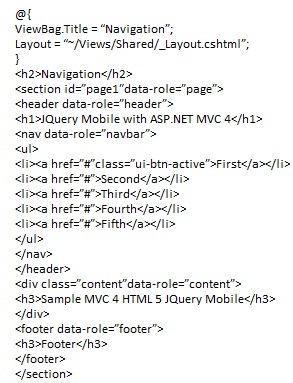
- Next, write some JQuery Mobile application code to check th UI view in SmartPhones while Model & Controller logic remains same & could change according to business requirements.
- Database -> Entity Framework (EF) -> Model in MVC 4(Entities) (DAL)-> Controllers (Business Logic Layer)(BLL) -> View(s) -> Master(_Layout.cshtml) is the default development path in MVC 4 Web & mobile application.
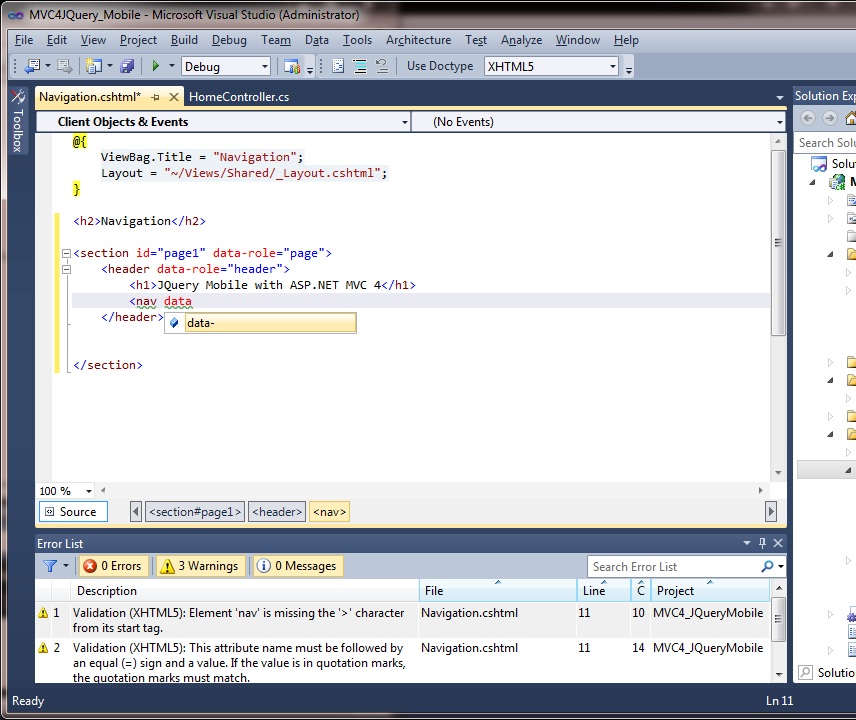
- Next , Check the nice intellisense support for HTML5 , JQuery Mobile in Visual Studio 2011 Developer Preview.
- Check out the MVC 4 Mobile Web applications with JQuery Mobile , HTML5 , CSS 3 media queries in Smart Devices.
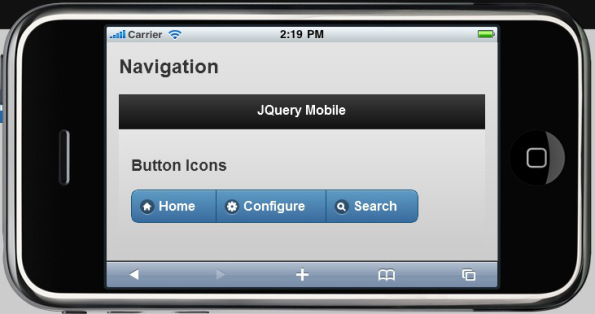
- JQuery Mobile View in iPhone of MVC 4 Mobile application:
July 12, 2013 08:19 by
Mike
ASPHostPortal.com is a premiere web hosting company that specializes in Windows and ASP.NET-based hosting, proudly announces the new Microsoft product, ASP.NET MVC 5 hosting to all new and existing customers.
ASP.NET MVC 5 is the latest update to Microsoft's popular MVC (Model-View-Controller) technology - an established web application framework. MVC enables developers to build dynamic, data-driven web sites. ASP.NET MVC 5 adds sophisticated features like single page applications, mobile optimization, adaptive rendering, and more. Here are some new features of ASP.NET MVC 5:
- ASP.NET Identity
- Bootstrap in the MVC template
- Authentication Filters
- Filter overrides
“We pride ourselves on offering the most up to date Microsoft services. We're pleased to launch this product today on our hosting environment” said Dean Thomas, Manager at ASPHostPortal.com. “We have always had a great appreciation for the products that Microsoft offers. With the launched of ASP.NET MVC 5 hosting services, we hope that developers and our existing clients can try this new features.”
ASPHostPortal.com is one of the Microsoft recommended hosting partner that provide most stable and reliable web hosting platform. With the new launch of ASP.NET MVC 5 into its feature, it will continue to keep ASPHostPortal as one of the front runners in the web hosting market. For more information about new ASP.NET MVC 5, please visit http://www.asphostportal.com.
About ASPHostPortal.com:
ASPHostPortal.com is a hosting company that best support in Windows and ASP.NET-based hosting. Services include shared hosting, reseller hosting, and sharepoint hosting, with specialty in ASP.NET, SQL Server, and architecting highly scalable solutions. As a leading small to mid-sized business web hosting provider, ASPHostPortal strive to offer the most technologically advanced hosting solutions available to all customers across the world. Security, reliability, and performance are at the core of hosting operations to ensure each site and/or application hosted is highly secured and performs at optimum level.